

Accounting
Double-entry books, recorded from your work.
Every invoice, payment, expense, and POS sale becomes a balanced journal straight away. You or your accountant just review it, reconcile the bank statement, post depreciation, then close the books each month.
On every paid plan. On the Free plan, journals are still recorded automatically.
Before and after
Books kept after the fact always fall behind.
Invoices are made in one app, bank transactions are downloaded into a spreadsheet, then a consultant copies everything into journals at month end. The numbers can only be trusted weeks later.
Before
4 separate places
- Journal spreadsheetFinance · invoices retyped as journals
- Downloaded transactionsFinance · bank transactions pasted into a spreadsheet
- Asset listAdmin · depreciation worked out separately
- Consultant's summaryConsultant · copied into journals at month end
Accounting period
September 2026
Closed- Every document journalledBalanced
- Bank transactions matchedDifference IDR 0
- Depreciation posted
- Books closed30 Sep 2026
How it works
From the first transaction to closed books.
01 · Chart of accounts
Accounts ready from day one.
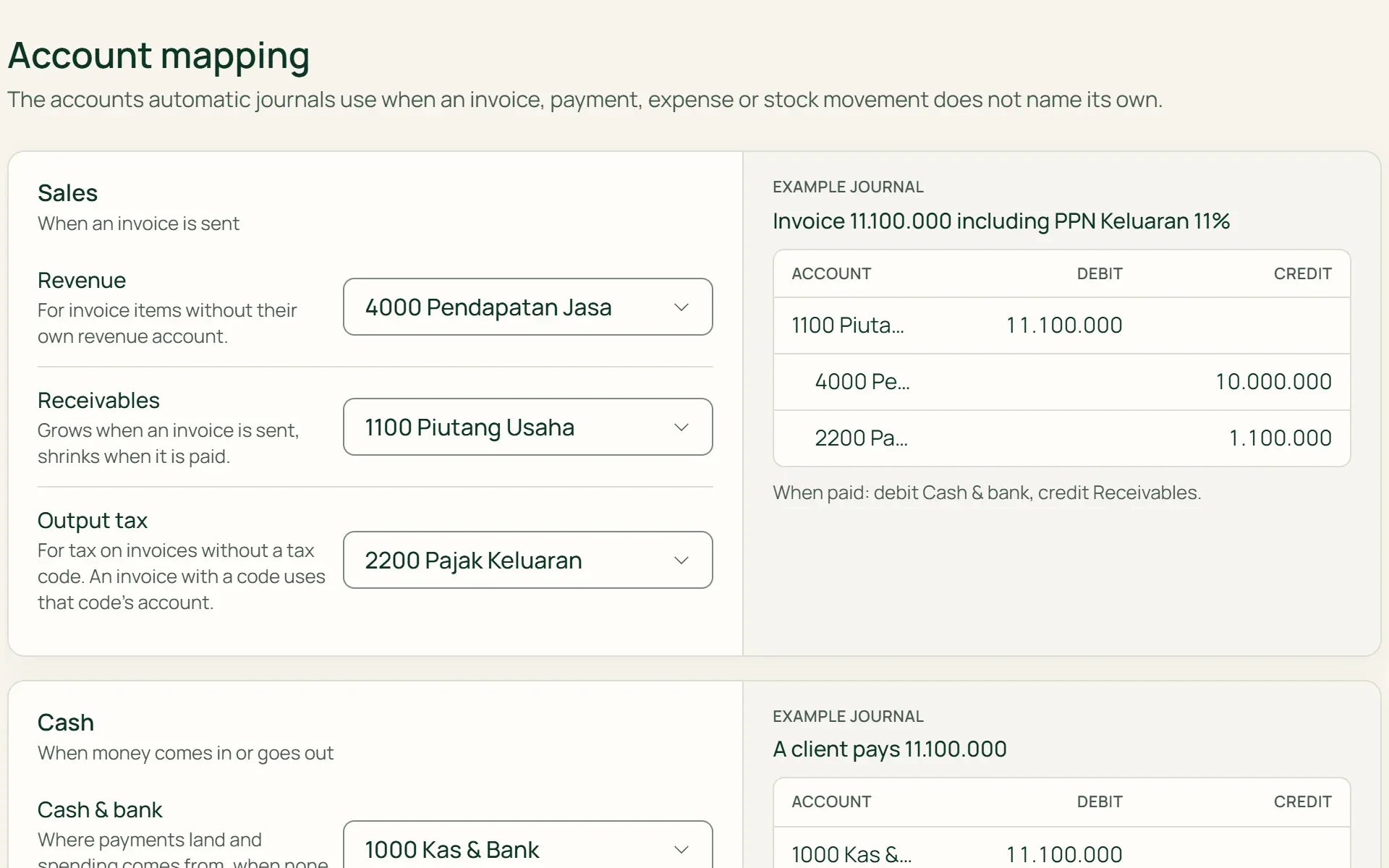
Tumra sets up a basic chart of accounts, from Cash & Bank to Accumulated Depreciation. Add your own accounts, mark cash and COGS accounts, then use Account Mapping to choose where invoices, payments, expenses, and stock are recorded. Each choice comes with an example journal.
- Chart of Accounts (COA)
- Account Mapping
- Example journal
02 · Automatic journals
Daily work becomes journals straight away.
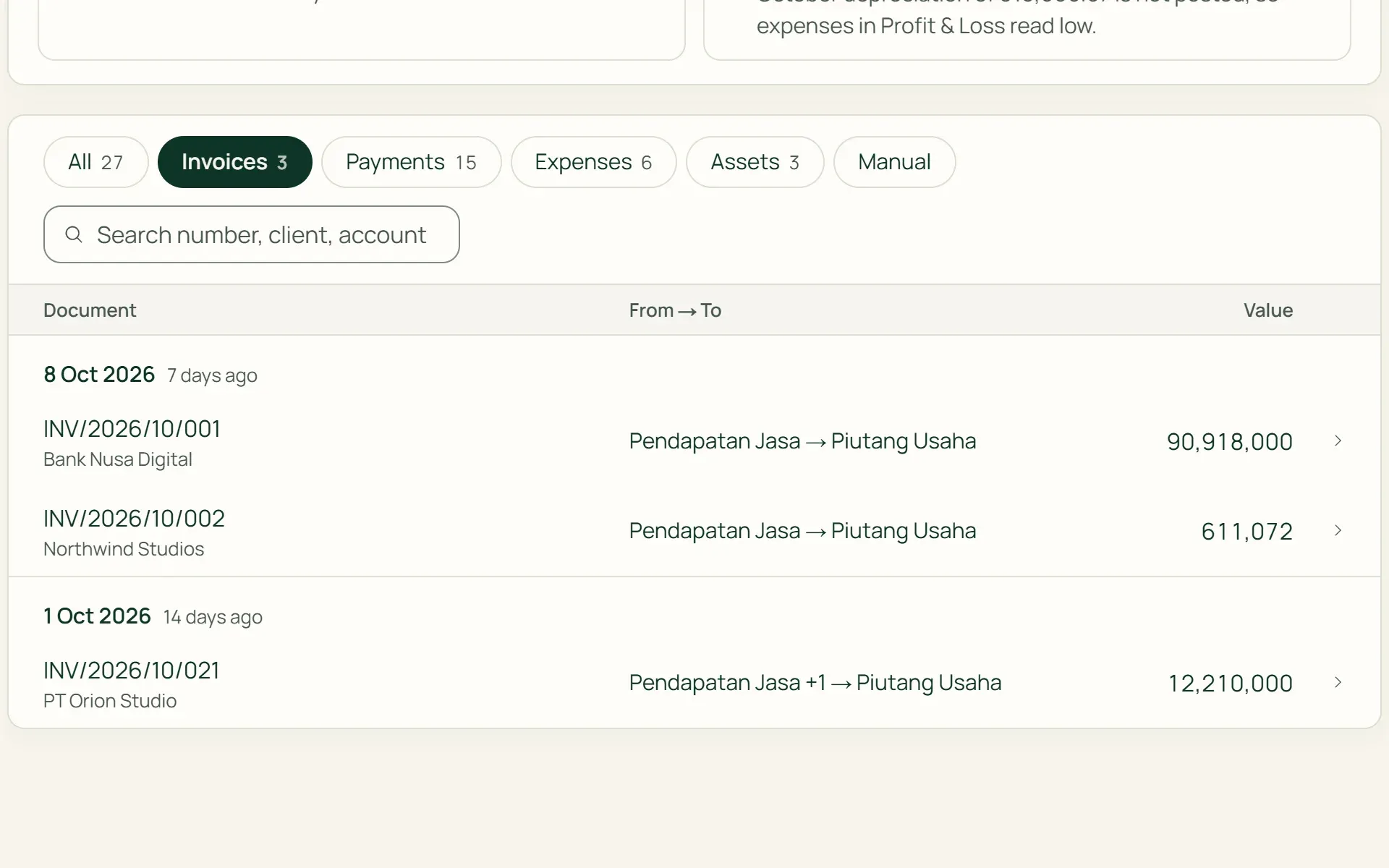
Issued invoices, payments, expenses, vendor bills, POS sales, goods receipts, and depreciation create their own journals. Drafts aren't journalled yet. The Journals page shows everything by group, with a From → To column and a link to the source document.
- No re-entry
- Link to document
- Excel export
03 · Manual journals
Adjustments from ready-made examples.
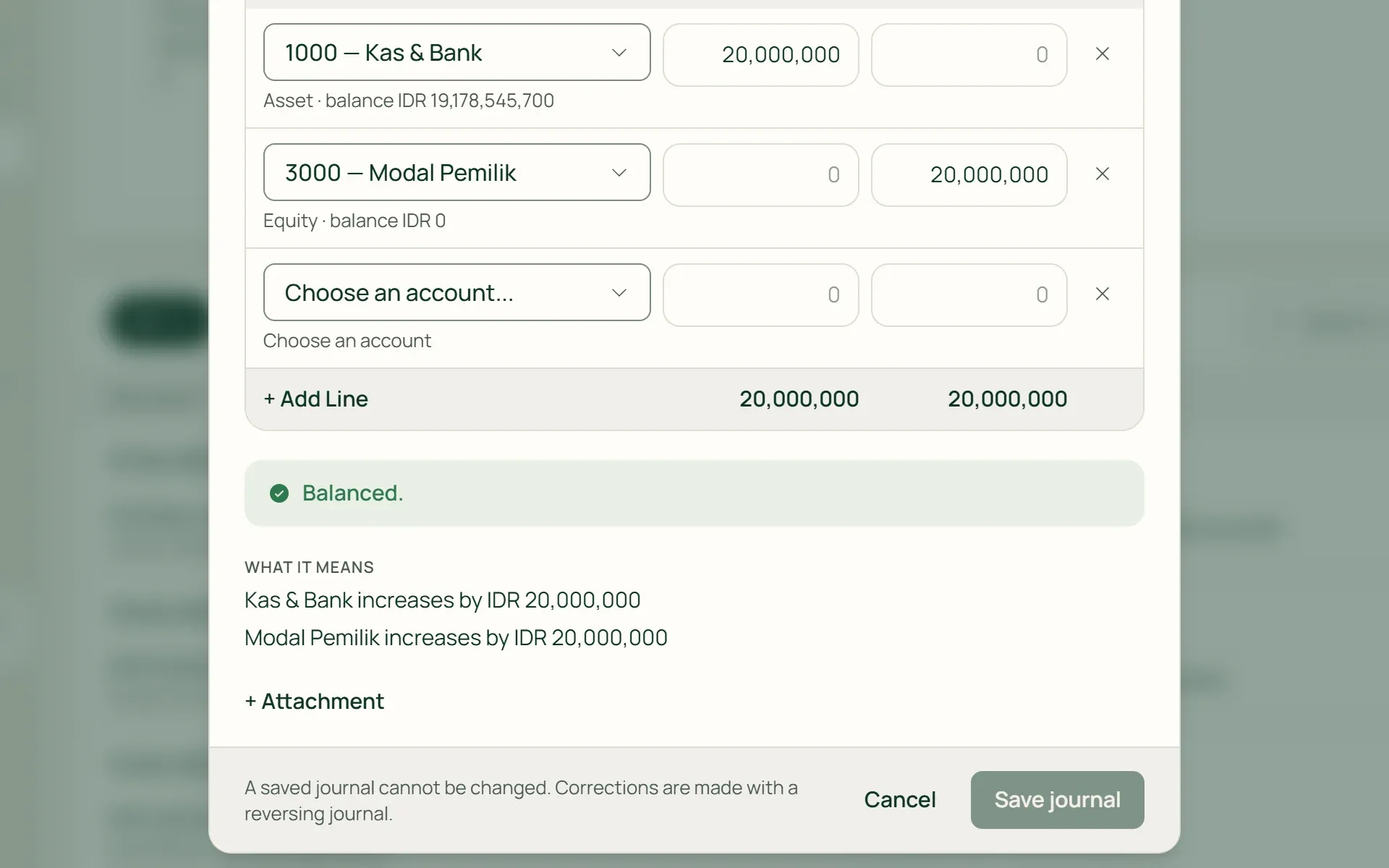
Start from an example: accrued expense, capital contribution, owner's drawing, transfer between accounts, or reclassification. Tumra explains what it means in plain language and rejects a journal that doesn't balance. A saved journal can't be changed; it is corrected with a reversing journal.
- Must balance
- Attached proof
- Reversing journal
04 · Reconciliation
Match your books to the bank statement.
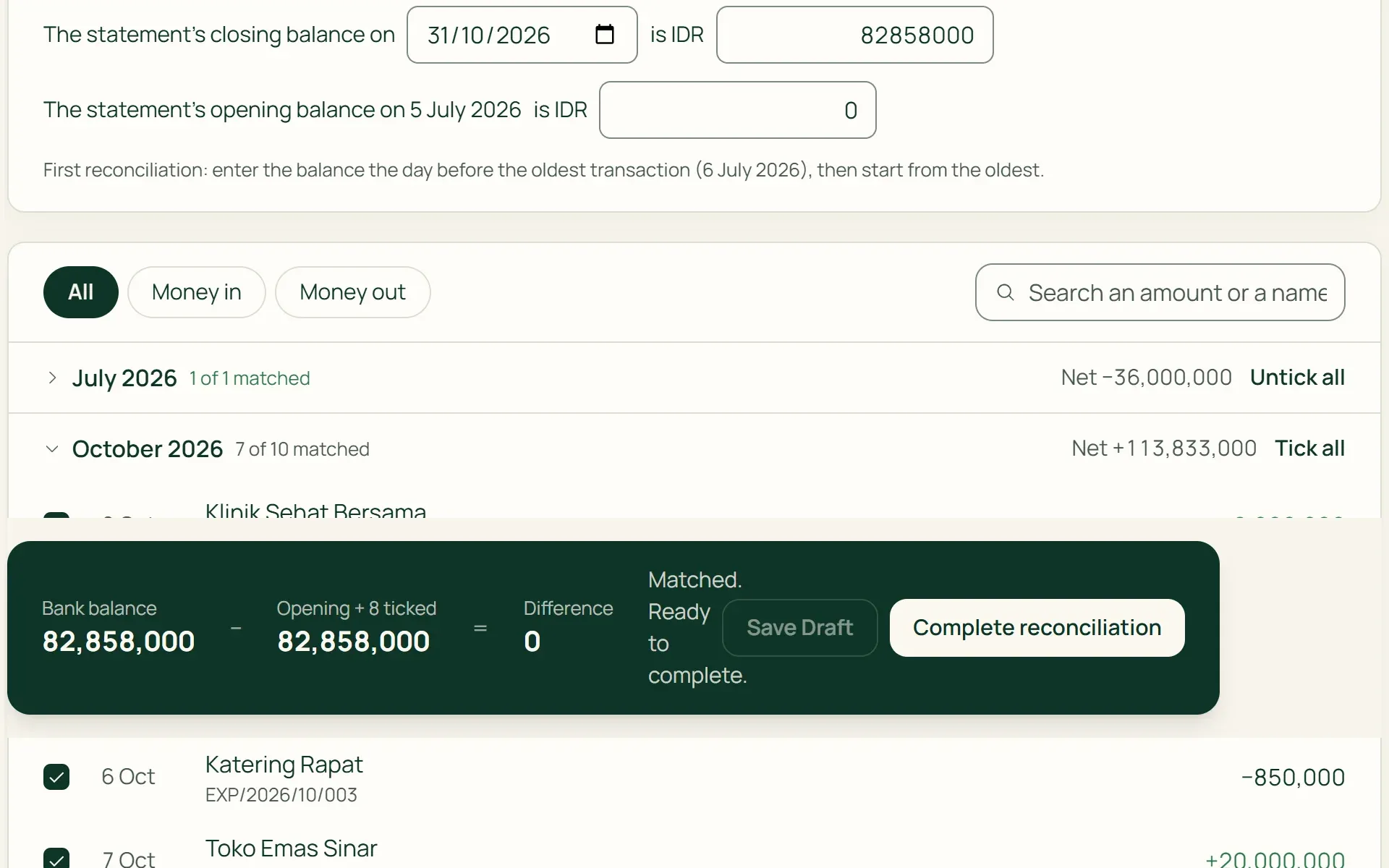
Choose an account, enter the date and the balance per the bank, then tick the transactions that also appear on the statement. Tumra works the difference down to zero. A draft can be saved and picked up later, and cash on hand is matched against a physical count.
- Balance per the Bank
- Save Draft
- Cash, counted by hand
05 · Close the books
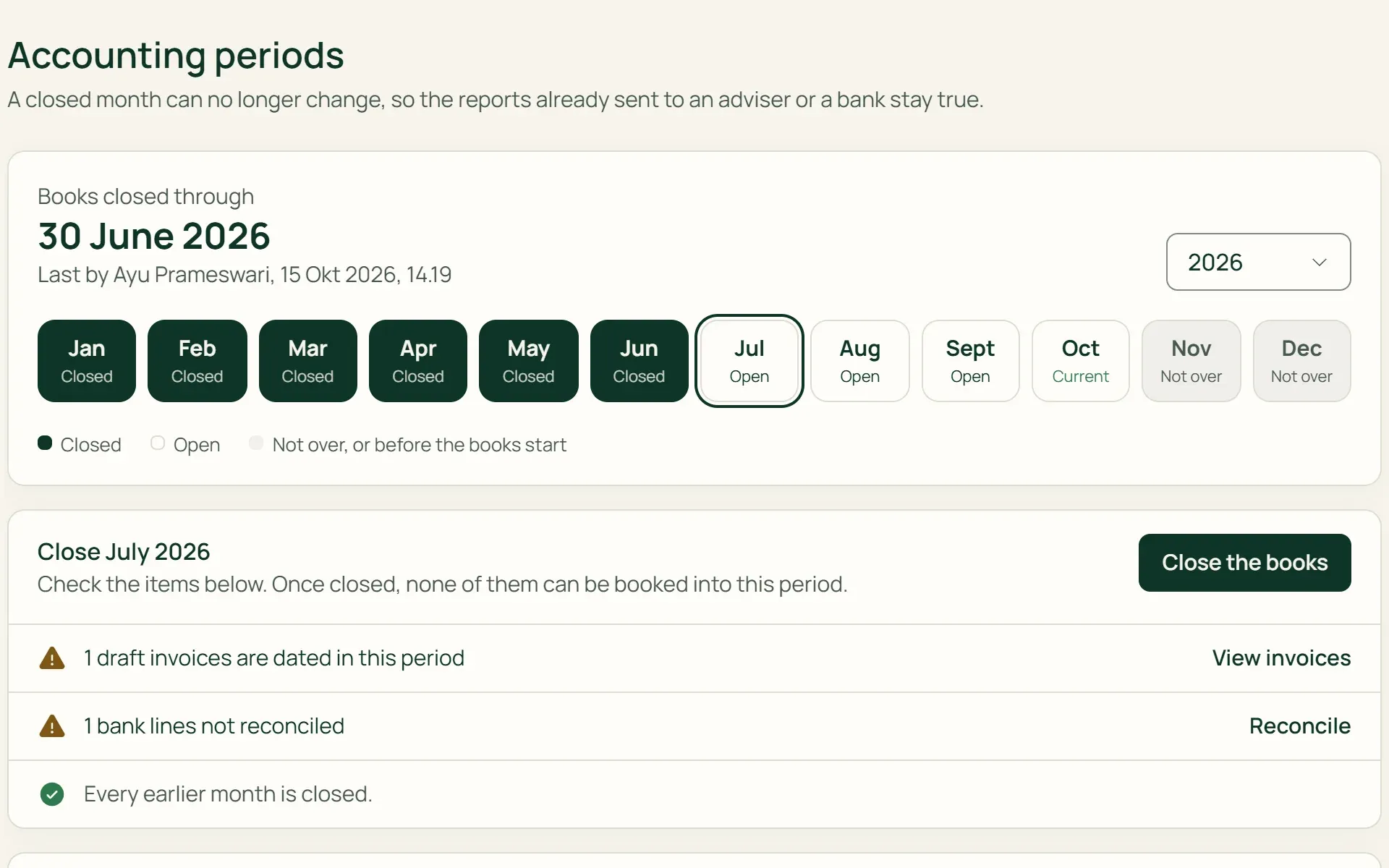
Lock a finished month.
Before closing, Tumra checks for documents without a journal, unbalanced journals, depreciation not yet posted, draft invoices, and bank transactions not yet matched. Once a month is closed, no journal can be posted to it.
- Closing checklist
- Reopen with a reason
- Fiscal year
What you can do
Double-entry accounting you can check.
Fixed assets and depreciation
Record assets with their cost, residual value, and useful life. Straight-line depreciation is posted each month with one button, and disposing of an asset works out the gain or loss.
Opening balances from your old books
Enter cash and bank, client receivables, and vendor payables as of your start date. Owner's equity is calculated automatically, so the opening balance journal always balances.
Corrections that leave a trail
Journals aren't edited or deleted. Mistakes are fixed with a reversing journal, so the original and its correction can both be read.
Checks on every screen
Tumra tells you when a journal is dated in the future, depreciation hasn't been posted, or a cash payment was recorded to a bank account.
Balance enforced by the database
A journal whose debits and credits don't match, or that falls in a closed month, is rejected by the database, not just by the form.
General ledger and trial balance
Open one account's history with its running balance, or the trial balance of every account. Journals can be exported to Excel for your consultant.
For shops
Stock and COGS go into the books too.
On the Retail Starter, Retail, and Bisnis plans, goods coming in add to Inventory and Accounts Payable, goods sold record COGS, and stock count differences go to the Inventory Variance account. POS sales are recorded as ordinary invoices, with the same journals.
- Goods receiptsEvery receipt from a supplier adds to stock and accounts payable. Returns reduce them.
- Average COGSThe cost of goods sold is calculated from each variant's weighted average cost.
- Stock countsThe difference between the count and the records is journalled to the Inventory Variance account.
Books filled in by other features.
Invoices & billing
An issued invoice becomes a receivable and revenue straight away, tax included.
Learn more →Financial reports
Profit & Loss, Balance Sheet, and Cash Flow are read straight from the same journals.
Learn more →Multi-currency
Foreign currency invoices are recorded in your base currency, with the exchange difference when they're paid.
Learn more →
Plans
Accounting on every plan.
On the Free plan, journals are still recorded, but the Accounting menu opens on paid plans.
| Feature | FreeRp 0/moRp 0/yr | FreelancerRp 129,000/moRp 1,290,000/yr | AgencyRp 349,000/moRp 3,490,000/yr | StarterRp 179,000/moRp 1,790,000/yr | RetailRp 349,000/moRp 3,490,000/yr | BisnisRp 499,000/moRp 4,990,000/yr |
|---|---|---|---|---|---|---|
| Automatic journals | Included | Included | Included | Included | Included | Included |
| Chart of accounts & account mapping | Included | Included | Included | Included | Included | Included |
| Opening balances | Included | Included | Included | Included | Included | Included |
| Journals & manual journals | Not included | Included | Included | Included | Included | Included |
| Bank reconciliation | Not included | Included | Included | Included | Included | Included |
| Fixed assets | Not included | Included | Included | Included | Included | Included |
| General ledger & trial balance | Not included | Included | Included | Included | Included | Included |
| Inventory & COGS | Not included | Not included | Not included | Included | Included | Included |
Retail Free: as on Free. Journals, including stock and cost of goods from every sale, are recorded automatically; the Accounting menu opens on paid plans.
FAQ
Common questions
Do I need to know accounting?
Not necessarily. Journals are recorded on their own from invoices, payments, expenses, and sales. Manual journals start from an example and are explained in plain language. The in-app Help Centre also has a Learn Accounting category.
What happens on the Free plan?
Journals are still recorded automatically from the first transaction, and the chart of accounts can be set up. The Journals, Bank Reconciliation, Fixed Assets, and FX Revaluation pages and the financial reports open once you move to a paid plan. Journals already recorded show up straight away, with no re-entry.
Can bank statements be imported, or the bank connected?
Not yet. Tumra doesn’t connect to banks and can’t import statement files yet. You reconcile by entering the balance per the bank, then ticking the transactions that match. The draft can be saved and picked up again any time.
How do I fix a wrong journal?
Saved journals aren’t changed or deleted. A manual journal is fixed with Reverse Journal, which creates a reversing journal on the same date. Journals from invoices, payments, or expenses are corrected through their document: Tumra reverses the old journal, then records the new one.
Who can see and record journals?
The owner, admins, and finance staff. Project managers can be given finance access one person at a time. Only the owner or an admin can reopen a closed month, and the reason is kept in the history.
What isn’t available yet?
Recurring journals, your own journal number series, budgets, cost centres, and books for several businesses in one account aren’t available yet. Depreciation uses the straight-line method only.
Tidy books from your first invoice.
Try every Tumra feature free for 30 days, no credit card needed.