

Customers & credit
Credit on record, with the limit kept at the till.
Group your customers as members or wholesale. As soon as a customer is chosen at the till, their prices and discounts change with them. Sales on credit go straight into receivables, and the till refuses credit that goes over the limit.
Available on the Retail Free, Retail Starter, Retail & Bisnis plans.
Before and after
The credit book in the drawer never reaches the accounts.
Wholesale prices are taped to the wall, member discounts live in the cashier's head, and credit is written in an exercise book. At the end of the month, nobody knows for sure who owes how much.
Before
4 records
- Credit bookCashier · credit written in an exercise book
- Price listOwner · wholesale prices taped to the wall
- Remembered discountsCashier · member discounts live in someone's head
- Debts tallied by handOwner · nobody knows for sure who owes what
On credit
Warung Bu Ani
Unpaid- Customer group recognisedWholesale
- Wholesale price appliedIDR 15,000
- Credit limit checkedIDR 10,000,000
- Added to receivables ageingDue 27 Oct
How it works
From customer groups to credit paid off.
01 · Groups
Set the rules once.
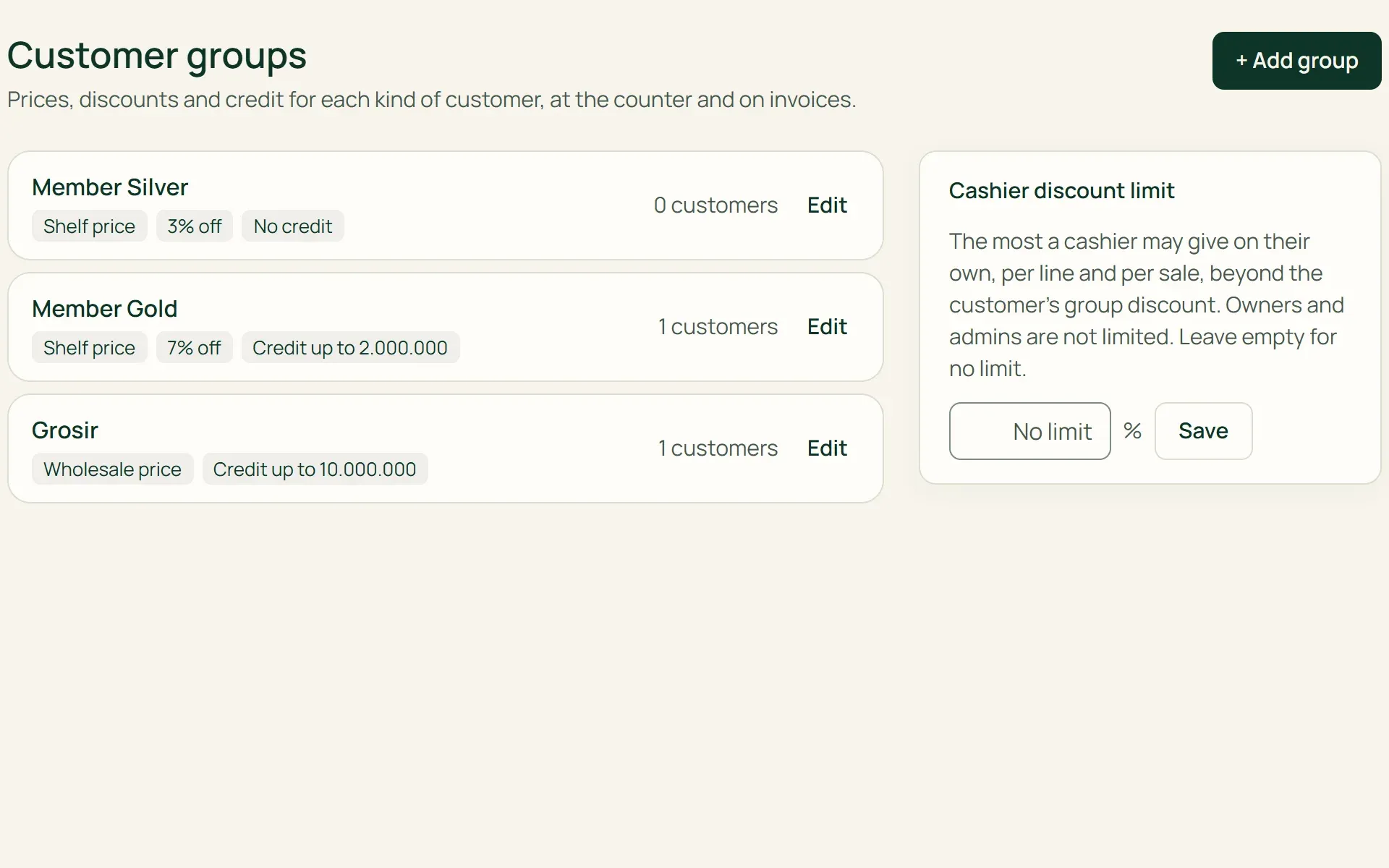
Create groups such as Member Silver, Member Gold, or Wholesale. Each group has a price basis (shelf or wholesale), a discount percentage, and whether it may buy on credit, with a limit. Tumra provides three example groups to start with.
- Shelf / wholesale price
- Discount %
- Credit limit
02 · Till
Pick the customer, and the price follows.
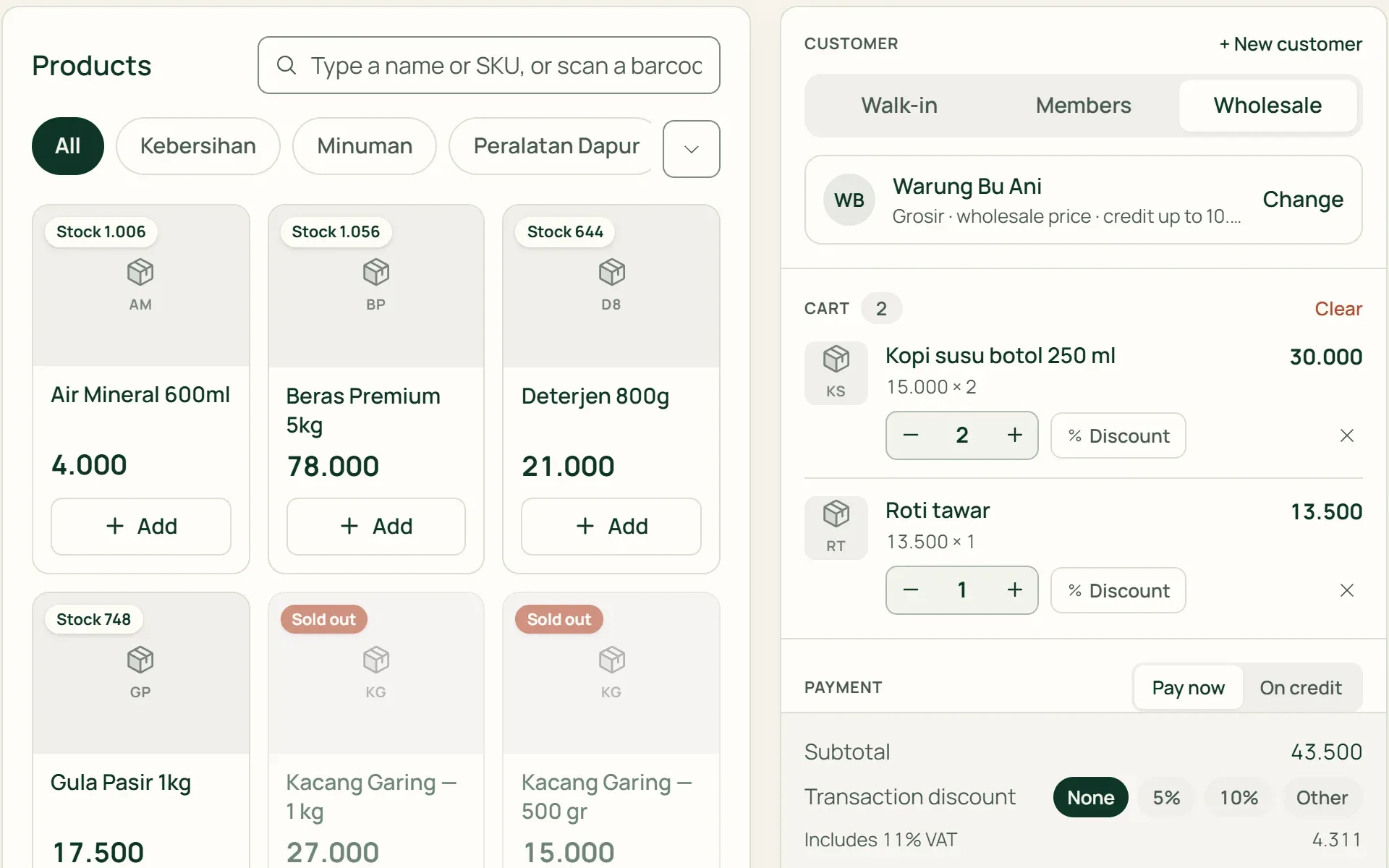
Every sale starts with the walk-in customer. Search for a customer by name or phone number, or add a new one with just a name and phone number. Wholesale prices and group discounts go into the cart straight away.
- Search name / phone
- New customer at the till
03 · Credit
Record what's owed without a notebook.
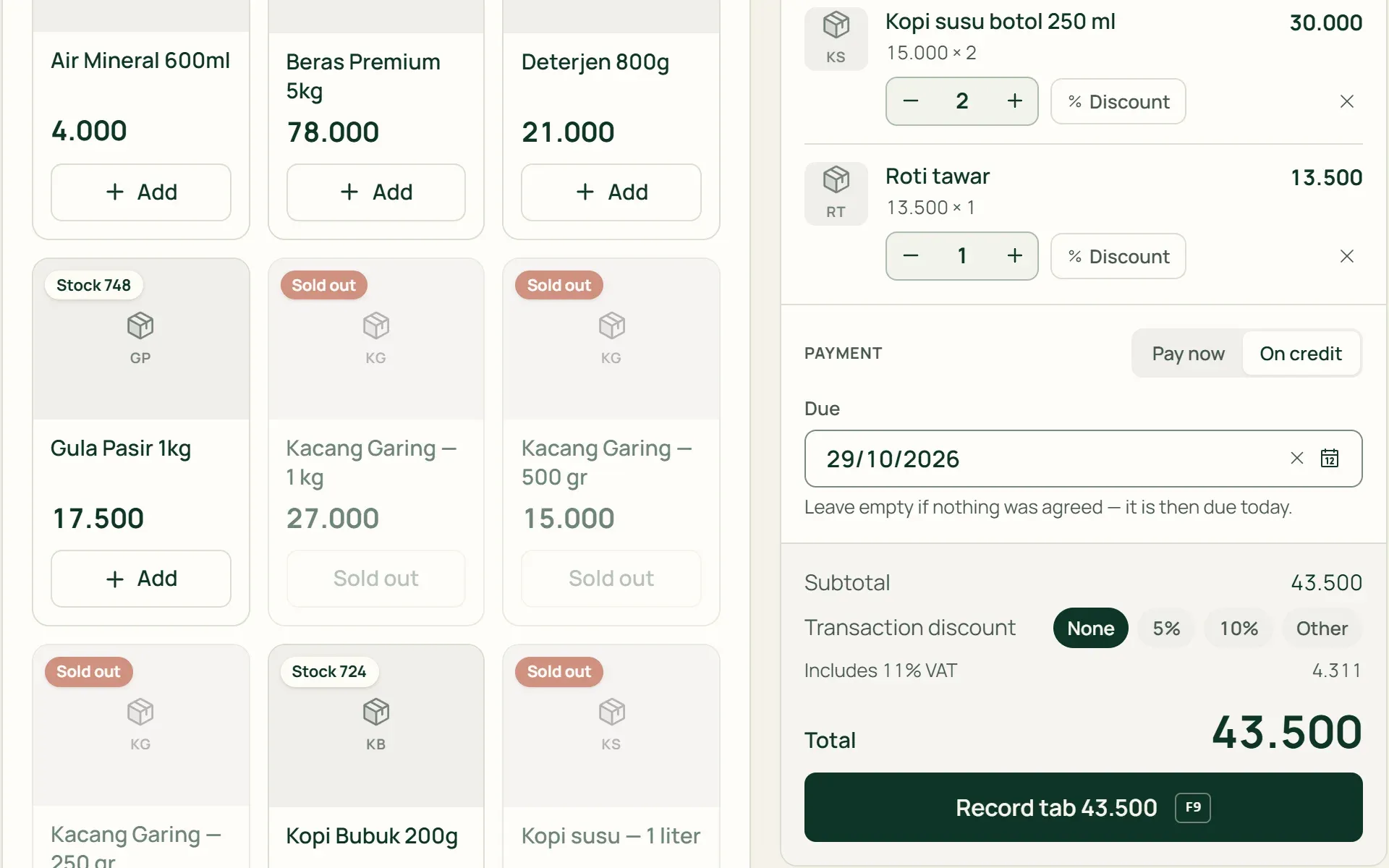
Choose On credit, enter a due date if one was agreed, then record it. If the sale would take the customer over their limit, the till refuses it and shows how much is still allowed. The credit sale becomes an unpaid invoice straight away.
- Due date
- Limit checked automatically
04 · Settlement
Pay off part, or all at once.
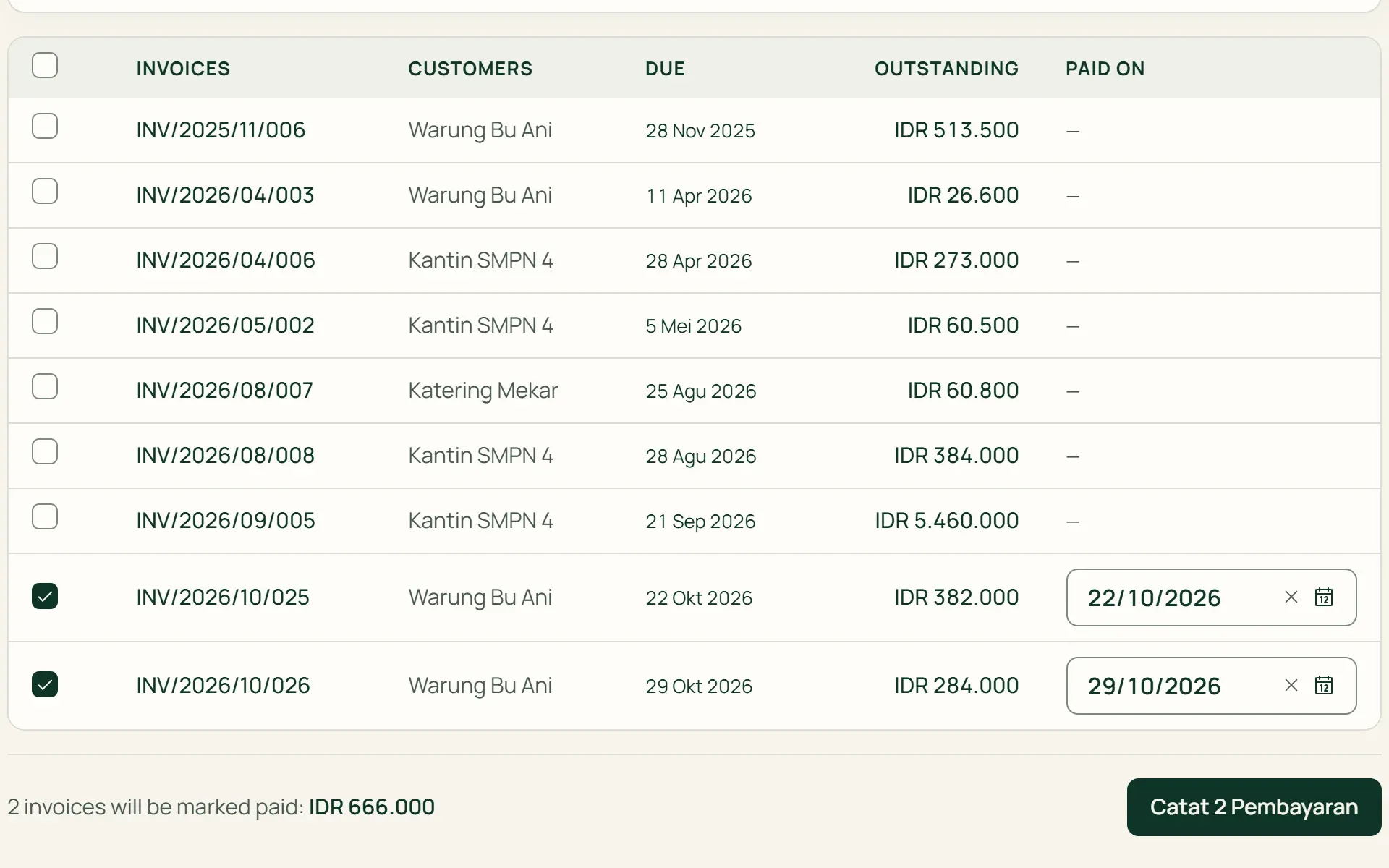
Settlement is recorded as a payment on the invoice, and can be partial. Several credit sales can be settled together. Cash received can go straight into a till drawer that is open.
- Part payment
- Bulk settlement
What you can do
Every customer on their own terms.
Two price levels
Shelf prices for ordinary shoppers, wholesale prices for the wholesale group. The wholesale price is never higher than the shelf price.
Items left out of discounts
Mark thin-margin items, such as cigarettes, mobile top-ups, or gas, so group discounts don't apply to them.
Prices checked on the server
Every line at the till is checked against the catalogue price for that customer, so prices can't be changed quietly.
Cashier discount limit
Set the largest discount a cashier may give per line and per sale. Owners and admins aren't bound by this limit.
Credit goes into receivables
A credit sale is recorded as an unpaid invoice. It appears in receivables ageing, on the customer's page, and in Agenda on its due date.
Sales by customer
Net sales, number of sales, gross profit, discounts given, and the amount still owed, for each customer. Sortable, and exportable to Excel.
Customers are part of every sale in the shop.
Point of sale (POS)
Customers and credit are chosen right on the counter screen.
Learn more →Sales & purchasing
Wholesale customers order through quotations, sales orders, and delivery notes.
Learn more →Financial reports
Credit goes into accounts receivable and receivables ageing, with no manual tallying.
Learn more →
Plans
Customers and credit for shops.
Free, Freelancer, and Agency don't have a till or stock.
| Feature | FreeRp 0/moRp 0/yr | FreelancerRp 129,000/moRp 1,290,000/yr | AgencyRp 349,000/moRp 3,490,000/yr | StarterRp 179,000/moRp 1,790,000/yr | RetailRp 349,000/moRp 3,490,000/yr | BisnisRp 499,000/moRp 4,990,000/yr |
|---|---|---|---|---|---|---|
| Customer list | Included | Included | Included | Included | Included | Included |
| Number of customers | 3 | Unlimited | Unlimited | Unlimited | Unlimited | Unlimited |
| Groups & wholesale prices | Not included | Not included | Not included | Included | Included | Included |
| Credit with limits | Not included | Not included | Not included | Included | Included | Included |
| Cashier discount limit | Not included | Not included | Not included | Included | Included | Included |
| Sales by customer | Not included | Not included | Not included | Included | Included | Included |
Retail Free: unlimited customers, with groups, store credit and cashier discount limits as on Starter.
FAQ
Common questions
Can the cashier give credit to anyone?
No. Credit has to be in a customer’s name, not the walk-in customer’s. It’s refused if the customer’s group doesn’t allow credit, or if their total owed would go over the limit. A customer’s own limit takes precedence over their group’s.
How is credit paid off?
By recording a payment on its invoice, which can be partial. Several credit sales can be paid off together with bulk settlement. Settlements are recorded by the owner, an admin, or finance. Cashiers can’t record a settlement from the till screen.
Can cashiers add new customers?
Yes, straight from the till screen, with just a name and phone number. The group and other details are filled in later on the customer’s page by the owner or finance.
Are there member points or special prices per customer?
Not yet. A “member” in Tumra is a group with its own discount and credit rules, without points or member cards. Prices follow the group: the shelf or wholesale price, plus the group’s discount percentage. For different terms, create a new group.
Are customers reminded when their credit is due?
Not automatically yet. Credit that’s due shows in receivables ageing, on the customer’s page, and in Agenda, so you contact the customer yourself. A credit sale’s invoice can be emailed to the customer’s billing address.
Can I bring over my existing customer list?
Yes. The owner or an admin can upload the Excel template in Settings → Import & Migration. Groups and credit limits are then set per customer after the import.
Close your credit notebook for good.
Try Tumra for shops free for 30 days, no credit card needed.