

Team & roles
Everyone sees what they need to see.
Invite your team by email and give each person one of six roles. Cashiers only open the counter, staff only see the projects opened to them, and the financial figures stay with Owners, Admins, and Finance. When someone leaves, their work moves to a successor.
Agency and Retail include 3 users, Bisnis 4, Pro versions 6–8. Freelancer and Retail Starter up to 3 users.
Before and after
One shared account means everyone sees everything.
One email and one password for the whole team. Anyone can open the revenue and the debts, nobody knows who changed what, and when someone leaves, the password leaves with them.
Before
1 shared account, 4 gaps
- One shared accountOwner · one email and password for the whole team
- Passwords over chatTeam · the password goes round the group chat
- Everyone sees revenueTeam · revenue and debts open to anyone
- Ex-employee accountsOwner · the password leaves with the employee
Team & Users
Bagus Santoso
Project Manager- Invitation accepted7-day link
- Role assigned1 of 6 roles
- Finance access grantedNo Finance role
- Work handed over on leavingRina Wulandari
How it works
From the first invitation to the handover.
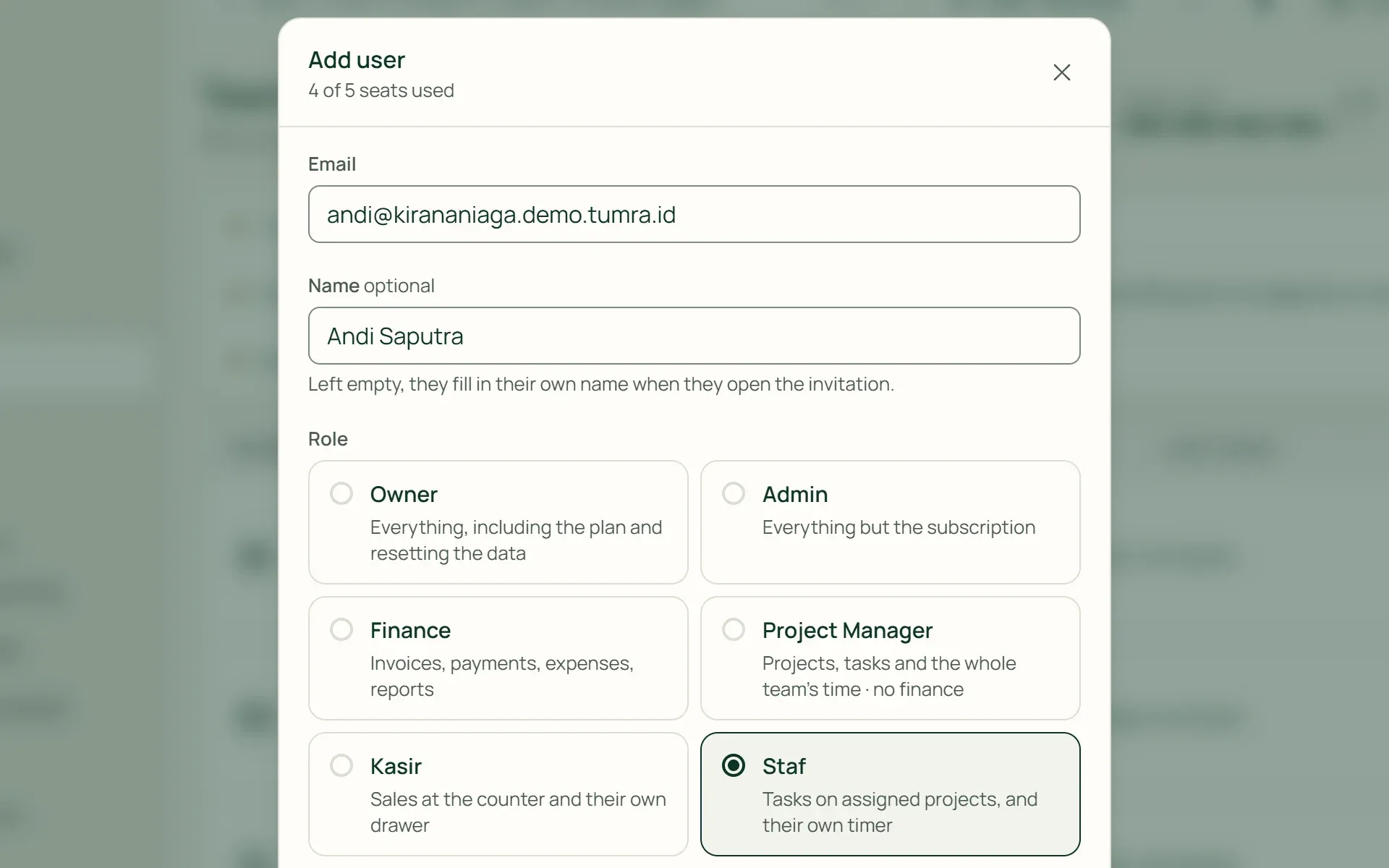
01 · Invite
Invite by email, without sharing passwords.
Enter the email and choose a role. The new member gets a link to create their own password, valid for 7 days and can be resent. If email can't be used yet, choose "Set a password" and hand the password over in person.
- 7-day link
- Resend invitation
- Set a password
02 · Roles
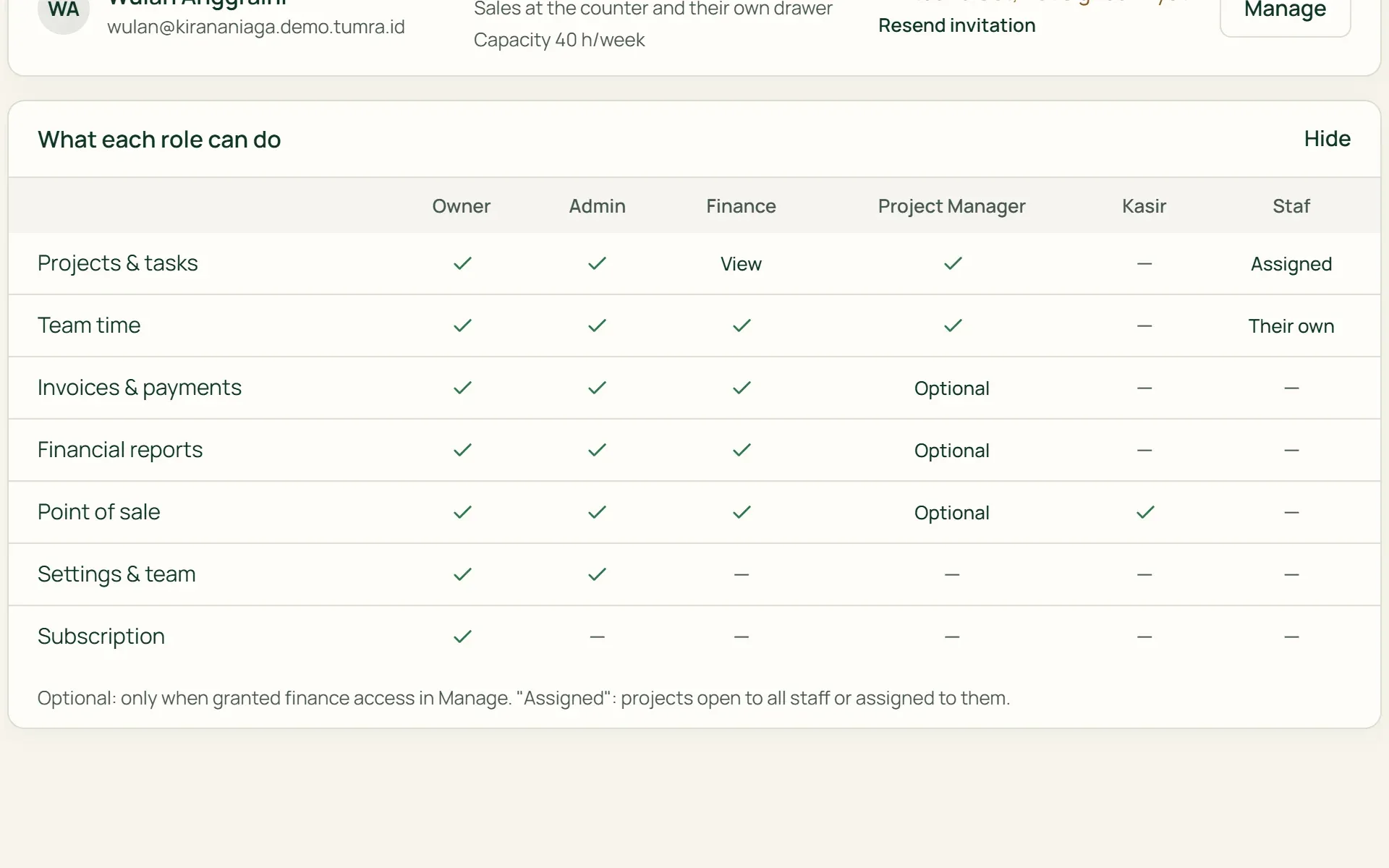
Six roles with clear limits.
Owner, Admin, Finance, Project Manager, Cashier, and Staff. The "What each role can do" table shows who can open projects, invoices, financial reports, the counter, settings, and the subscription plan.
- Owner & Admin
- Finance
- Project Manager
- Cashier & Staff
03 · Access
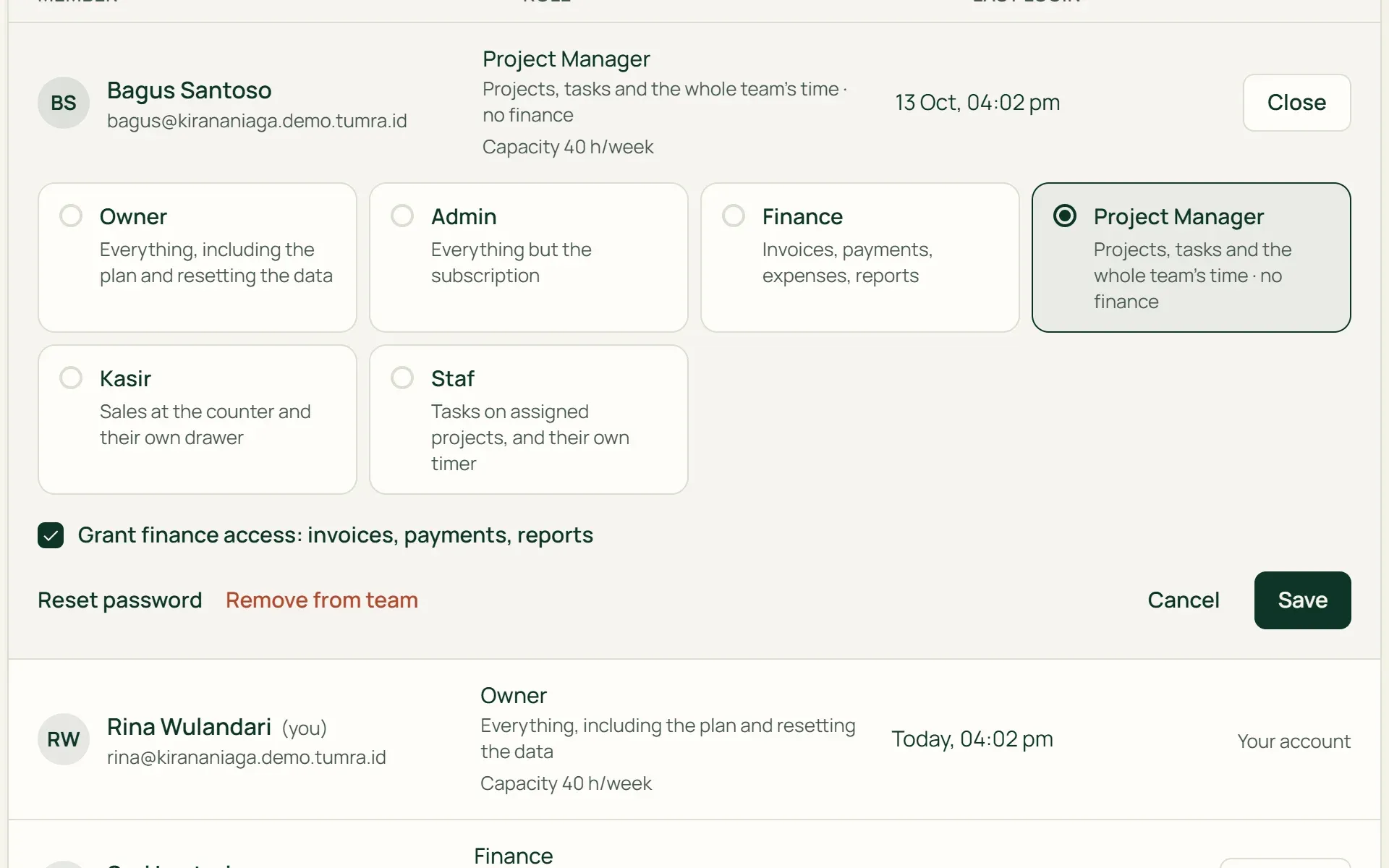
Open up the finances for just one person.
Project Managers don't see money by default. In the Manage panel, an Owner or Admin can give one Project Manager access to invoices, payments, and reports without making them Finance. Staff only see the projects and clients opened to them.
- Grant finance access
- All staff
- Only certain people
04 · Leaving
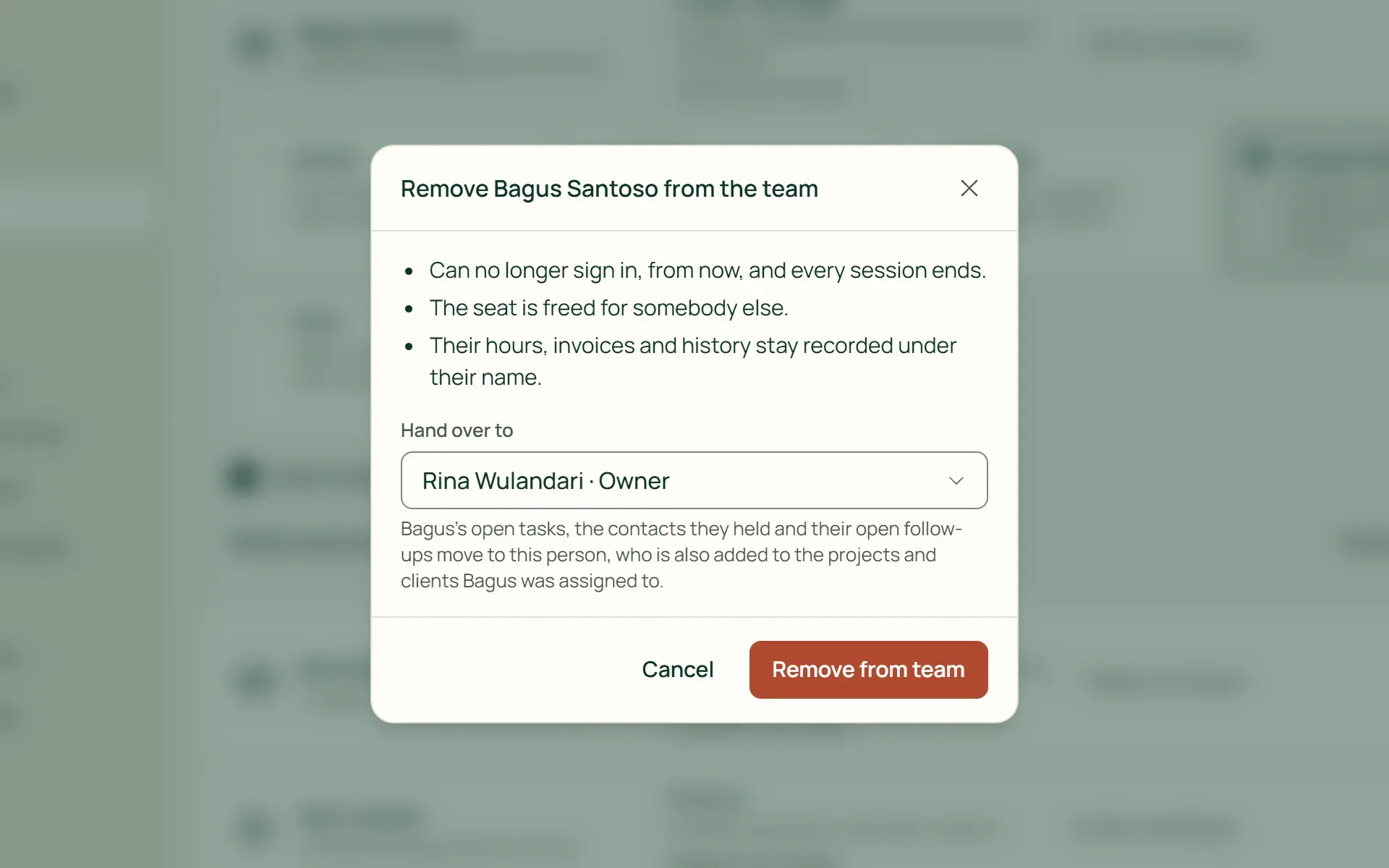
A member leaves, their work doesn't disappear.
Choose a successor in "Remove from team". Unfinished tasks, the contacts they held, and open follow-ups move to the successor. A running timer is stopped, all their sessions end, and their hours and history stay recorded under their name.
- Hand over to
- Timer stopped
- Seat freed up
What you can do
The right access for every role.
Seats in one place
The "Seats used" meter sits next to the Add User button. When the seats are full, the button becomes Add seats, and the Owner adds them from the plan page.
There's always an Owner
The last Owner can't be removed or given a lower role. If there's only one Owner, an Admin can send an email asking them to add a second Owner.
Accounts are never deleted
Members who leave become inactive and can be reactivated. Their email can be released, so the same address can be used by a new member.
Work capacity per person
Set working hours per week, 40 hours by default. The Team this week card on the dashboard compares it with scheduled tasks. For service and mixed businesses.
Passwords and sessions under control
An Owner or Admin can reset a member's password, and all their sessions end immediately. Anyone can sign out of all other devices from their Profile.
Sign in with Google
Members can sign in with a Google account whose email matches the invitation email, or with an email and a password of at least 10 characters.
For shops
Cashiers serve customers, the books stay closed.
On the Retail Starter, Retail, and Bisnis plans, the Cashier role only opens the counter. Cashiers see the goods, selling prices, and the customer, but not cost prices, profit, invoices, or reports. Each shift runs with its own drawer.
- A drawer per cashierOpen drawer with an opening float, then Close drawer and count the cash. The difference is recorded per shift.
- No finance accessCost prices, profit, the ledger, and reports stay with Owners, Admins, and Finance only.
- Drawer closed before leavingA cashier whose drawer is still open can't be removed from the team until the drawer has been counted.
The right team on every job.
Projects & tasks
Choose who joins each project. Staff only see the projects opened to them.
Learn more →Point of sale (POS)
Cashiers sell from their own drawer without opening the shop's books.
Learn more →Clients & CRM
Decide which staff can see each client, along with its projects and contacts.
Learn more →
Plans
Your team on every plan.
Extra seats are IDR 50,000 per user per month; invitations not yet accepted use a seat, inactive members don't.
| Feature | FreeRp 0/moRp 0/yr | FreelancerRp 129,000/moRp 1,290,000/yr | AgencyRp 349,000/moRp 3,490,000/yr | StarterRp 179,000/moRp 1,790,000/yr | RetailRp 349,000/moRp 3,490,000/yr | BisnisRp 499,000/moRp 4,990,000/yr |
|---|---|---|---|---|---|---|
| Team & Users | Not included | Included | Included | Included | Included | Included |
| Users included | 1 | 1 | 3 (Pro: 8) | 2 | 3 (Pro: 6) | 4 (Pro: 8) |
| Extra seats | Not included | up to 3 in total | Unlimited | up to 3 in total | Unlimited | Unlimited |
| Project Manager role | Not included | Included | Included | Not included | Not included | Included |
| Cashier role | Not included | Not included | Not included | Included | Included | Included |
| Staff access per project | Not included | Included | Included | Not included | Not included | Included |
| Sign in with Google | Included | Included | Included | Included | Included | Included |
Retail Free is for one user: no Team & Users, extra seats or Cashier role.
FAQ
Common questions
How many team members are included in a plan?
Agency and Retail include 3 users, Bisnis 4, Retail Pro 6, and Agency Pro and Bisnis Pro 8. The Owner can add seats at IDR 50,000 per user per month in Settings → Plan & Billing. Invitations not yet accepted use a seat. Removed members don’t, so their seat can be used by someone else.
Can the free plans and Freelancer add members?
Free and Retail Free can’t: both are single-user plans and seats can’t be added. Freelancer includes 1 user and can add seats up to 3 users in total. The same limit applies to Retail Starter, which includes 2 users. On Agency, Retail, Bisnis, and the Pro versions, extra seats are unlimited.
Can a Project Manager see invoices and reports?
Not by default. An Owner or Admin can tick “Grant finance access” in one Project Manager’s Manage panel. They can then open invoices, payments, and reports, and also serve at the counter, without being made Finance.
Are the accounts of members who leave deleted?
No. The account is only deactivated: they can’t sign in any more, but their hours, invoices, and history stay recorded under their name. The account can be reactivated as long as there’s a free seat. Work already handed to a successor doesn’t come back by itself.
Is there two-step verification or custom roles?
Not yet. Tumra doesn’t have two-step verification (2FA) yet, and the six roles can’t be changed or added to. What’s already there: passwords of at least 10 characters, Sign in with Google, and a “Sign out of all other devices” button in your Profile.
Bring your team to work in one place.
Try every Tumra feature free for 30 days, no credit card needed.