

Products & stock
Stock recorded by location, without recounting.
Build a catalogue with variants, units, barcodes, and photos. Stock moves on its own when goods are sold, received, transferred, or recounted, and every change is recorded with its reason. Inventory is valued at weighted average cost.
Available on the Retail Free, Retail Starter, Retail & Bisnis plans.
Before and after
The stock book never matches the shelf.
Goods coming in are written in a book, sales sit in the cash register, and damaged goods aren't recorded at all. When the stock is counted, the difference can't be explained.
Before
4 separate places
- Stock bookWarehouse · goods in are written down, damaged goods aren't
- Supplier invoicesAdmin · buy prices sit in a pile of invoices
- Cash registerCashier · sales never reach the stock book
- Manual countsOwner · the gap with the book can't be explained
Goods receipt
Iced coffee 250 ml
Received- Variant matched in the catalogue250 ml
- Stock up, cost averaged24 @ IDR 7,250
- Receipt recorded in the history+12 @ IDR 7,500
- Ready to check in a stock count
How it works
From the catalogue to the stock count.
01 · Catalogue
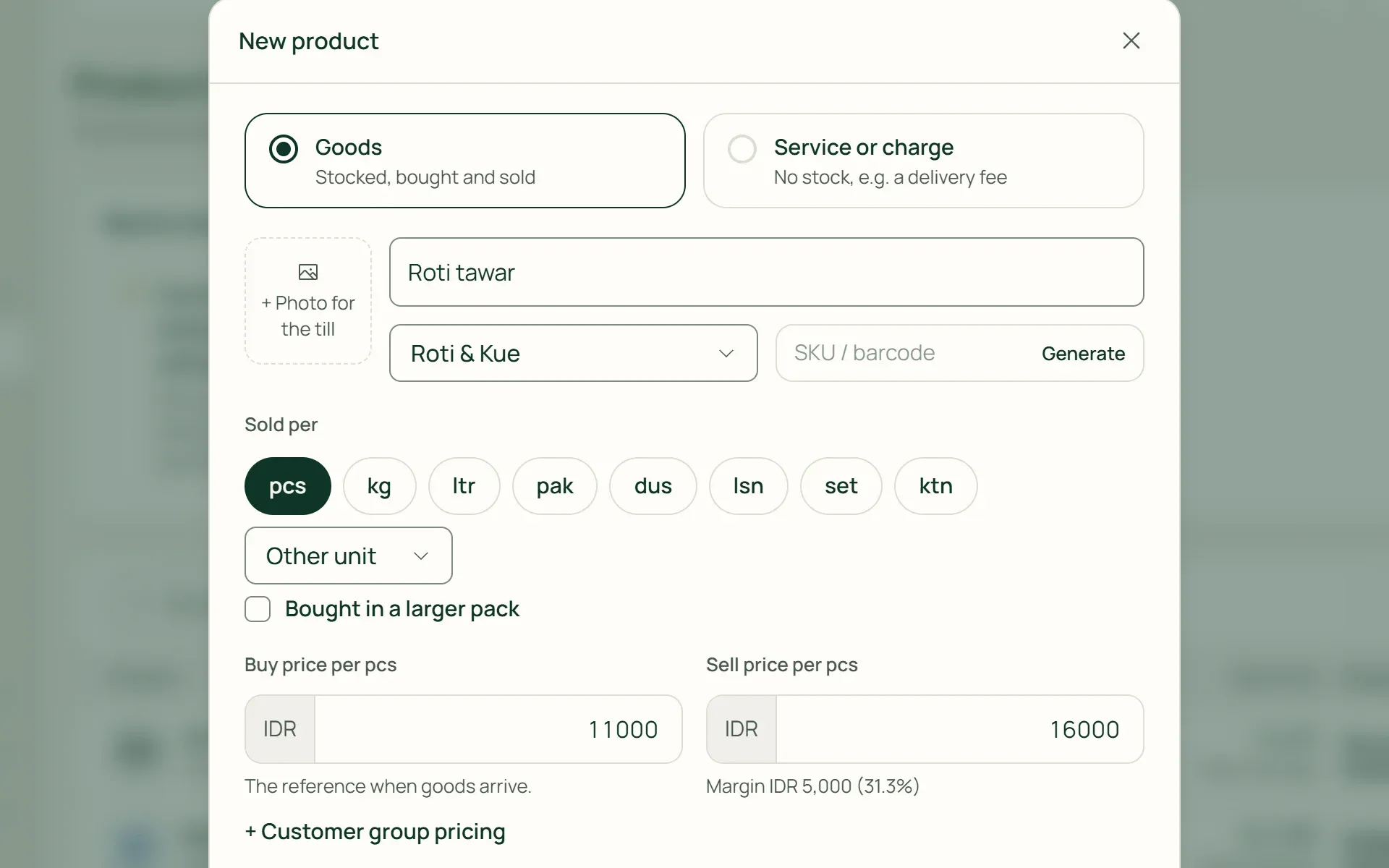
Enter each item once, in full.
Name, category, unit, sell price, buy price, wholesale price, and a photo for the till. Turn on Count its stock for goods you keep, and Track by batch for goods that expire. Many products can be imported at once from Excel.
- Wholesale price
- Photo for the till
- Excel import
02 · Variants
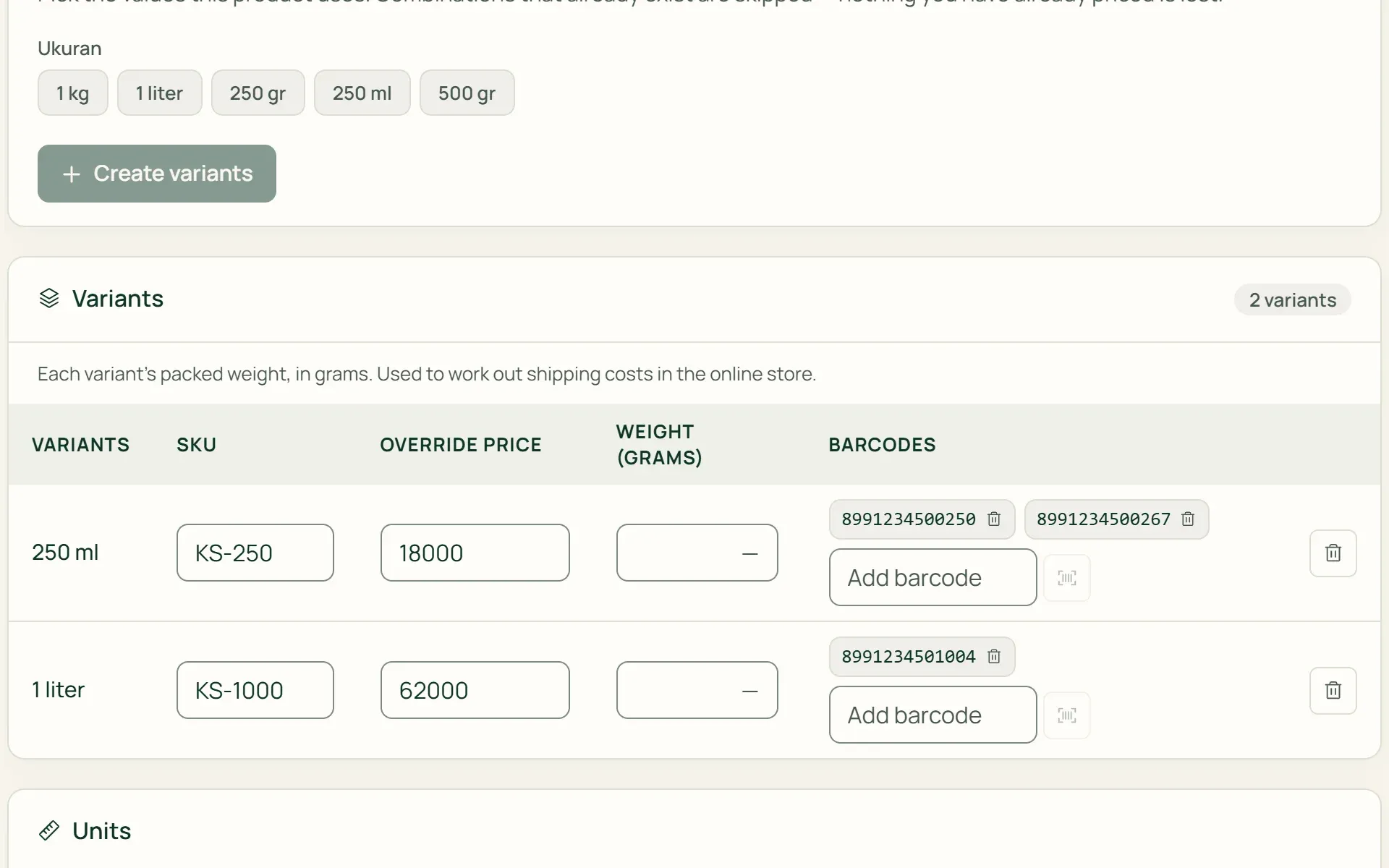
Sizes and flavours, each with its own stock.
Create attributes such as Size or Flavour, pick their values, then press Create variants. Each variant has its own SKU, override price, and several barcodes. Packs such as a carton of 12 are stored in the base unit, so 5 cartons are recorded as 60.
- SKU per variant
- Multiple barcodes
- Pack units
03 · Stock
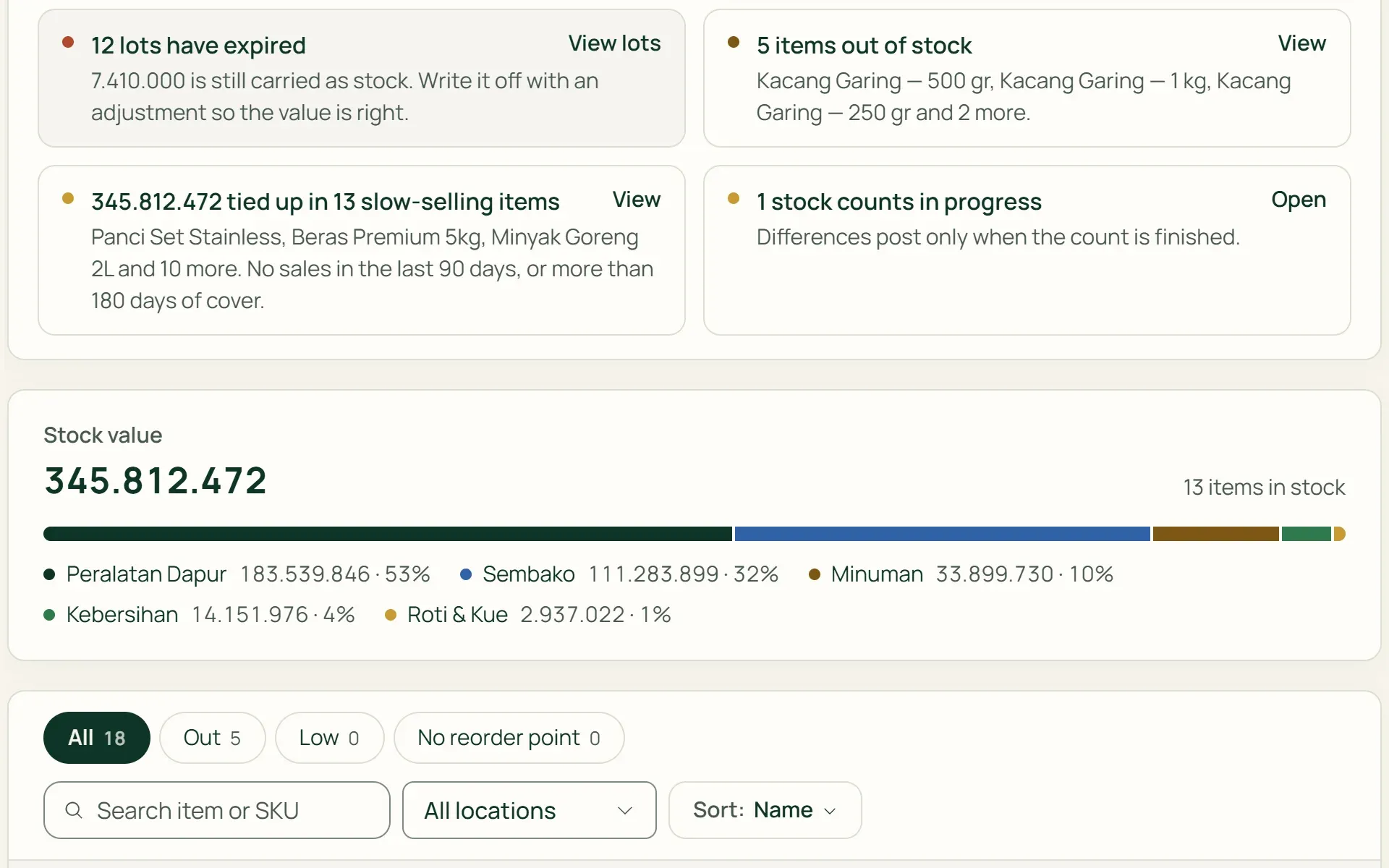
Stock moves without re-entry.
Sales, goods receipts, returns, and transfers change stock on their own. The Stock page flags items that are out, running low, negative, or slow-selling, with an estimate of how many days they will last at their current sales rate.
- Low
- Out
- Days of stock left
04 · Stock count
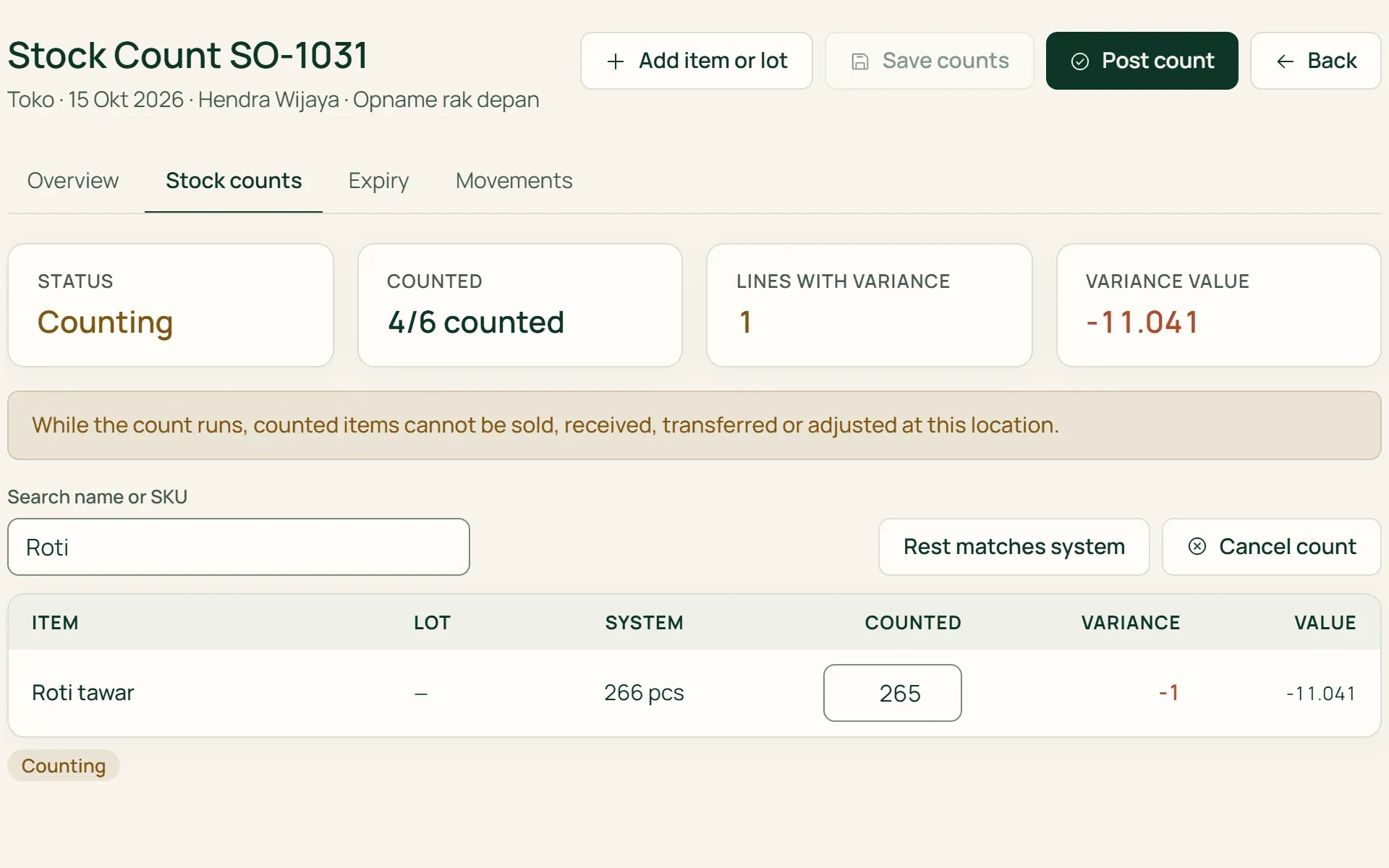
Count what's on the shelf, the difference is journalled.
Start a stock count per location, for every item or just some. Enter the quantities counted, and Tumra shows each difference and its value. Posting creates the stock adjustments and their journal together.
- Per location
- The rest stays as recorded
- Automatic journal
05 · Stock card
Every change, with its reason.
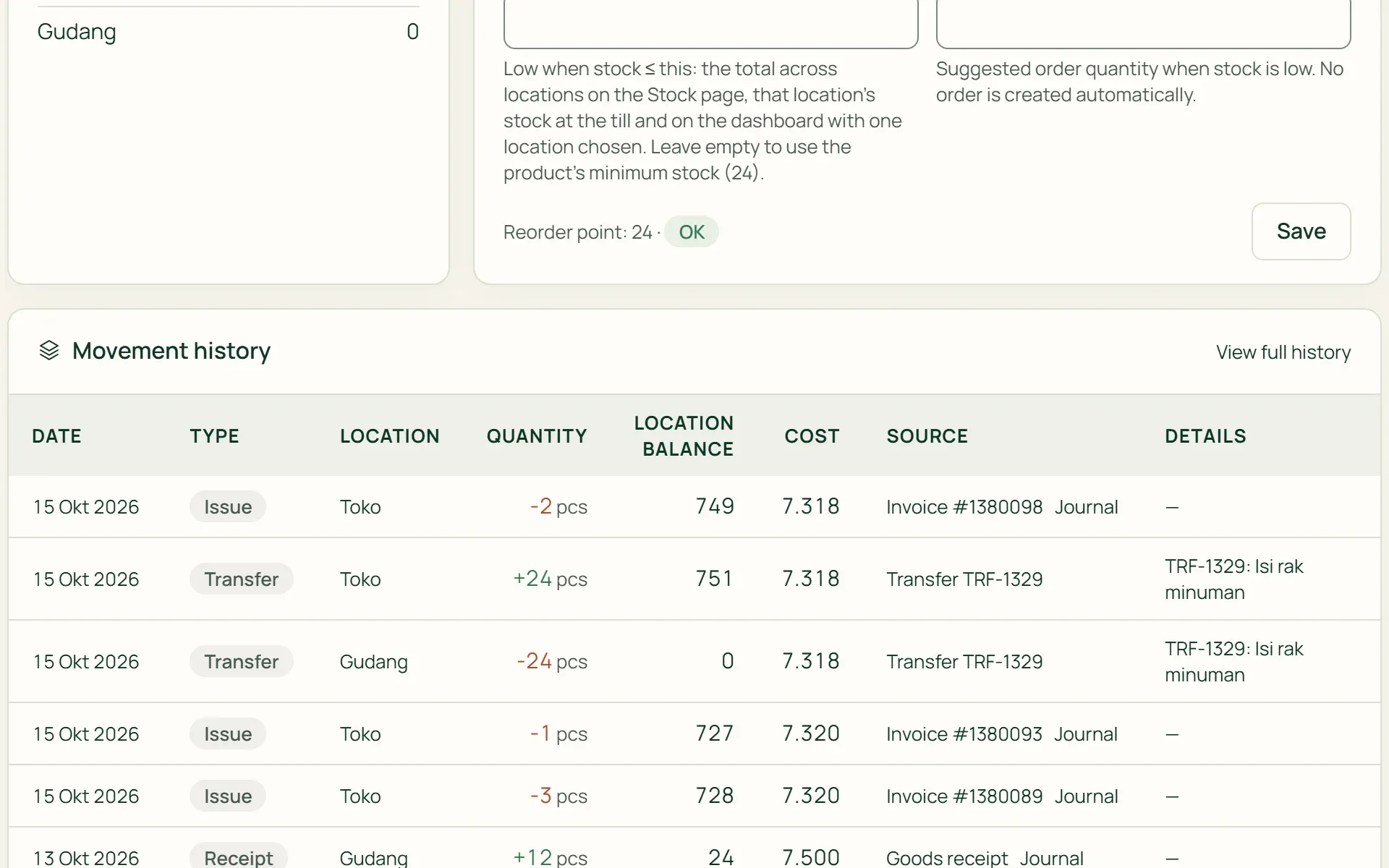
The stock card shows stock by location, batches, average cost, and the movement history with who recorded each movement. The history can't be edited: corrections are recorded as new adjustments.
- Stock by location
- Average cost
- History
What you can do
A catalogue and stock you can trace.
Multiple locations
Warehouses, shops, and other places, each with its own stock. There's no limit on warehouses. Move many items between locations in one document, with no journal, since the inventory value stays the same.
Automatic average cost
Cost is a weighted average of every receipt. Each sale records its own COGS, and every movement that carries a value goes into the journal.
Batches and expiry
Track batch numbers and expiry dates. Sales and transfers take the batch closest to expiry first, and batches about to expire show up in Agenda.
Adjustments with a reason
Damaged, expired, lost, found, or a correction. A reason must be chosen, and the value is recorded at average cost to the stock difference account.
Reorder points
Set when an item counts as running low, with a suggestion based on its sales over the last 90 days. Items running low can be turned into a purchase order straight away.
Margins under watch
The catalogue flags products sold below cost, margins far below their category's average, and costs that are still a placeholder price.
Stock that follows every transaction.
Point of sale (POS)
Item cards at the counter show stock at the selling location, and every sale reduces it.
Learn more →Sales & purchasing
Goods receipts add to stock and to what you owe. Items running low can be turned into a purchase order.
Learn more →Import & export
Import products and opening stock from Excel, then export the stock history any time.
Learn more →
Plans
Products and stock, plan by plan.
Free, Freelancer, and Agency only have a product list for invoices, without stock; each extra location with a till is IDR 99,000 a month.
| Feature | FreeRp 0/moRp 0/yr | FreelancerRp 129,000/moRp 1,290,000/yr | AgencyRp 349,000/moRp 3,490,000/yr | StarterRp 179,000/moRp 1,790,000/yr | RetailRp 349,000/moRp 3,490,000/yr | BisnisRp 499,000/moRp 4,990,000/yr |
|---|---|---|---|---|---|---|
| Product & service list | Included | Included | Included | Included | Included | Included |
| Import products from Excel | Included | Included | Included | Included | Included | Included |
| Stock & average cost | Not included | Not included | Not included | Included | Included | Included |
| Variants & pack units | Not included | Not included | Not included | Included | Included | Included |
| Warehouses | Not included | Not included | Not included | Unlimited | Unlimited | Unlimited |
| Locations with a till | Not included | Not included | Not included | 1 | 2 (Pro: 5) | 2 (Pro: 5) |
| Stock counts & adjustments | Not included | Not included | Not included | Included | Included | Included |
| Batches & expiry | Not included | Not included | Not included | Included | Included | Included |
Retail Free: as on Starter, up to 100 active products. Archived products don't count.
FAQ
Common questions
Which costing method is used?
Weighted average, one figure per variant across all locations. For example: 12 bottles of iced coffee cost IDR 7,000 each, then 12 more arrive at IDR 7,500. The cost becomes IDR 7,250, and selling 2 bottles records COGS of IDR 14,500. The method is fixed and can’t be switched to FIFO.
Can I import products and opening stock from Excel?
Yes. Download the template from Settings → Import & Migration → Products & opening stock, fill in one row per product (name, SKU, category, unit, selling price, cost and opening stock), then upload it to review a preview before saving. New categories and units are created for you, variants aren’t supported yet, and a wrong import can be reversed with Undo this import as long as none of its products have been used.
Can stock go negative?
Not by default: a sale is refused if there isn’t enough stock, and the till stops at the quantity on the shelf. If you turn on Allow negative stock in Stock rules, the sale goes through, and items below zero are flagged so they can be corrected.
Can I sell by the kilogram or by weight on a scale?
Partly. Units such as kg can be used in the catalogue, goods receipts, and adjustments. At the till, quantities are still whole numbers, and billing by the actual weight on a scale isn’t available yet.
Who can see stock?
The owner, admins, and finance, because stock is money on the Balance Sheet. Project managers can see it if they’re given finance access. The Cashier role only sees stock quantities at the selling location on the till screen, without buy prices or values.
Can a product have several photos?
Not yet. Each product has one photo, up to 5 MB, which also shows at the till. Photos per variant and photo galleries aren’t available yet.
Start with the stock on your shelves.
Try Tumra's catalogue, stock, and till free for 30 days, no credit card needed.