

Client portal
Clients follow their own progress, without having to ask.
Give a client contact a portal sign-in to see projects, the schedule, tasks, time logs, and issued invoices. You choose what they're allowed to see. Your budgets, costs, and books are never sent.
Available on the Agency & Bisnis plans.
Before and after
Progress reports put together by hand are always a day late.
The client asks over chat, the team tallies hours in a spreadsheet, and the invoice PDF gets buried in email. Every "how far along are we?" eats time that could go into the work.
Before
4 places
- Status questions over chatOwner · client questions answered one by one
- Weekly reportAdmin · progress written up by hand each week
- Hours tallied by handTeam · hours put together again in a spreadsheet
- PDF by emailFinance · invoices buried in the client's inbox
Client portal
Dimas Pratama
Active- Project progress shown67%
- Tasks shown with due dates4 unfinished
- Logged hours shown18 hours · 30 days
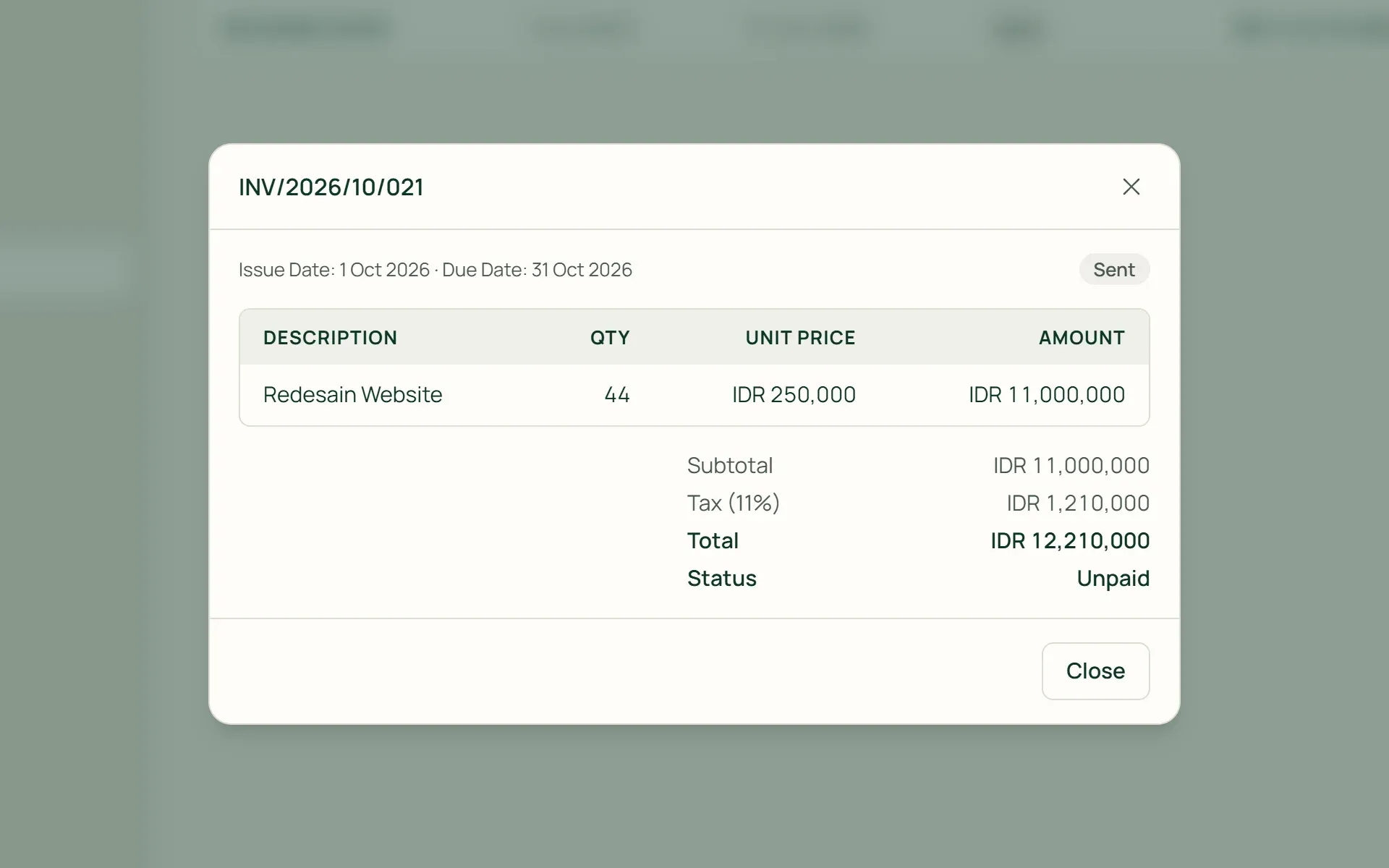
- Invoice ready to printINV/2026/10/021
How it works
From one invitation to a paid invoice.
01 · Invite
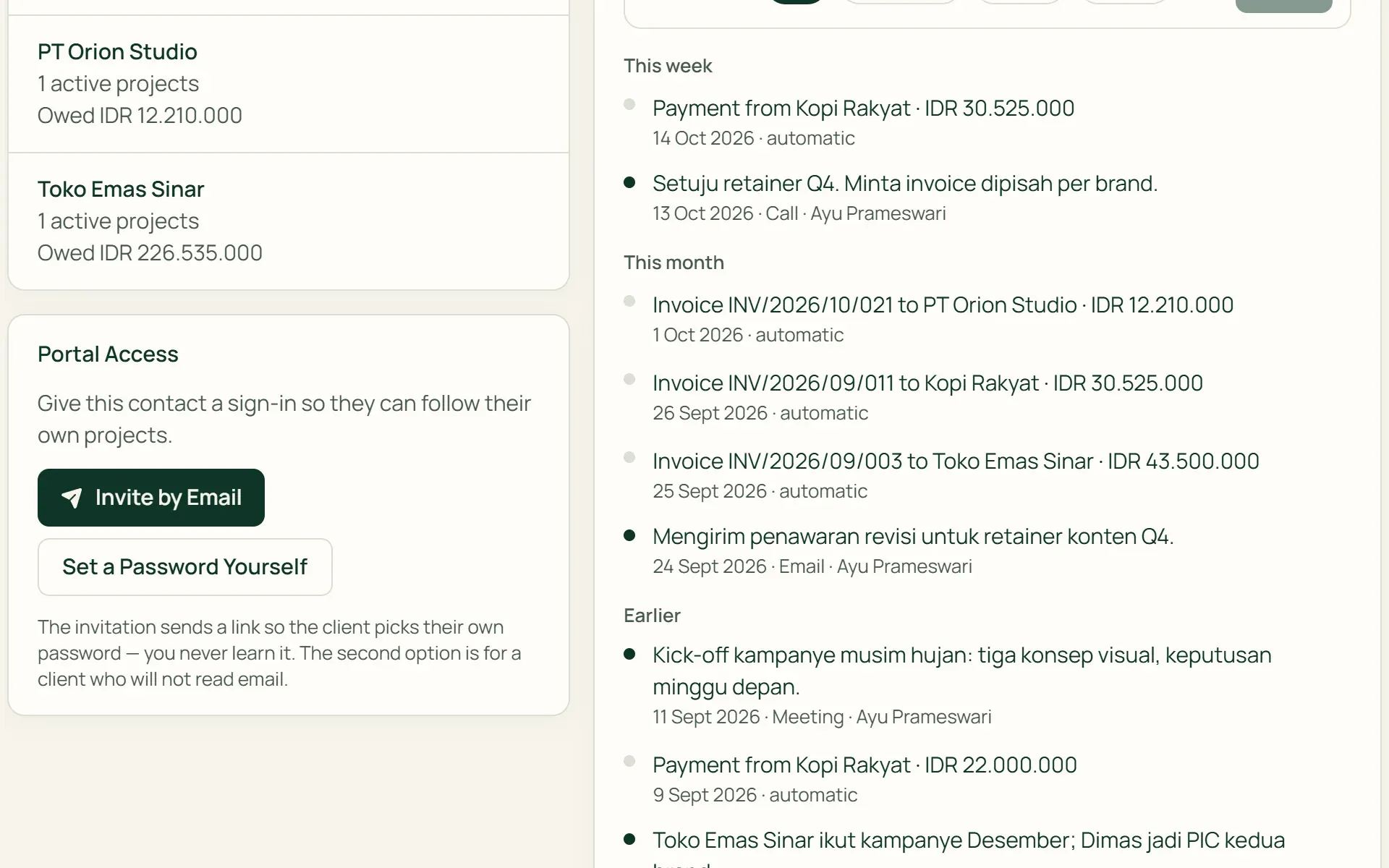
Give access from the contact page.
Open the client contact, then choose "Invite by Email". The client gets a link to create their own password, valid for 7 days and single-use. For clients who rarely read email, choose "Set a Password Yourself" and pass it on in person.
- 7-day invitation
- Set the password yourself
- Per contact
02 · Visibility
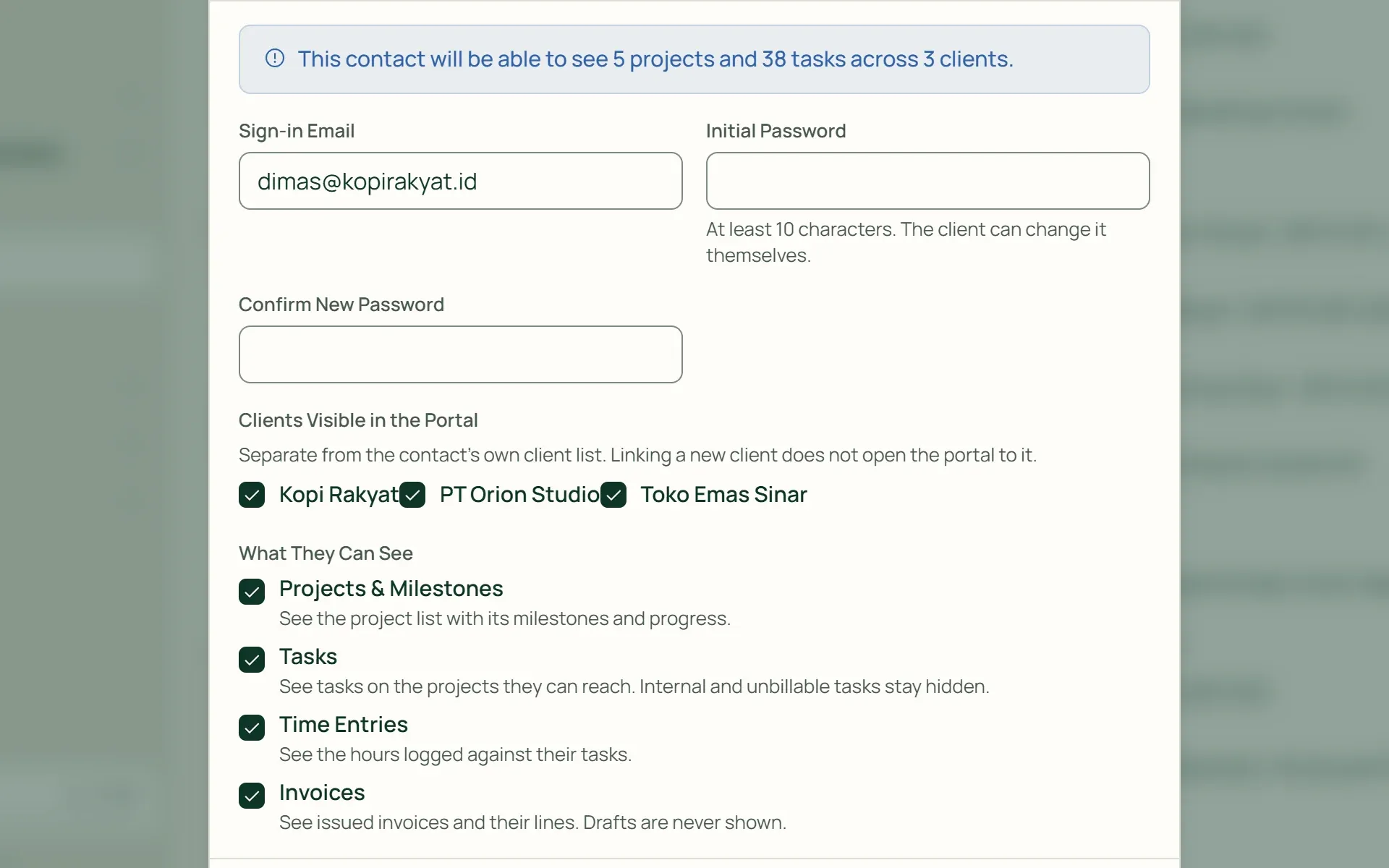
Decide what they can see.
Tick Projects & Milestones, Tasks, Time Entries, and Invoices for each contact, then choose which clients are visible if they represent more than one. Before you save, Tumra tells you how many projects and tasks will be opened up.
- Per contact
- Per client
- Count before saving
03 · Projects
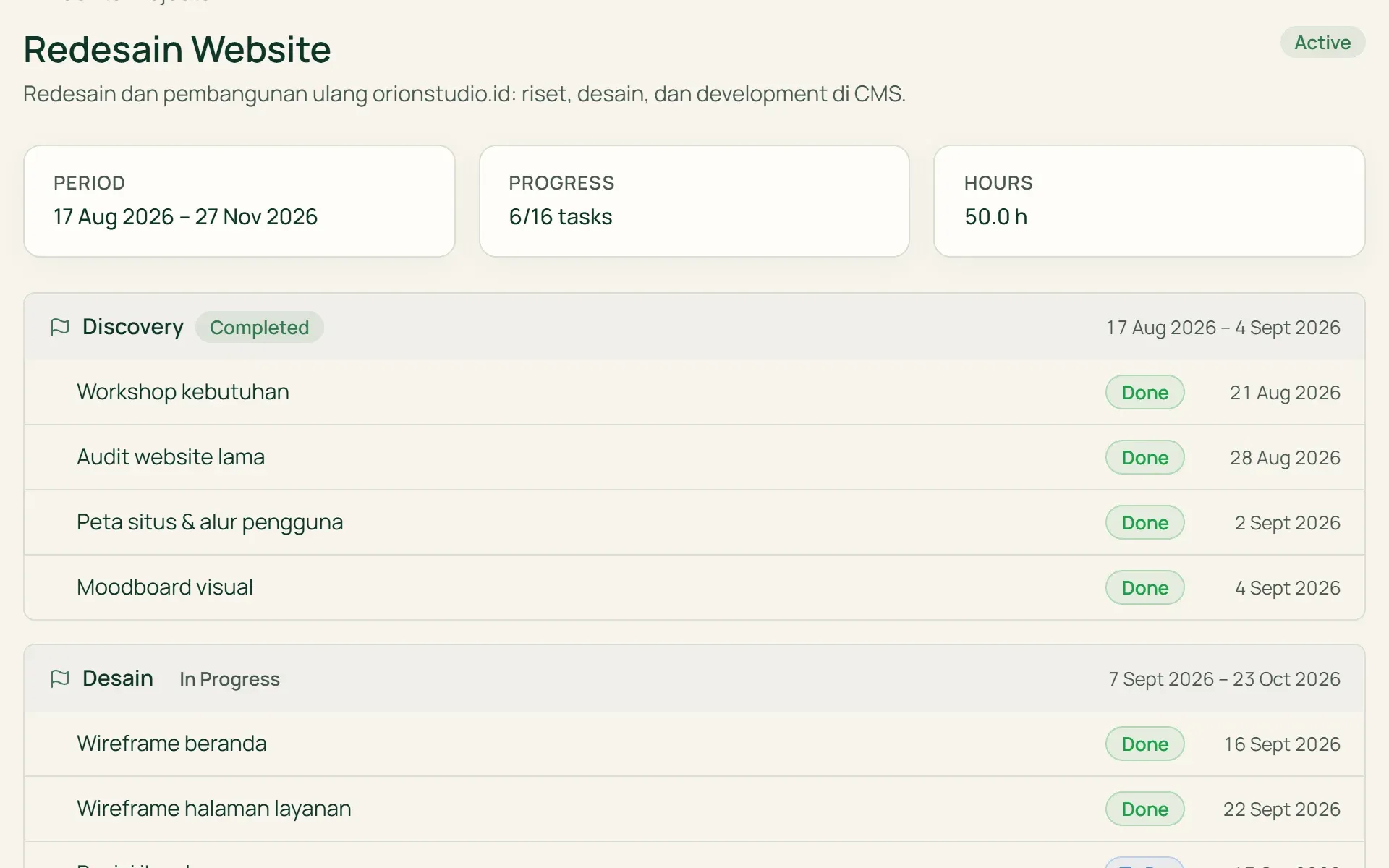
Clients follow progress without asking.
Clients see their projects with milestones, tasks with their status and due dates, hours logged, and assets such as Figma or Drive links. The schedule is available as a Gantt Chart and a monthly Agenda.
- Milestones
- Gantt Chart
- Agenda
- Assets
04 · Comments
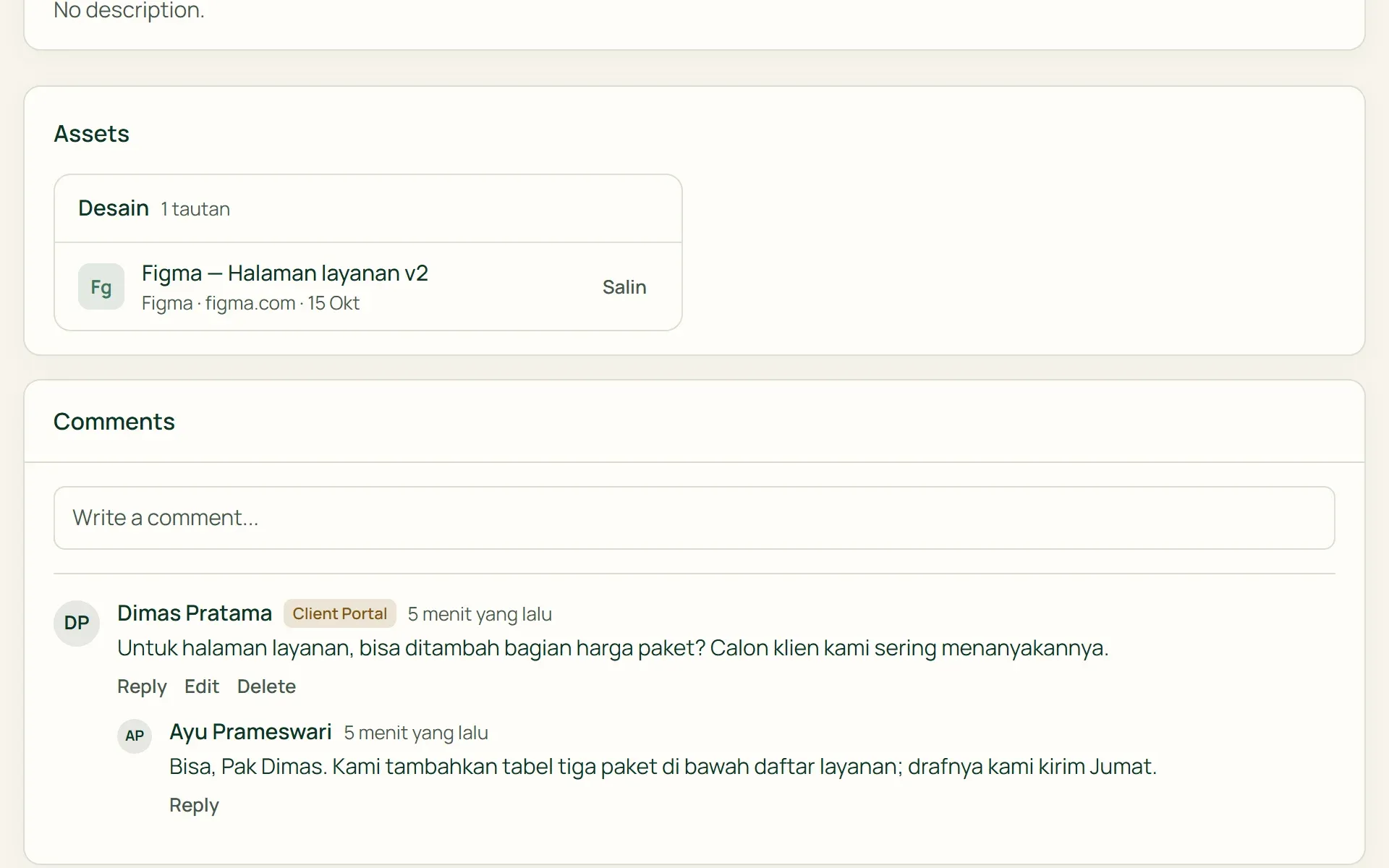
Discuss right on the project and task.
Clients can write and reply to comments on the projects and tasks they can see. Team comments marked "Team only", and their replies, never appear in the portal. In the app, client comments are tagged "Client".
- Threaded replies
- Team only
- File links
05 · Invoices
Issued invoices, ready to print.
Clients see a list of invoices with the issue date, due date, status, and line details. Drafts never appear. From each invoice, the client can open a print version to print or save as PDF.
- Paid / Unpaid
- Print / Save PDF
What you can do
Open for clients, tidy for the team.
Schedule as a Gantt and an Agenda
A Gantt Chart with a 1, 3, or 6 month range, and a monthly Agenda with that client's project, milestone, task, and invoice due dates.
Time logs by period
Clients choose 7 days, 30 days, This month, Last month, or their own dates, then see the Hours per Day chart and a breakdown by task.
Internal figures stay inside
Project budgets, costs, expenses, and the books are never sent to the portal. When it comes to money, clients only see invoices issued to them.
What's internal stays internal
Non-billable tasks never appear. Specific projects or tasks can be hidden from the client, and hiding a project also hides its tasks and time logs.
The client's choice of language
Clients choose Indonesian or English for the portal. Project and task names stay as you wrote them. There's a dark mode, and the layout adapts to phone screens.
Access changes immediately
Deactivate, revoke, or reset the password at any time. Changes apply as soon as the client opens their next page. Their last sign-in is shown on the contact page.
The portal uses data from the work you've already done.
Clients & CRM
Portal access is given per contact, for the clients linked to that contact.
Learn more →Projects & tasks
The projects, milestones, tasks, assets, and comments clients see come from here.
Learn more →Invoices & billing
Invoice emails can include a portal link for clients who already have access.
Learn more →
Plans
Client portal on every plan.
Client portal accounts are separate from team accounts and don't use a seat.
| Feature | FreeRp 0/moRp 0/yr | FreelancerRp 129,000/moRp 1,290,000/yr | AgencyRp 349,000/moRp 3,490,000/yr | StarterRp 179,000/moRp 1,790,000/yr | RetailRp 349,000/moRp 3,490,000/yr | BisnisRp 499,000/moRp 4,990,000/yr |
|---|---|---|---|---|---|---|
| Client portal | Not included | Not included | Included | Not included | Not included | Included |
| Contacts with access | Not included | Not included | Unlimited | Not included | Not included | Unlimited |
| Projects, Gantt & Agenda | Not included | Not included | Included | Not included | Not included | Included |
| Tasks & time logs | Not included | Not included | Included | Not included | Not included | Included |
| Invoices & PDF printing | Not included | Not included | Included | Not included | Not included | Included |
| Client comments | Not included | Not included | Included | Not included | Not included | Included |
| Business logo in the portal | Not included | Not included | Included | Not included | Not included | Included |
FAQ
Common questions
Do clients need to pay or use a seat?
No. Clients sign in with a portal account that’s separate from your team accounts, so they don’t use a seat and aren’t charged. The portal is included on the Agency and Bisnis plans.
What can clients never see?
“Team only” comments, non-billable tasks, hidden projects or tasks, draft invoices, budgets, costs, expenses, and the books. What they do see: team members’ names on time logs, and the unit prices on the lines of issued invoices.
Can clients pay invoices through the portal?
Not yet. Clients can view, print, or save invoices as PDF, with the status Paid or Unpaid. Payments are still recorded by your team. The balance left after a part payment isn’t shown in the portal yet.
What if a client forgets their password?
There’s no “forgot password” button in the portal yet. An owner or admin can use “Resend sign-in link” or “Reset Password” on the contact page. Once signed in, clients can change their own password in the portal’s Settings.
Can the portal use my own logo or domain?
A logo, yes; a domain, not yet. The portal shows your business name and logo on Agency and Bisnis and their Pro versions. The address stays Tumra’s (`app.tumra.id/portal`), and custom colours can’t be set yet. The print version of an invoice in the portal uses the same invoice document you print from the app.
Is the team notified when a client comments?
Not yet. There are no email or in-app notifications for client comments yet. The comment appears on the project or task it belongs to, tagged “Client”, and can be replied to from there.
Let clients follow their own progress.
Try the client portal and every other Tumra feature free for 30 days, no credit card needed.