

WooCommerce integration
A completed WooCommerce order, straight into a sale.
Connect your WooCommerce store, map its products to the Tumra catalog, then turn on Orders become sales. Every order the store completes takes stock out, records cost of goods, and becomes an invoice with its payment. The buyer joins your Customers list.
Retail and Bisnis: 1 store, up to 3 on Pro. Not included in Retail Starter.
Before and after
Online store orders without typing them twice.
Without an integration, every web order is recorded twice: stock is taken out by hand, the invoice is typed again, and the transfer is matched yourself. With Tumra, a completed order is already fully recorded.
Before
4 manual steps
- Tally web ordersAdmin · copy from the WooCommerce dashboard
- Take stock out by handWarehouse · edit stock one item at a time
- Manual invoiceAdmin · retype name, items, prices
- Match the transferFinance · check the bank statement
WooCommerce
Order #1052
Completed- Stock goes down−3 pcs
- Cost of goods recordedIDR 25,500
- Invoice issuedIDR 67,000
- Payment recordedPaid
How it works
From an API key to the first order.
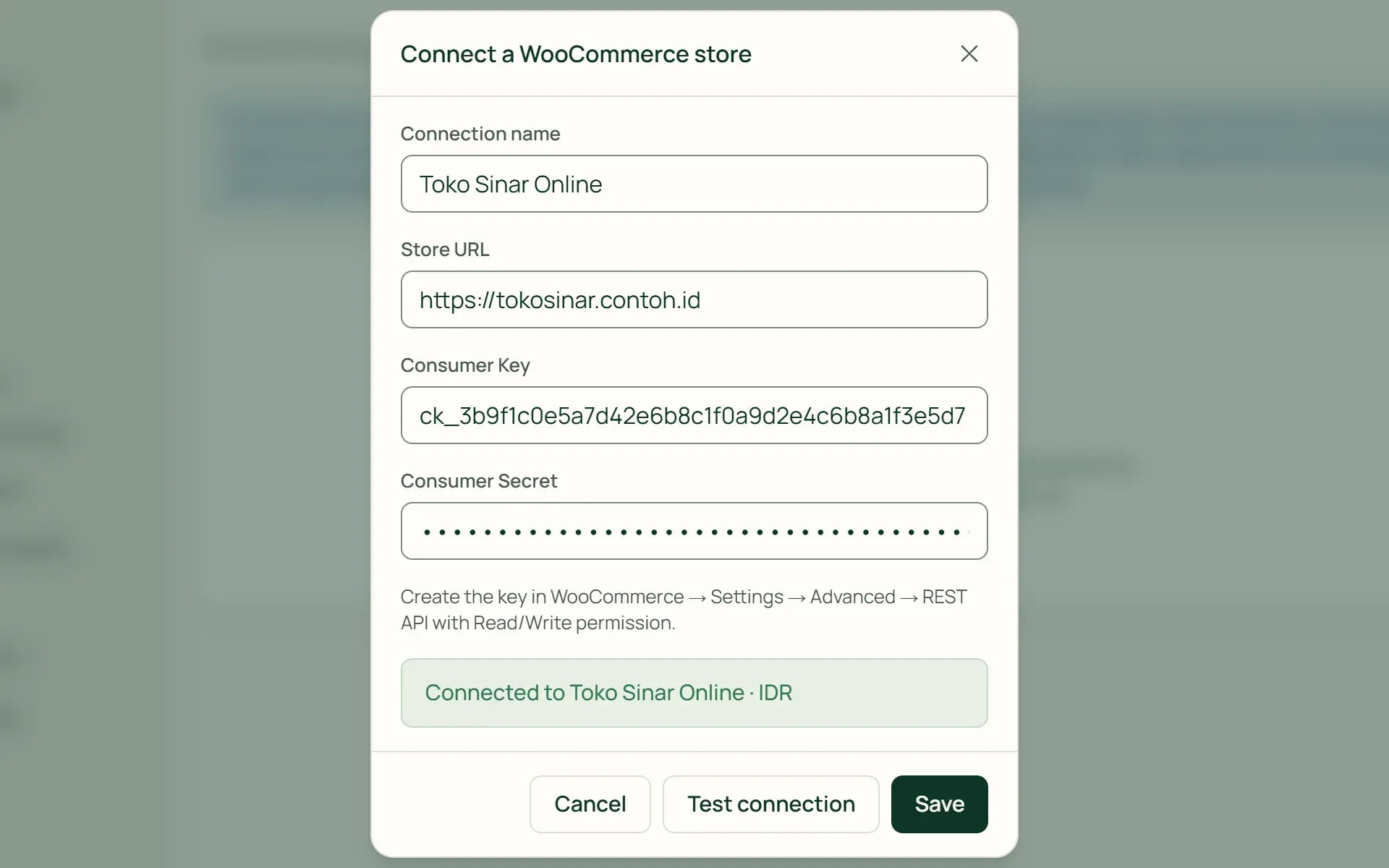
01 · Connect
Connect the store with a REST API key.
Create a Consumer Key and Consumer Secret with Read/Write permission in WooCommerce, then press Test connection. Tumra shows the store's name and currency. The store must use HTTPS. Keys are stored encrypted, and only a fragment is ever shown.
- Read/Write
- Test connection
- HTTPS
02 · Map
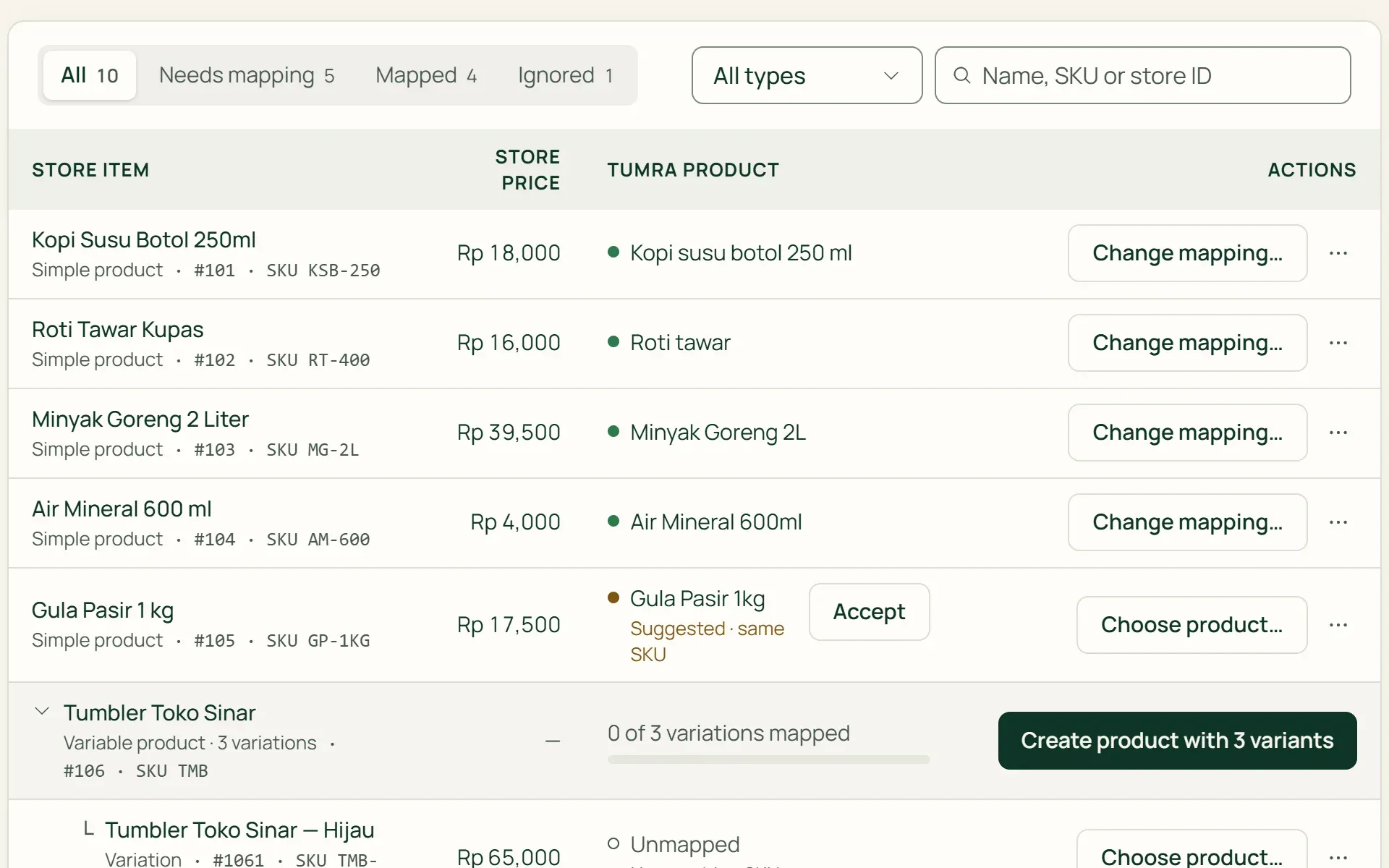
Match store products by SKU.
Press Read store catalog. Simple products, variable products, and their variations are read with their SKUs and prices. Items with the same SKU are offered as suggestions. Other items can be mapped to an existing product, ignored, or created as a Tumra product.
- Map by SKU
- Create product
- Ignore
03 · Activate
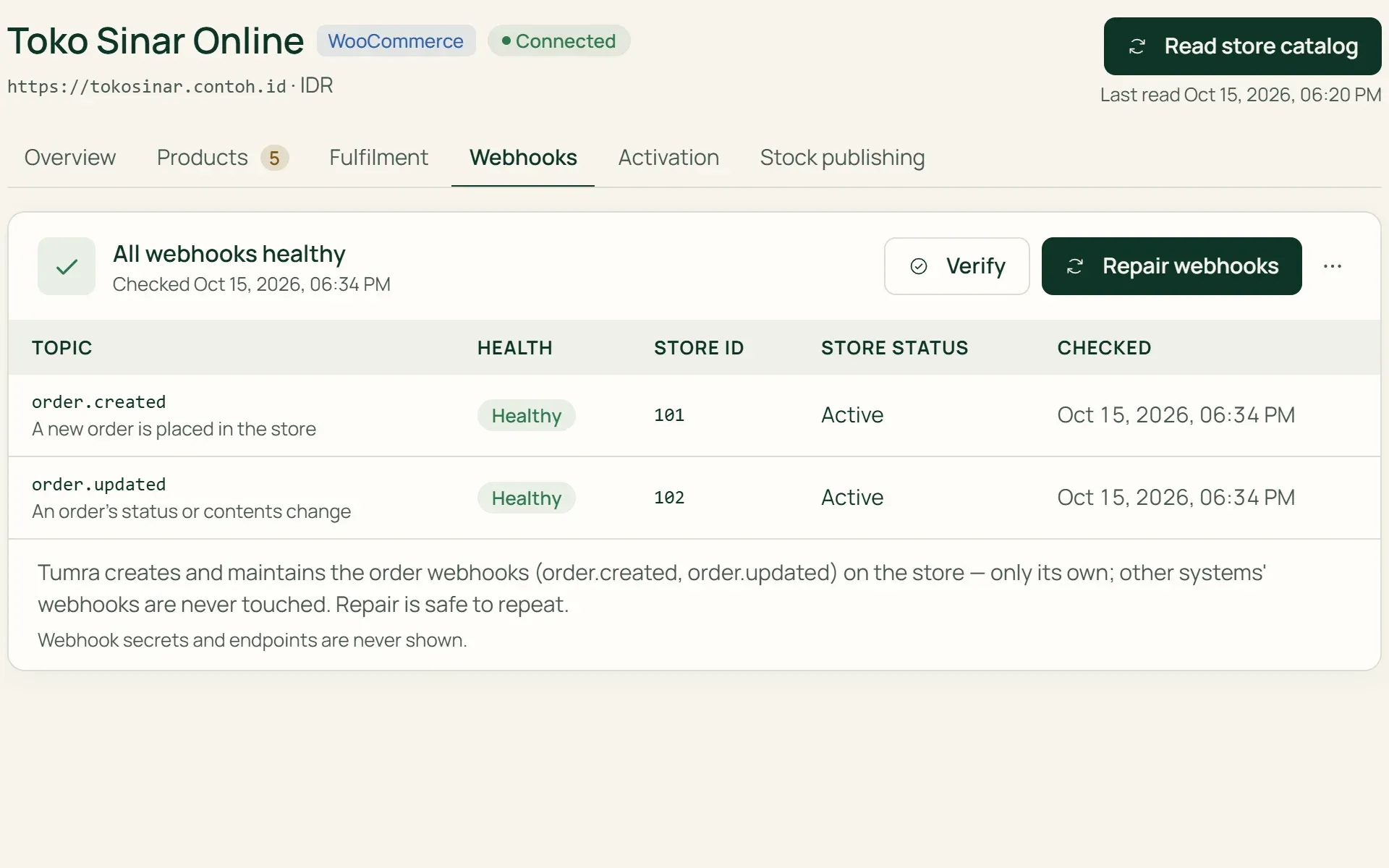
Choose a location, set up webhooks, then activate.
Choose a fulfilment location: stock for store orders is taken from here. Press Configure webhooks; Tumra installs order.created and order.updated in the store and checks them every day. The Activation tab names any blockers left. Activating does not change stock by itself.
- Fulfilment location
- Webhooks
- Blockers
04 · Turn on
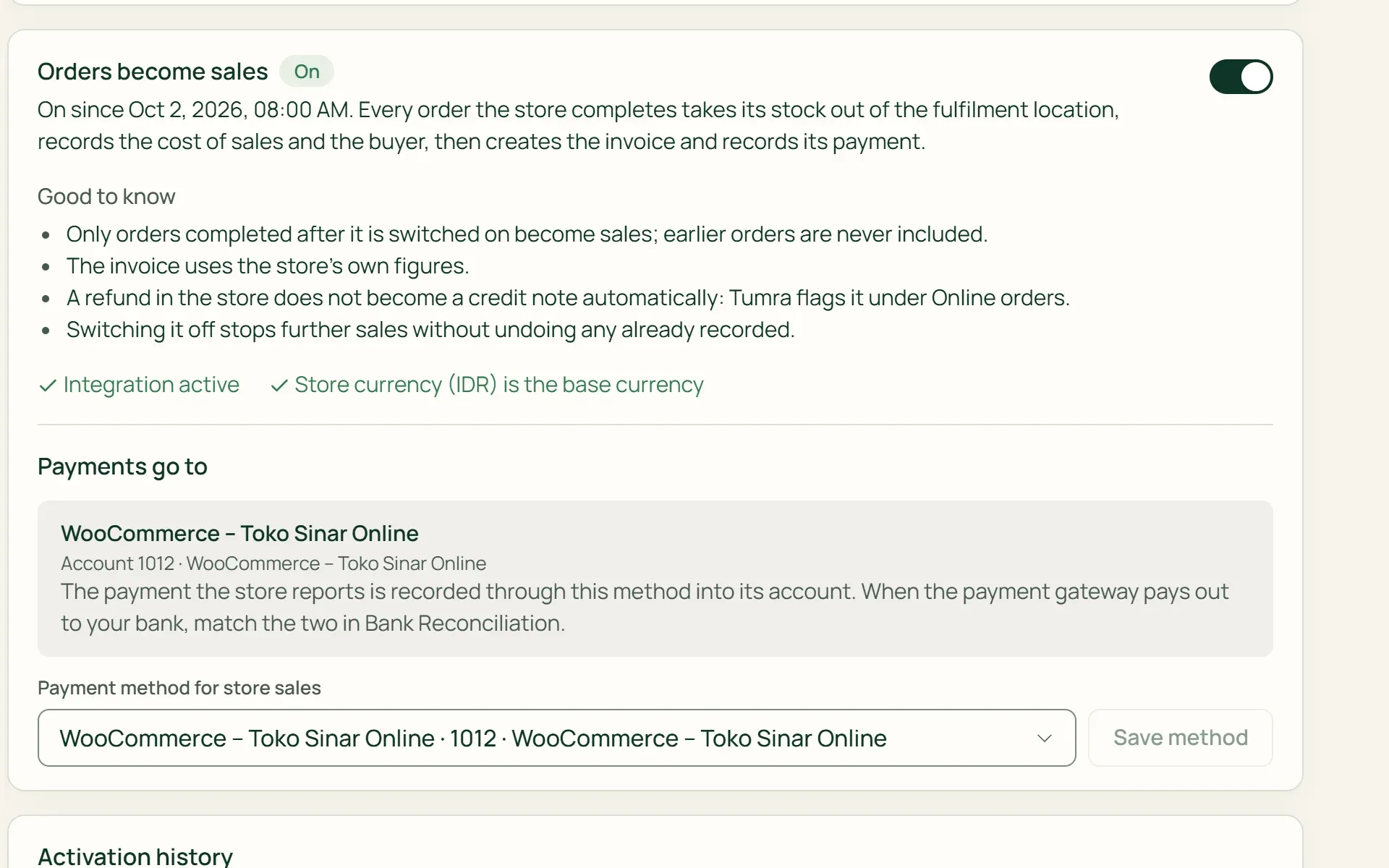
Turn on Orders become sales.
From then on, orders the store completes take stock out, record cost of goods and the buyer, then become an invoice and a payment. Orders completed before that are not included. Payments go to the store's clearing account, or to another method you choose.
- New orders only
- Payments go to
05 · Monitor
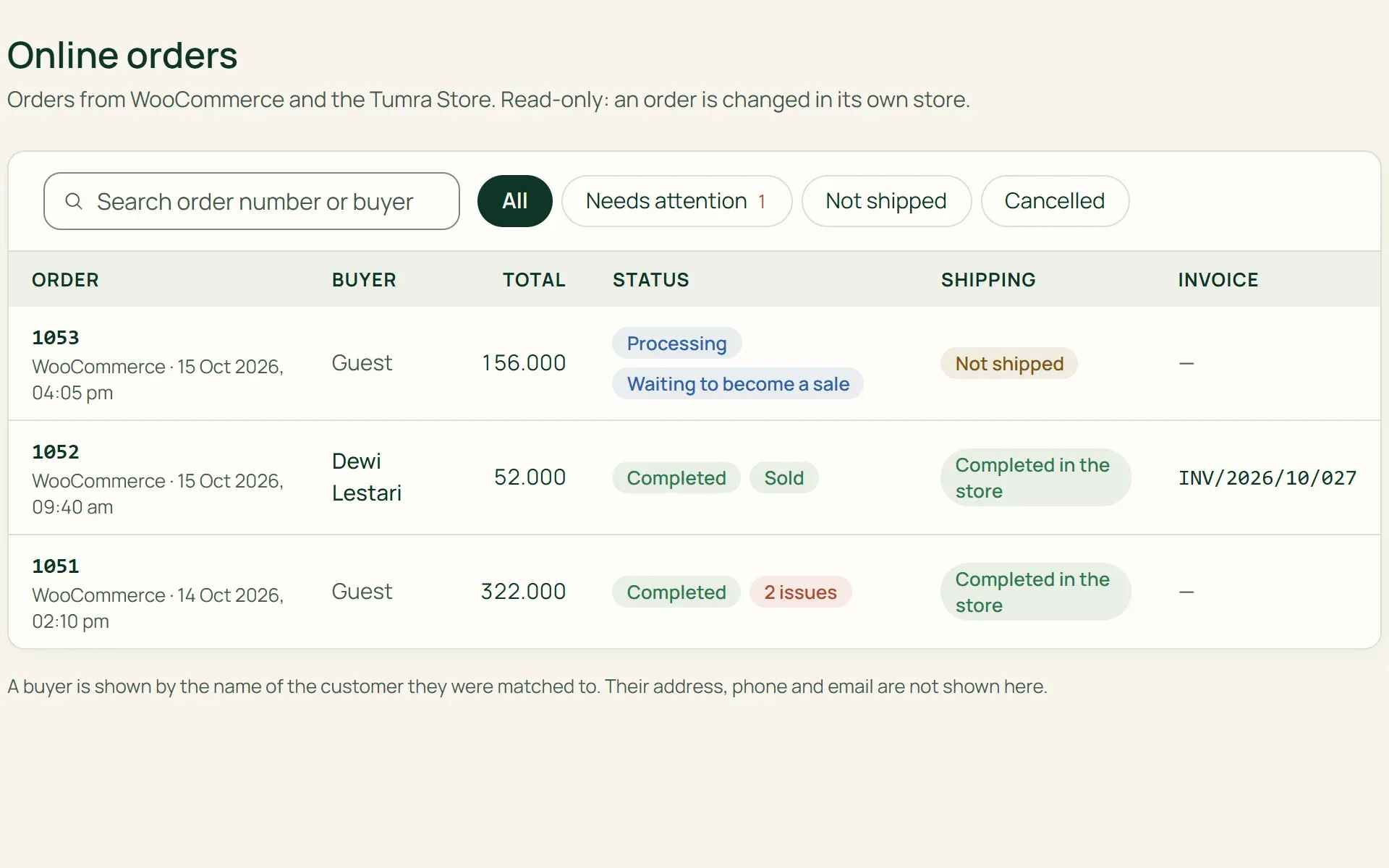
See every order under Online orders.
Each order shows its status: Sold, Waiting to become a sale, Not automatic, or Needs attention. Problems are written in plain sentences. If a sale is held up, an owner or admin presses Try again once the cause is fixed.
- Sold
- Needs attention
- Try again
What you can do
One order, every record follows.
Stock out, cost of goods recorded
Orders completed in the store take stock out of the fulfilment location. The batch closest to expiry goes first, and its cost of goods is recorded in the journal.
Invoices use the store's numbers
Coupons, Shipping, fees, and rounding go onto the invoice as they are. For a VAT-registered business with VAT-inclusive prices, VAT is split out of the total when the online store doesn't charge it.
Buyers become Customers
Buyers are matched by their store customer account, phone number, then email. If nothing matches, Tumra creates a new customer. Existing customer details are never overwritten.
Payments to a clearing account
Paid orders are recorded as paid to the account "WooCommerce – store name", or to another payment method you choose. Match them against the money that arrives in Bank Reconciliation.
Refunds flagged, not guessed
A refund in the store raises a Refund not recorded flag, with two credit note links. The flag clears itself once the credit notes cover the refund.
Stock sent to chosen listings
For listings you approve under Stock publishing, Tumra sends the available quantity to WooCommerce and overwrites the number in the store. Prices are not sent.
An online store connected to your books.
Products & stock
Orders use the products, variants, batches, and cost of goods from the Tumra catalog.
Learn more →Invoicing & billing
Every order becomes a regular invoice, corrected with a credit note like any other.
Learn more →Customers & store credit
Online store buyers join the same Customers list as buyers at the counter.
Learn more →
Plans
WooCommerce for shop plans.
Retail Pro and Bisnis Pro can connect up to 3 stores. Retail Starter does not include WooCommerce.
| Feature | FreeRp 0/moRp 0/yr | FreelancerRp 129,000/moRp 1,290,000/yr | AgencyRp 349,000/moRp 3,490,000/yr | StarterRp 179,000/moRp 1,790,000/yr | RetailRp 349,000/moRp 3,490,000/yr | BisnisRp 499,000/moRp 4,990,000/yr |
|---|---|---|---|---|---|---|
| WooCommerce connection | Not included | Not included | Not included | Not included | Included | Included |
| Number of stores | Not included | Not included | Not included | Not included | 1 (Pro: 3) | 1 (Pro: 3) |
| Read & map catalog | Not included | Not included | Not included | Not included | Included | Included |
| Orders become sales | Not included | Not included | Not included | Not included | Included | Included |
| Stock publishing to the store | Not included | Not included | Not included | Not included | Included | Included |
| Price sync | Not included | Not included | Not included | Not included | Not included | Not included |
FAQ
Common questions
What happens when an order is completed in the store?
With Orders become sales on, Tumra takes stock out of the fulfilment location and records cost of goods, matches or creates the customer, then issues an invoice with the store’s numbers. If the store reports the order as paid, the payment is recorded to the store’s clearing account. All of it shows under Online orders.
Are refunds in the store recorded automatically?
No. Tumra flags the order with Refund not recorded and prepares two credit note links: Price reduction only, or Goods returned. Returned goods go back to their location, batch, and the cost they left at. Online order invoices cannot be voided, and an order that changes after it was invoiced is only flagged, not rewritten.
Do older orders come in too?
No. Only orders completed after Orders become sales is turned on. Turning it off stops later orders without undoing those already recorded. Only orders in your base currency become sales, and the switch cannot be turned on if the store uses a different currency.
What if an order can’t be processed?
It goes to the Needs attention tab under Online orders, with the cause in a plain sentence, for example an accounting period that is locked or a store tax rate that differs from Tumra’s. Once the cause is fixed, an owner or admin presses Try again. Stock already taken out is not reversed.
Are stock, prices, and order status synced?
Stock yes, for listings you approve under Stock publishing while Orders become sales is on. Prices no: the selling price is filled in once when a product is created from the store. Tumra also doesn’t change orders in the store, so status and tracking numbers stay in WooCommerce.
Which plans can use WooCommerce?
Retail and Bisnis, 1 store each; Retail Pro and Bisnis Pro up to 3 stores. Retail Starter is not included. For now only WooCommerce is available, not Shopee, Tokopedia, or other marketplaces.
Connect your WooCommerce store.
Try every Tumra feature free for 30 days, no credit card needed.