

Projects & tasks
Keep every project moving, with nothing falling through the cracks.
Structure projects with milestones and tasks, move tasks across Kanban boards, and track timelines on a Gantt chart. Billing methods, hour estimates, file links, and team discussions stay on the same project page.
Free plan up to 15 projects. Archived projects are not counted.
Before and after
Projects managed in your head always leave something behind.
Task lists in chat groups, timelines in spreadsheets, and files scattered across folders. As multiple projects run at once, no one knows what is falling behind.
Before
4 places
- Group chatTeam · to-do lists buried in the conversation
- Schedule spreadsheetAdmin · due dates updated by hand, soon stale
- Drive folderTeam · files spread across different folders
- Meeting notesEveryone · decisions kept in their own notebook
Project
Redesain Website
Deadline 28 Nov- Tasks tracked on the Kanban12/31 tasks
- Milestones set out3 milestones
- Assets linked to tasksFigma links
- Discussion kept on the task
How it works
From a new project to approved tasks.
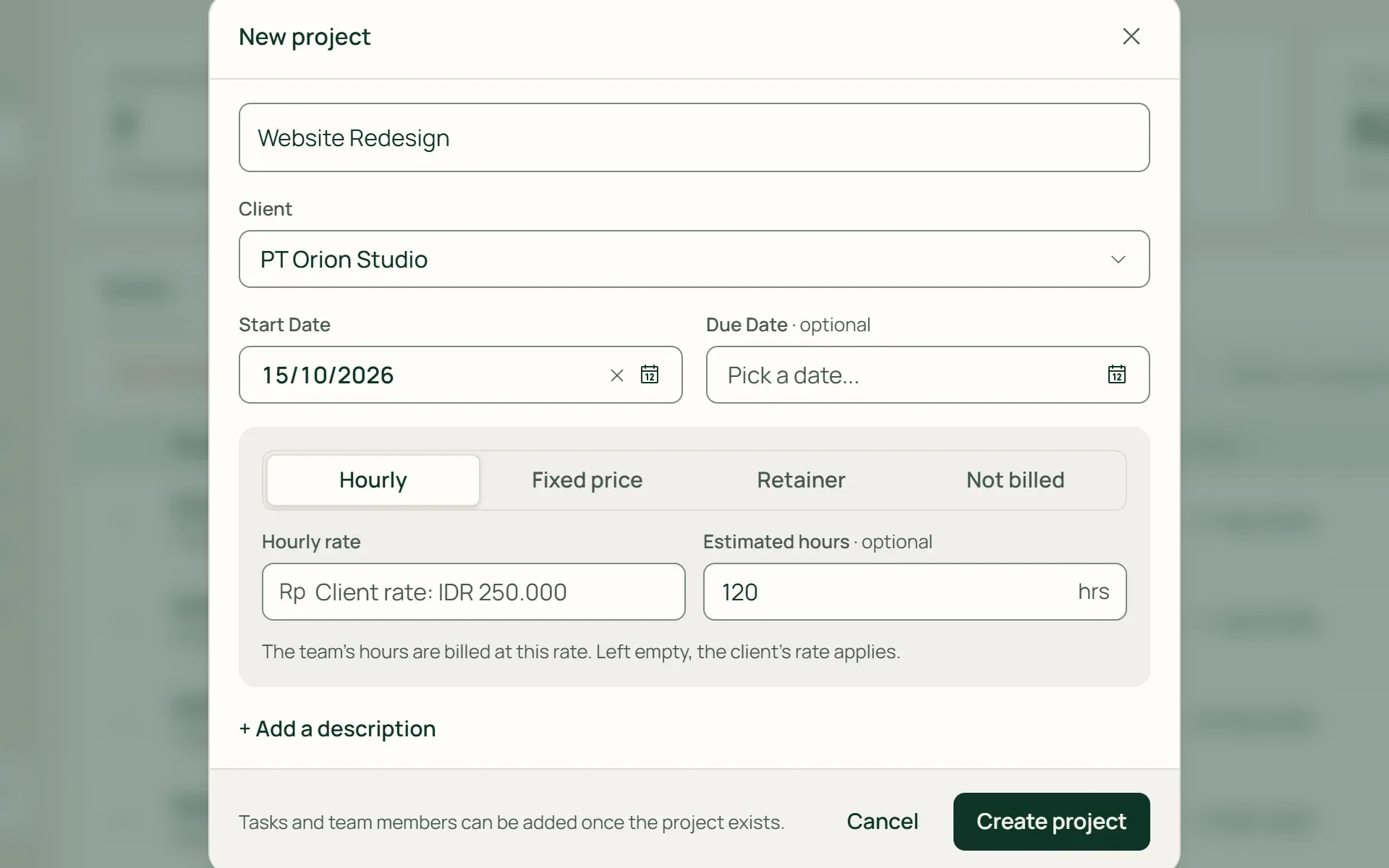
01 · Project
Set up billing from day one.
Select a client, start date, and deadline, then set the billing method. Blank hourly rates inherit from the client profile. Add agreed hour estimates, and Tumra tracks them against actual logged hours.
- Hourly
- Fixed price
- Retainer
- Non-billable
02 · Milestones
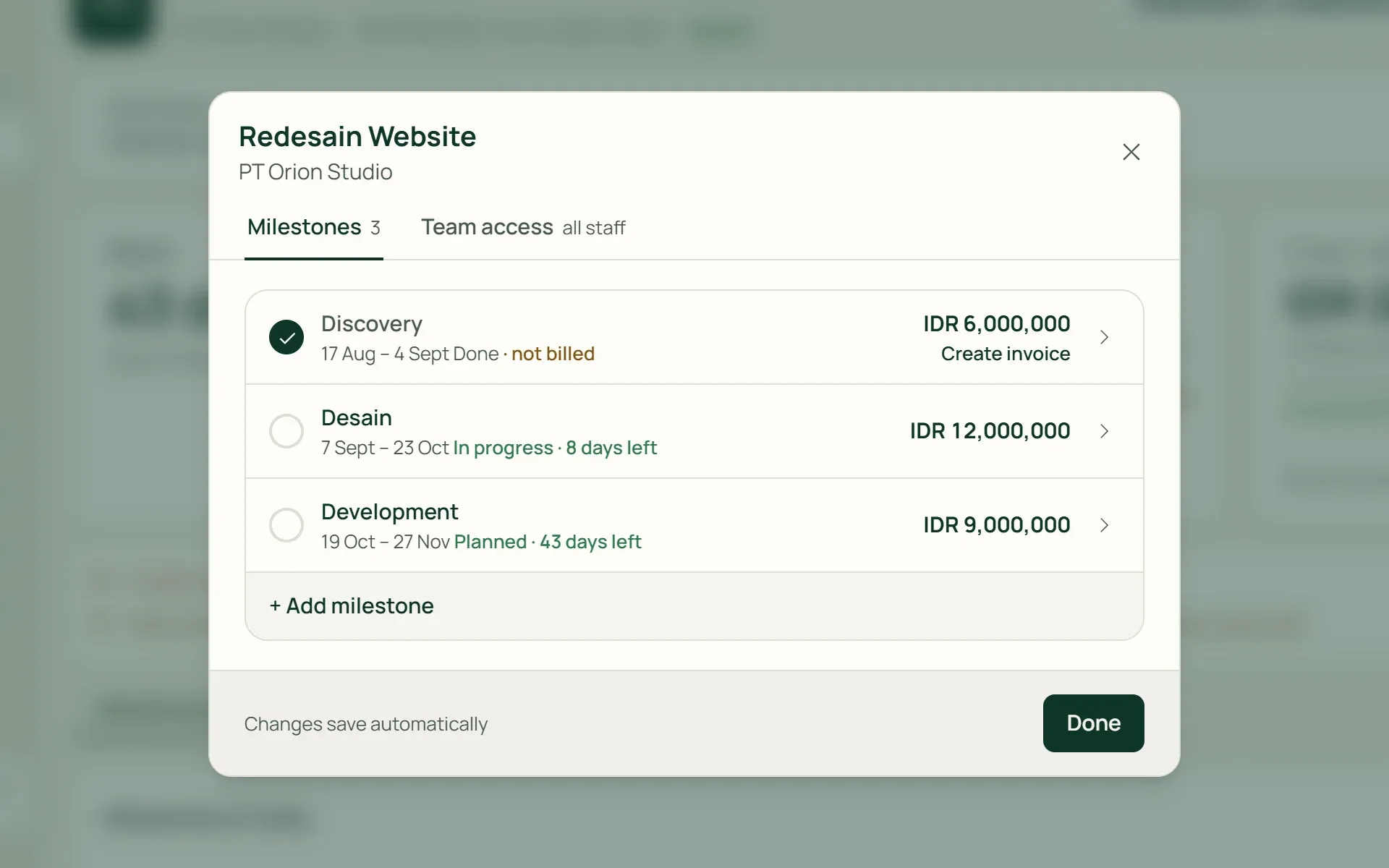
Break projects into phases.
Open Milestones & Collaboration to add milestones with their own dates and fees. Under Team Access, control whether all team members or specific individuals have access to the project.
- Milestone fees
- Team access
03 · Tasks
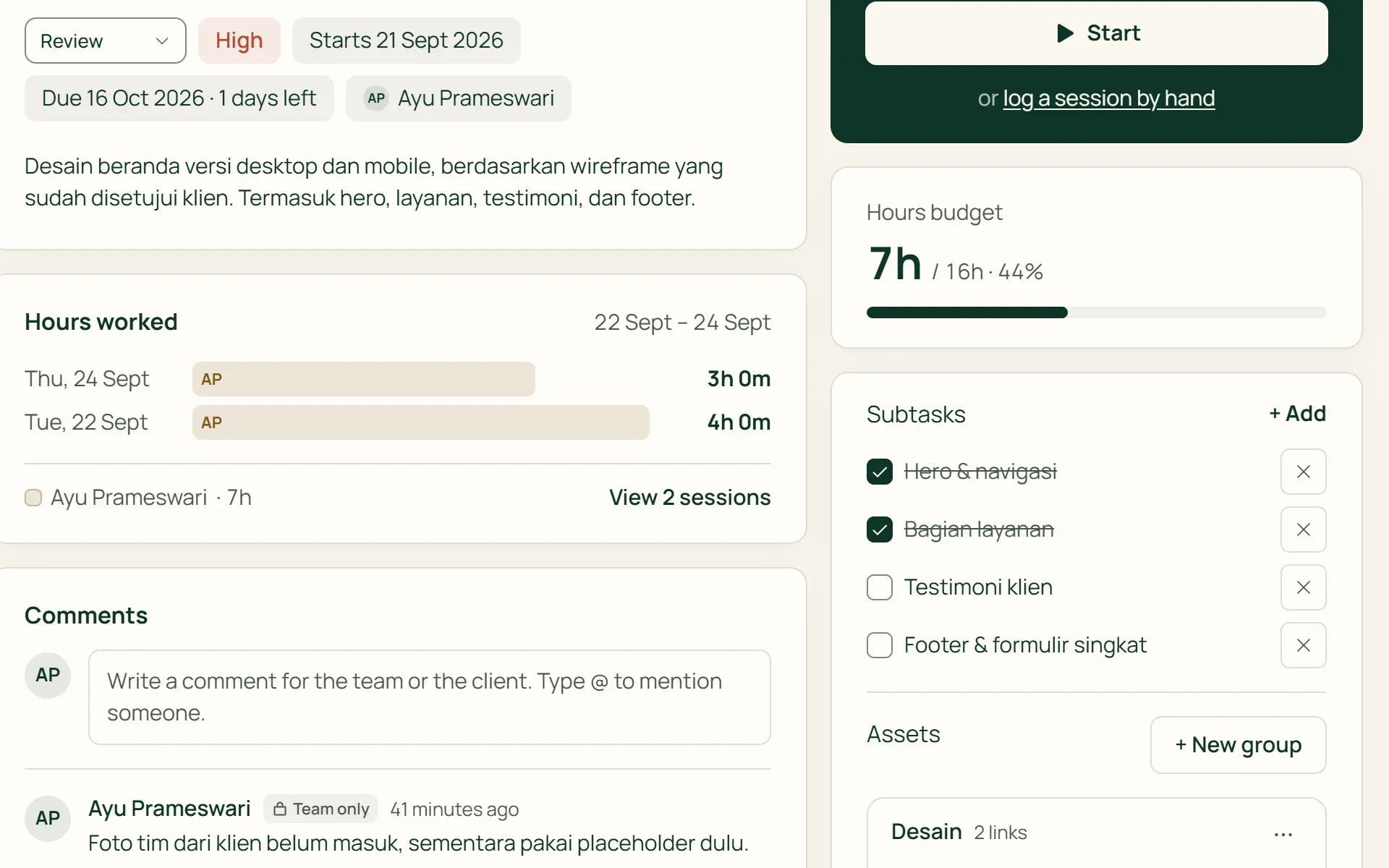
Every piece of work gets an owner and a deadline.
Tasks carry status, priority, assignee, start dates, deadlines, and hour estimates. Add subtasks as checklists, store links in Assets, and discuss details in Comments.
- Subtasks
- Priority
- Hour estimates
04 · Boards
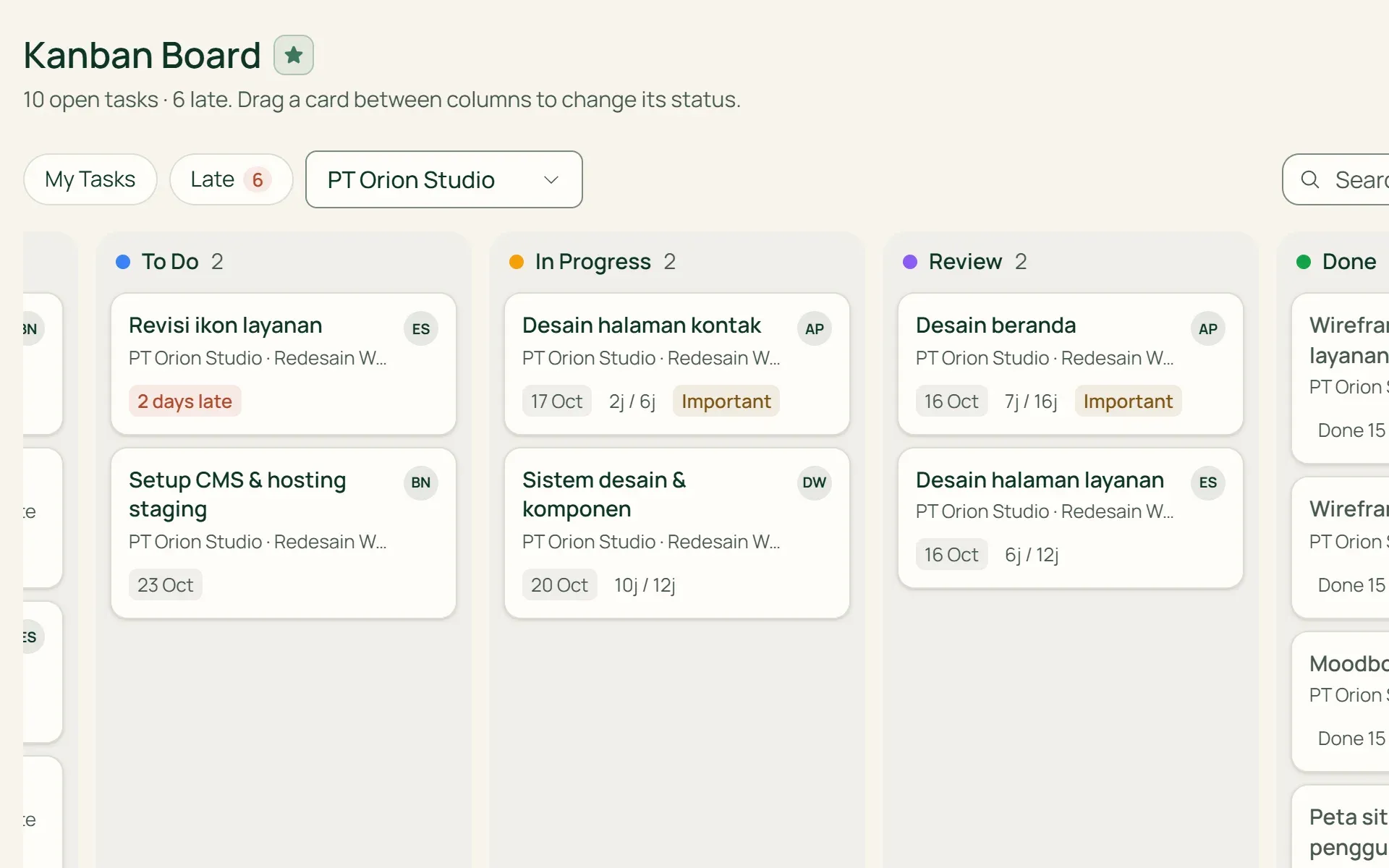
Drag tasks in Kanban, view schedules in Gantt.
Configure your own Kanban columns. Task cards display deadlines, assignees, and logged hours vs estimates. The Gantt chart arranges clients, projects, milestones, and tasks over 1, 3, or 6 months.
- Custom columns
- Gantt chart
05 · Review
Review completed tasks before closing.
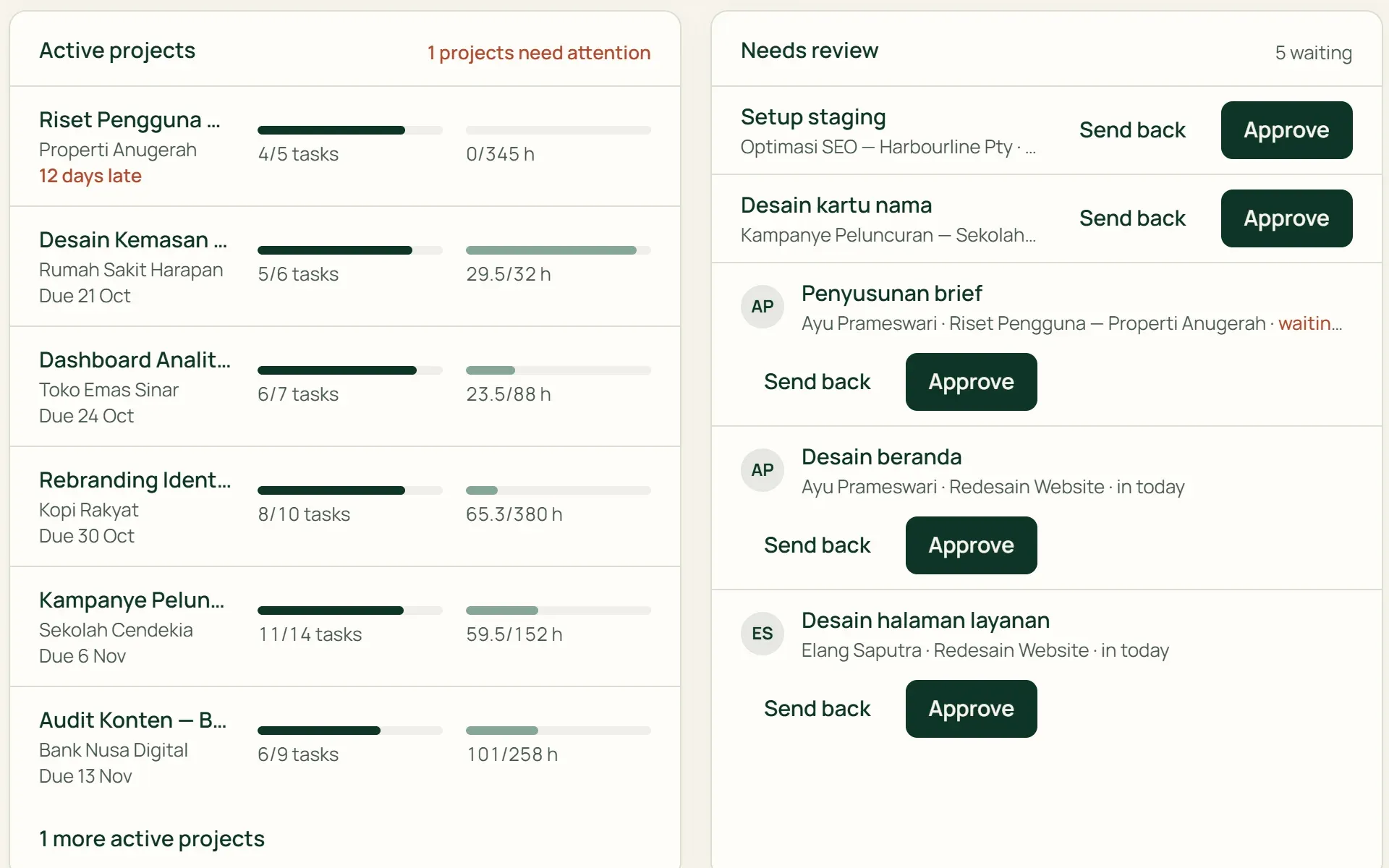
Mark a column as Needs Review. Tasks there appear on the dashboard of owners, admins, and project managers with Approve and Return buttons. Feedback is saved as internal comments.
- Approve
- Return
- Internal comments
Capabilities
From the first task to a billed project.
Four project billing models
Hourly using project or client rates. Fixed price for a lump sum. Retainers billed monthly on schedule. Non-billable for internal work.
Fees per project, milestone, or task
Project budgets can be split into milestones and tasks. The project page shows billed amounts, draft invoices, and remaining balance.
Estimates vs actual hours
Agreed hours, total task estimates, and logged hours displayed side by side. Tumra notifies you when logged hours exceed estimates.
Clear, organized task lists
Tasks grouped by overdue, next 7 days, upcoming, and unscheduled. Unassigned or undated tasks are flagged for cleanup.
Bulk actions for up to 200 tasks
Assign, change status or priority, move between milestones, or mark as billed across multiple tasks at once.
Team permissions per project
Team members without access cannot see the project in lists, Kanban, Gantt, or timer selectors. Fees and rates are only visible to finance roles.
Organized projects are easier to bill.
Time tracking
Start timers from any task. Hours accumulate on the project ready to pull into invoices.
Learn more →Invoicing & billing
Bill hours, project fees, milestones, and tasks directly from project data without retyping.
Learn more →Client portal
Clients view their projects, tasks, and schedules directly on a Gantt chart.
Learn more →
Plans
Projects and tasks in every plan.
Retail Starter and Retail plans are designed for retail businesses and do not include projects and tasks.
| Feature | FreeRp 0/moRp 0/yr | FreelancerRp 129,000/moRp 1,290,000/yr | AgencyRp 349,000/moRp 3,490,000/yr | StarterRp 179,000/moRp 1,790,000/yr | RetailRp 349,000/moRp 3,490,000/yr | Business |
|---|---|---|---|---|---|---|
| Projects, milestones & tasks | Included | Included | Included | Not included | Not included | Included |
| Project limit | 15 | Unlimited | Unlimited | Not included | Not included | Unlimited |
| Kanban & Gantt charts | Included | Included | Included | Not included | Not included | Included |
| Assets & comments | Included | Included | Included | Not included | Not included | Included |
| Users | 1 | 1–3 | 3 (Pro: 8) | Not included | Not included | 4 (Pro: 8) |
| Client portal access | Not included | Not included | Included | Not included | Not included | Included |
FAQ
Frequently asked questions
What’s the difference between a milestone and a task?
A task is a single piece of work with an assignee, an hour estimate, a deadline and a Kanban column, and time is always logged against a task. A milestone groups several tasks within a project and has its own deadline, status and an optional fee you can bill. You add milestones from Milestones & Collaboration on the project page.
Is there a limit on the number of projects?
The Free plan includes up to 15 active projects and 3 clients. Archived projects do not count toward the limit. Freelancer, Agency, and Business plans have unlimited projects.
Can files be uploaded directly to projects?
Not yet. Project and task assets are links (such as to Figma or Google Drive) grouped into categories. Comments can also include asset links.
Can Gantt charts be dragged with dependencies?
Not yet. The Gantt chart provides a timeline view across 1, 3, or 6 months. Dates are adjusted from task or milestone edit modals. Task dependencies and recurring projects are planned for upcoming updates.
Can all team members see every project and its budget?
Owners, admins, project managers, and finance roles see all projects. Staff members only see projects open to all staff or assigned directly to them. Fees, rates, and project values are restricted to finance roles.
Can clients see project progress?
Yes, on Agency and Business plans. Contacts invited to the client portal can see their projects, tasks, and schedules on Gantt charts. Internal-only notes and hidden tasks remain private to your team.
Move your next project to Tumra.
Try all Tumra features free for 30 days, no credit card required.