

Financial reports
Financial reports without waiting for month end.
Every invoice, payment, and expense goes into the journal straight away, so Profit & Loss, Balance Sheet, and Cash Flow are always up to date. Compare with the previous period, trace the numbers back to the source document, then export to Excel or print as PDF.
Available on all paid plans.
Before and after
Reports put together by hand are always a month late.
Bank transactions are downloaded, invoices copied into a spreadsheet, then the numbers matched one by one. By the time the report is done, the decision that needed those numbers has already passed.
Before
4 manual steps
- Download bank transactionsFinance · downloaded from internet banking
- Invoice summaryAdmin · invoices copied into a spreadsheet
- Profit spreadsheetFinance · revenue and expenses added up again
- Match by handFinance · numbers matched one by one
- Profit & Loss readyvs previous period
- Balance Sheet builtBalance check
- Cash Flow grouped30-day projection
- Late receivables visible> 90 days
How it works
From the summary down to the original transaction.
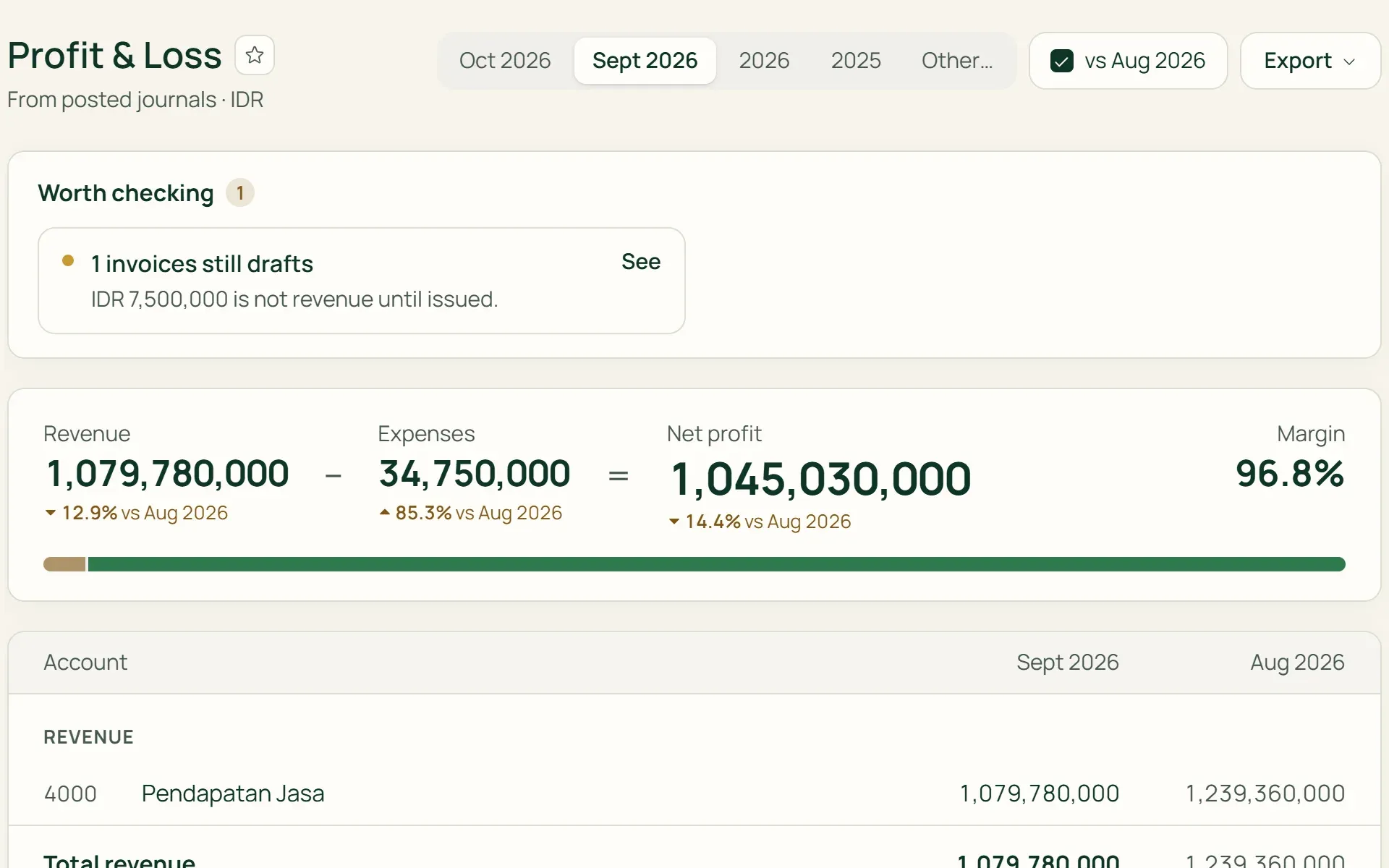
01 · Profit & Loss
Pick a period and see the result.
Monthly, yearly, or your own date range. Revenue less expenses gives net profit, with the margin and the change from the previous period. When there is cost of sales, gross profit is shown separately.
- Monthly
- Yearly
- Custom range
- vs previous period
02 · Balance Sheet
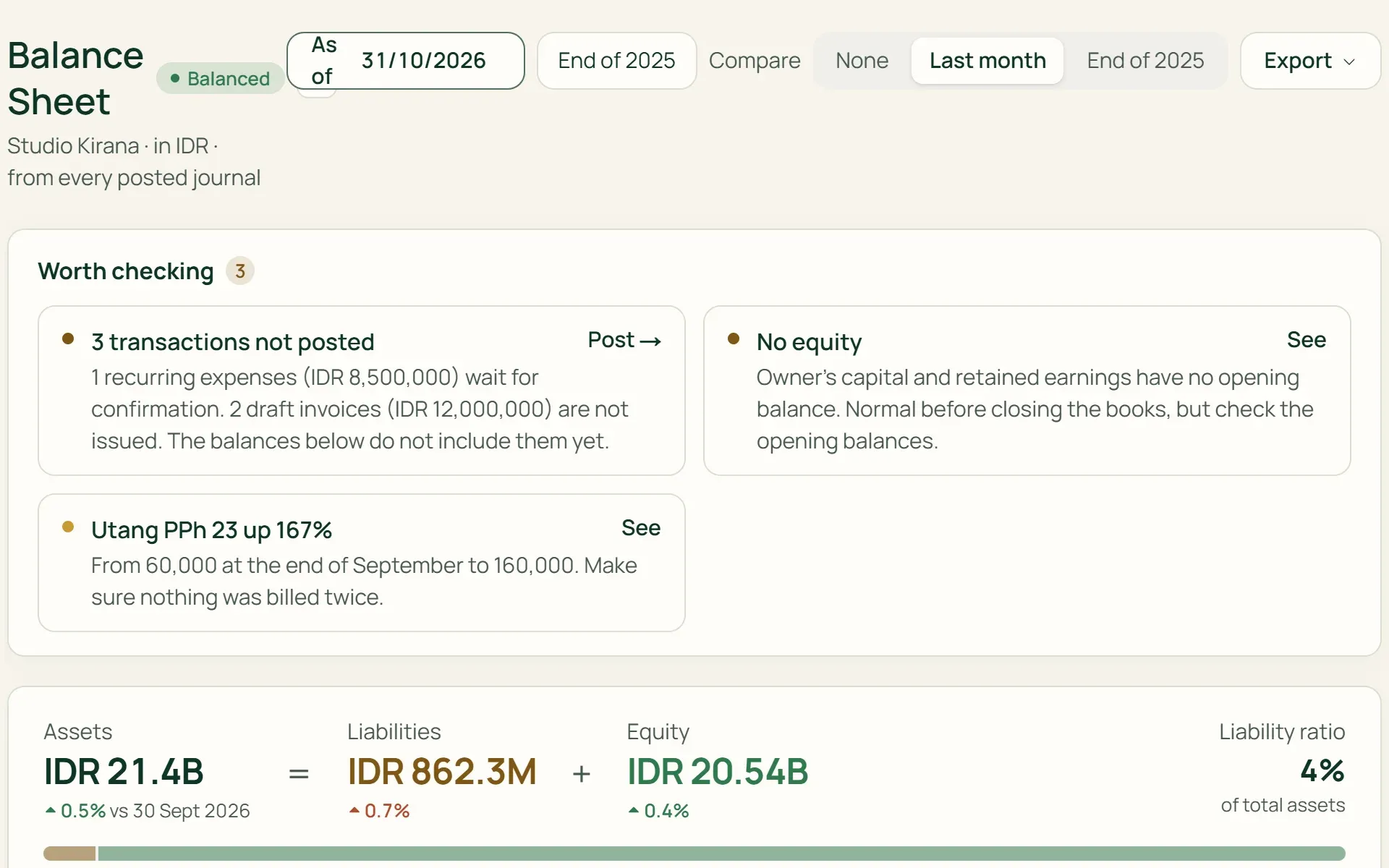
Where the business stands on one date.
Assets, liabilities, and equity as of the date you choose, compared with last month or the end of last year if you like. The ratio of liabilities to assets is shown at the top, and Tumra flags it if the balance sheet doesn't balance.
- Compare with last month
- Liabilities ratio
- Balance check
03 · Cash Flow
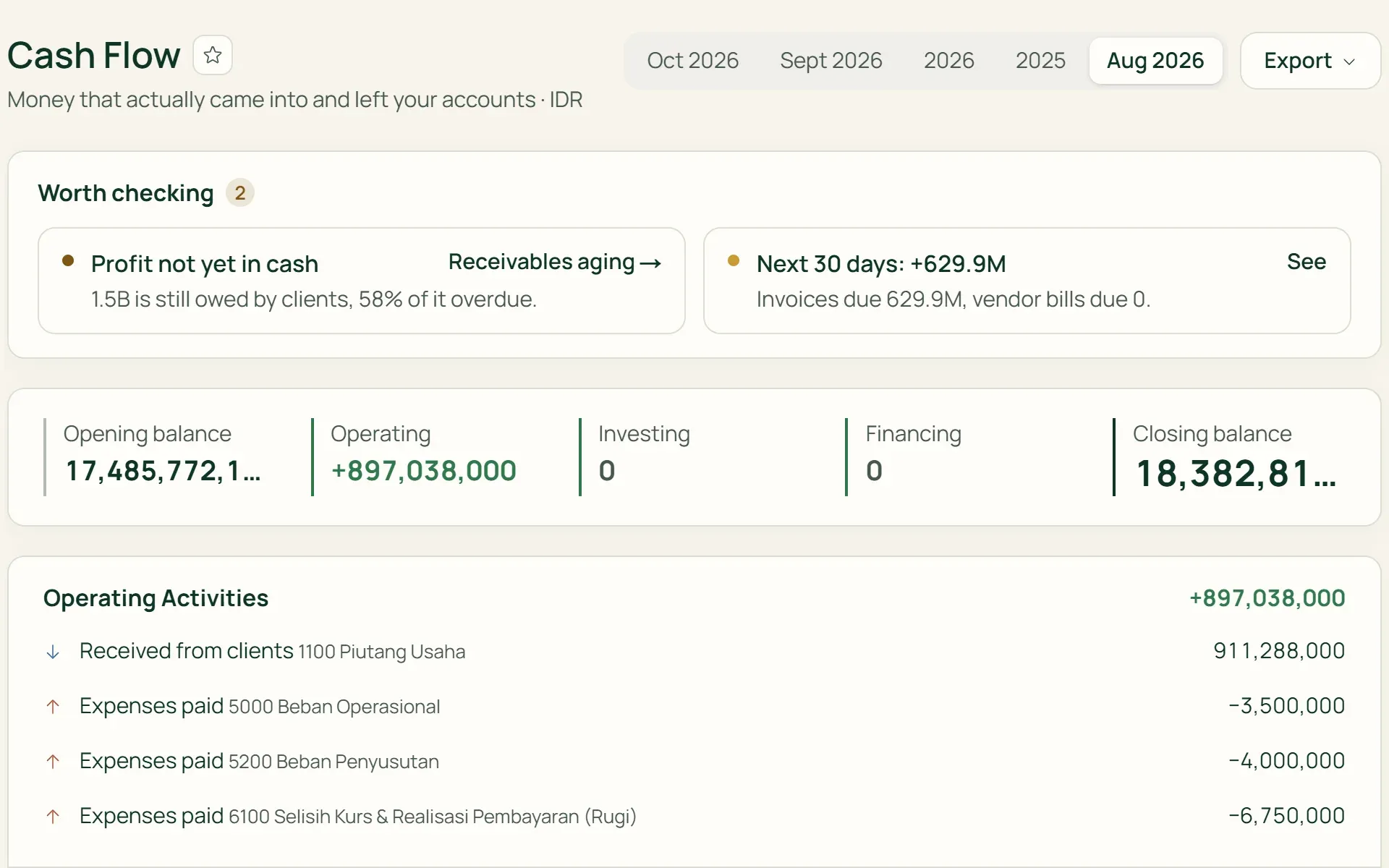
Where money came from, and where it went.
Money that actually came into and left your accounts, grouped into operating, investing, and financing activities. The closing balance of each account is shown too, along with a 30-day projection from invoices and vendor bills coming due.
- Operating
- Investing
- Financing
- 30-day projection
04 · Receivables
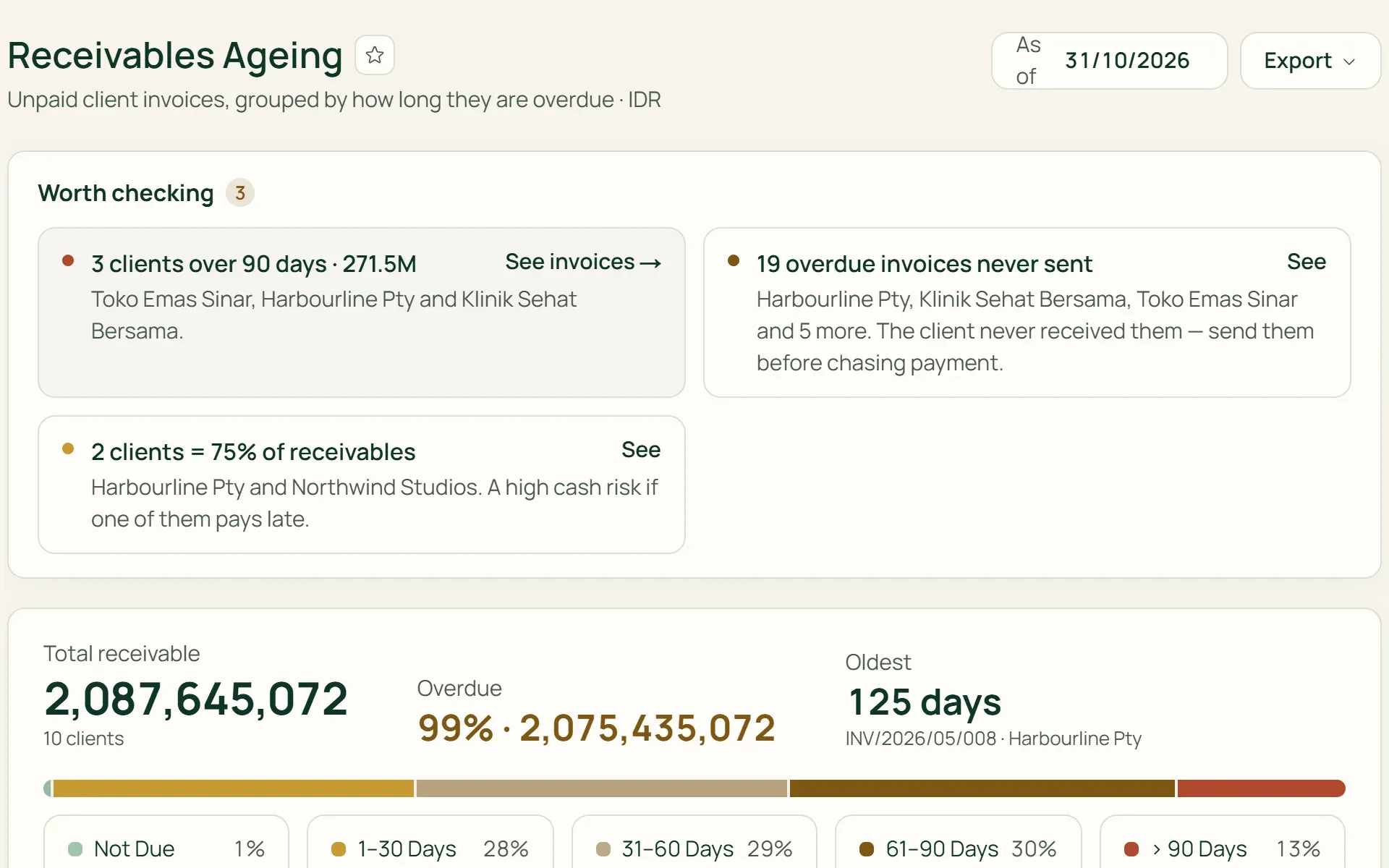
Who's late, and by how long.
Receivables Ageing groups unpaid invoices by client: not yet due, 1–30, 31–60, 61–90, and over 90 days. Payables Ageing does the same for vendor bills.
- By client
- By vendor
- > 90 days
05 · Drill down
Every number can be clicked.
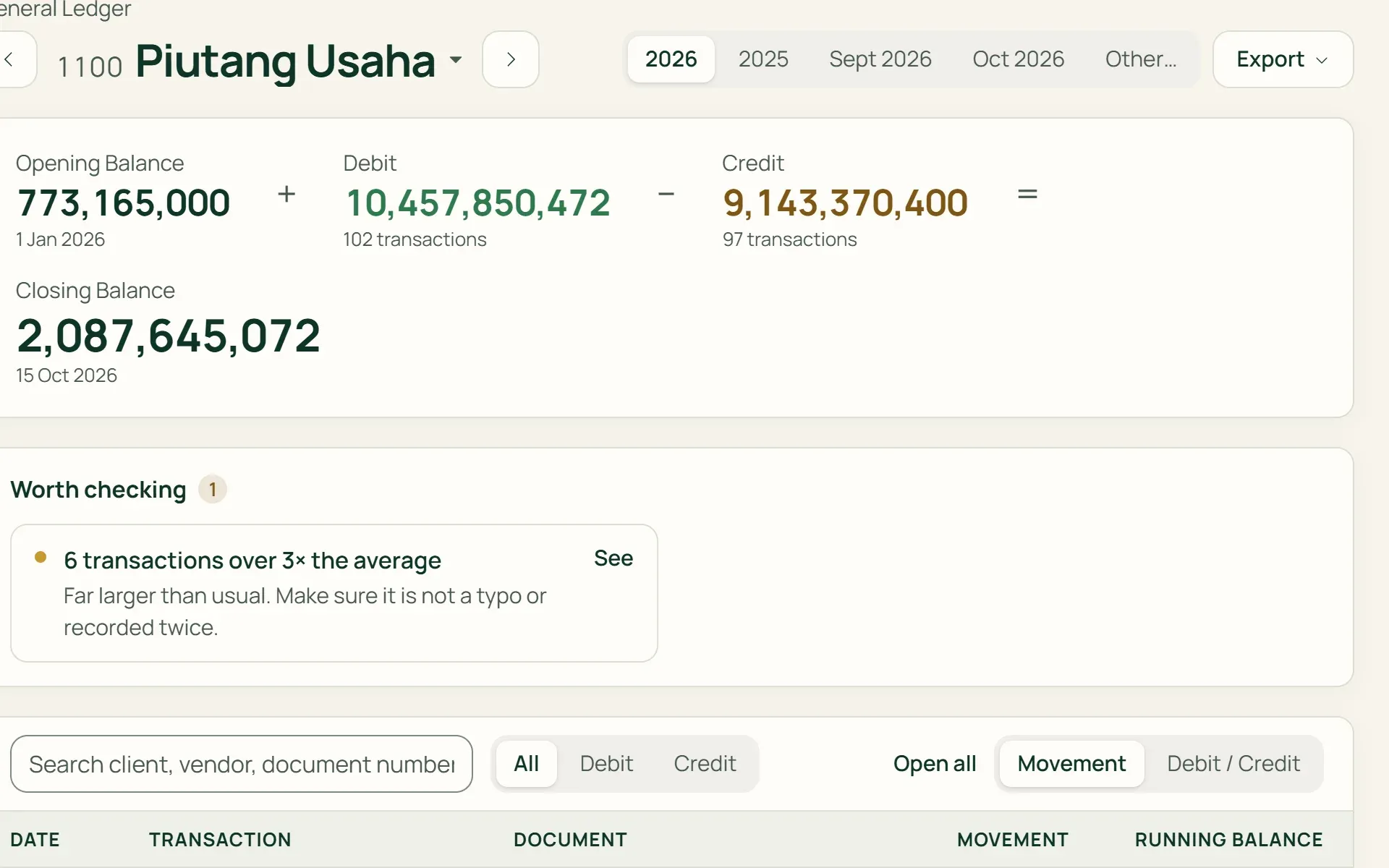
Click an account in Profit & Loss, Balance Sheet, or Trial Balance to open its General Ledger: the opening balance, every transaction with a running balance, and links to the original invoice, payment, or expense.
- General Ledger
- Running balance
- Source document
What you can do
How the business is doing, readable any time.
"Worth checking" notes
Above each report, Tumra flags what throws the numbers off: recurring expenses not yet posted, invoices still in draft, debits and credits that don't match, or clients more than 90 days overdue.
Trial Balance
Total debits and credits for every account up to a given date, as closing balances or total movements. Accounts with a zero balance can be hidden.
Finance tab on the dashboard
Cash and bank balances, receivables, payments received, net profit, and monthly cash flow, calculated on the same basis as the Profit & Loss report.
Export and print
Every report can be downloaded to Excel. Profit & Loss, Balance Sheet, Cash Flow, Receivables Ageing, and Payables Ageing can also be printed or saved as PDF.
One base currency
Foreign currency invoices and expenses enter the reports at the rate on the transaction date, so the numbers don't shift with today's rate.
Only for the right people
Reports are open to the Owner, Admin, and Finance roles. Project managers can be given finance access one at a time.
For shops and wholesalers
Shop Reports for what sold and what's left.
On the Retail Starter, Retail, and Bisnis plans, the Reports menu includes Shop Reports: net sales by channel, margin, inventory, purchasing, and wholesale (from Retail). Everything is calculated from the same transactions as the books, not from a separate copy.
- Sales by channelCashier (POS), direct invoices, and wholesale are kept apart, with top products and customers and a summary of cashier shifts.
- Inventory and slow moversStock value by location, expiry, inventory turnover, and goods that haven't sold for a long time.
- Purchasing and wholesalePurchase orders not yet received, purchase price changes, wholesale orders not yet delivered, and delivered goods not yet invoiced.
One set of books, many ways to read it.
Accounting
The journals and chart of accounts behind every number in the reports.
Learn more →Invoices & billing
An issued invoice shows up as revenue and a receivable in the reports straight away.
Learn more →Tax
VAT and PPh 23 (withholding tax) positions for each tax period, from the same books.
Learn more →
Plans
Reports on every plan.
On the Free plan, journals are still recorded, and the reports open as soon as you move to a paid plan.
| Feature | FreeRp 0/moRp 0/yr | FreelancerRp 129,000/moRp 1,290,000/yr | AgencyRp 349,000/moRp 3,490,000/yr | StarterRp 179,000/moRp 1,790,000/yr | RetailRp 349,000/moRp 3,490,000/yr | BisnisRp 499,000/moRp 4,990,000/yr |
|---|---|---|---|---|---|---|
| Profit & Loss, Balance Sheet, Cash Flow | Not included | Included | Included | Included | Included | Included |
| Trial Balance & General Ledger | Not included | Included | Included | Included | Included | Included |
| Receivables & Payables Ageing | Not included | Included | Included | Included | Included | Included |
| Finance tab on the dashboard | This year | Included | Included | Included | Included | Included |
| Excel export & PDF printing | Not included | Included | Included | Included | Included | Included |
| Shop Reports | Not included | Not included | Not included | Included | Included | Included |
Retail Free: financial reports as on Free. Shop Reports open for today through last month, without export.
FAQ
Common questions
Are reports updated automatically?
Yes. Reports are read straight from posted journals, so new transactions show up right away. Draft invoices and recurring expenses not yet confirmed aren’t included yet, and Tumra lists them under “Worth checking” so profit doesn’t look higher than it really is.
Are reports included on the Free plan?
Financial reports aren’t. On Free and Retail Free, invoices, payments, expenses and till sales are still recorded in the journal. Their figures show on the dashboard: the Finance tab on Free, the shop dashboard on Retail Free. Retail Free can also open Shop Reports up to last month. Profit & loss, balance sheet, cash flow and the other accounting reports start on Freelancer or Retail Starter, and once you change plans they include your earlier data straight away.
Can my accountant use these reports?
Yes. Every report can be exported to Excel. On every paid plan, you can also invite your accountant as a team member with the Finance role, so they can open reports and journals directly in Tumra.
What about invoices in dollars?
All reports are prepared in your business’s base currency. Foreign currency invoices and payments are recorded at the rate on the transaction date, and exchange differences go to their own account, so last month’s numbers don’t change when the rate moves.
Is there a profit-by-project report or budgeting?
Not yet. Tumra doesn’t have profit-by-project reports, budgets, or cost centres yet. Yearly mode always uses the calendar year, January to December. Printed and PDF reports are always in Indonesian.
How much data can be exported?
One Excel file holds up to 20,000 rows, and each person can export up to 10 times a minute. The General Ledger shows 200 transactions per page, while its opening and closing balances are still calculated from every transaction in the range.
See this month's profit, today.
Try every Tumra feature free for 30 days, no credit card needed.