

Agenda
What falls due this week, in one agenda.
Task and milestone deadlines, invoices falling due, contact follow-ups, and money in, all in one place. View them as a list, a week, or a month, then click to open the source straight away.
On every plan, including Free.
Before and after
Scattered deadlines are easy to miss.
Deadlines on the task board, invoice due dates in the receivables book, calls in your phone calendar, and supplier bills in a folder. To know what this week needs, you open four places.
Before
4 places
- Task boardTeam · deadlines only visible on the board
- Receivables bookFinance · due dates checked by hand
- Phone calendarEveryone · calls kept on their own phone
- Supplier bills folderAdmin · supplier bills tucked away in a folder
- Task deadlines gatheredToday
- Invoice due dates shownIDR 12,210,000
- Follow-ups scheduledTomorrow
- Money in recordedIDR 8,000,000
How it works
Open it once in the morning, know what's urgent.
01 · List
Starting today, 30 days ahead.
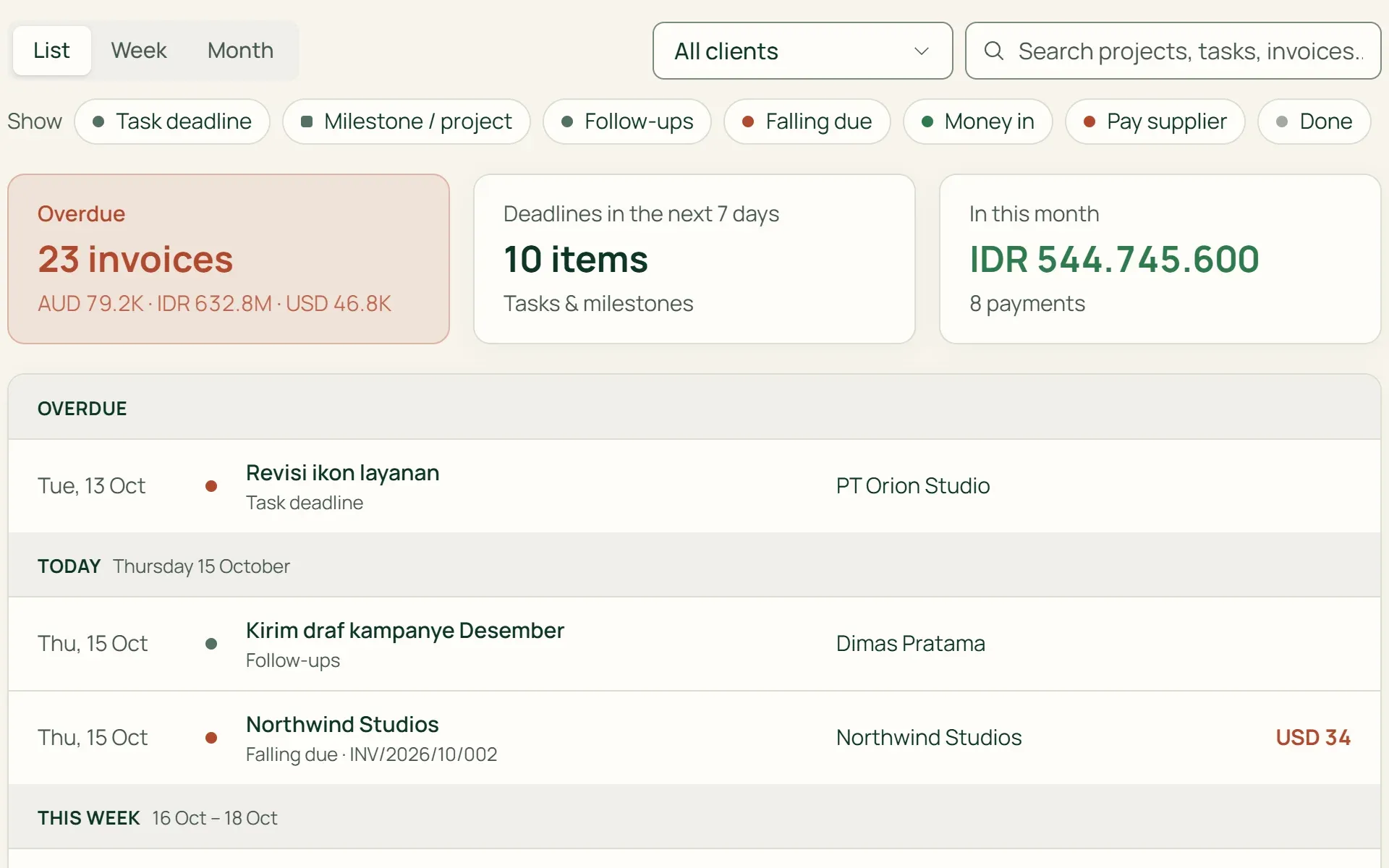
Agenda opens as a list grouped into Today, This week, Next week, and Later. Above it are three figures: overdue invoices, deadlines in the next 7 days, and money in this month.
- Overdue
- 7-day deadlines
- In this month
02 · Month
A full month, one day in detail.
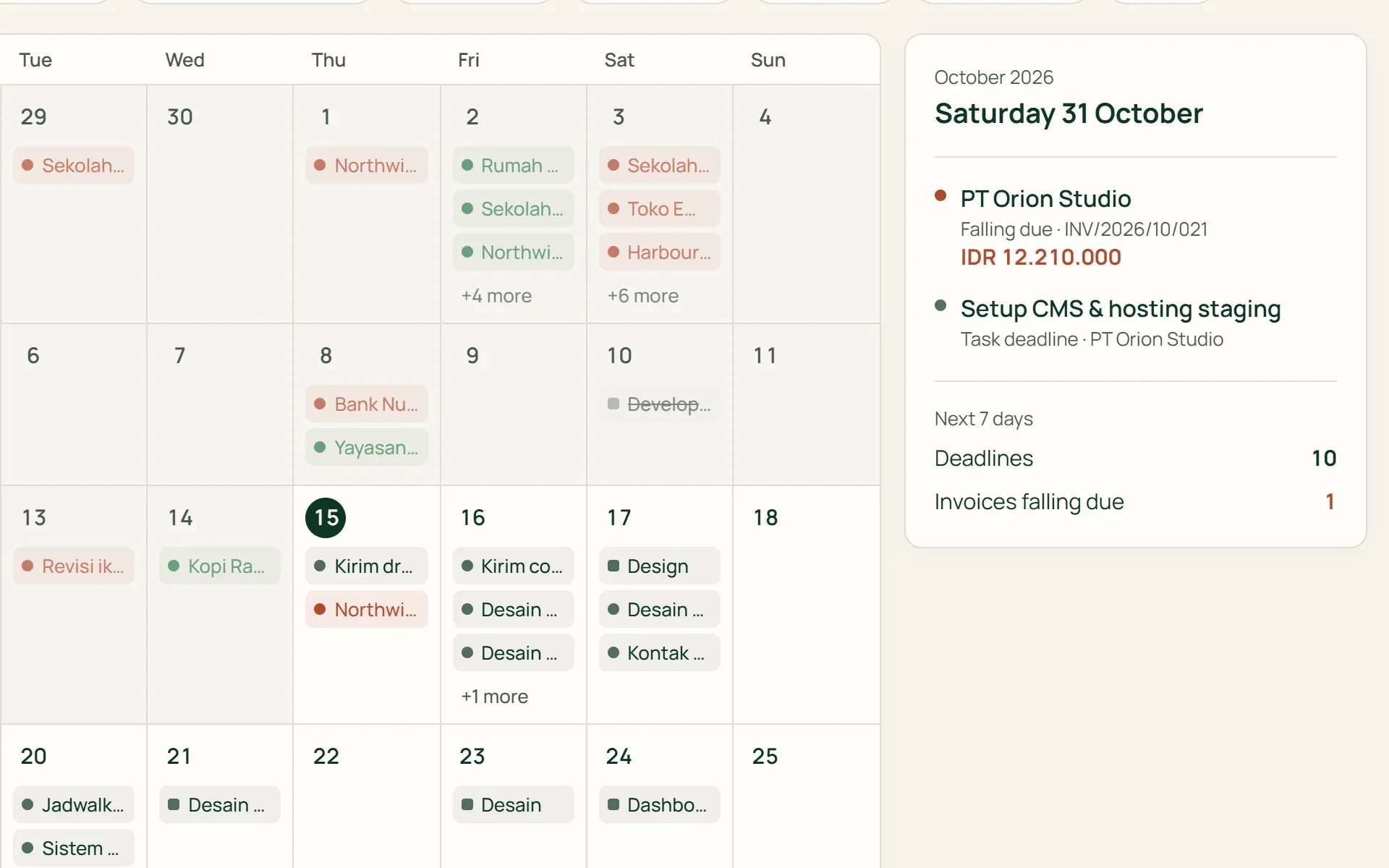
The monthly calendar starts on Monday. Each day shows three items, with the rest under "+N more". Click a day and everything on it appears in a side panel, with amounts and document numbers.
- Starts Monday
- Day panel
- Document numbers
03 · Filter
Show only what you need.
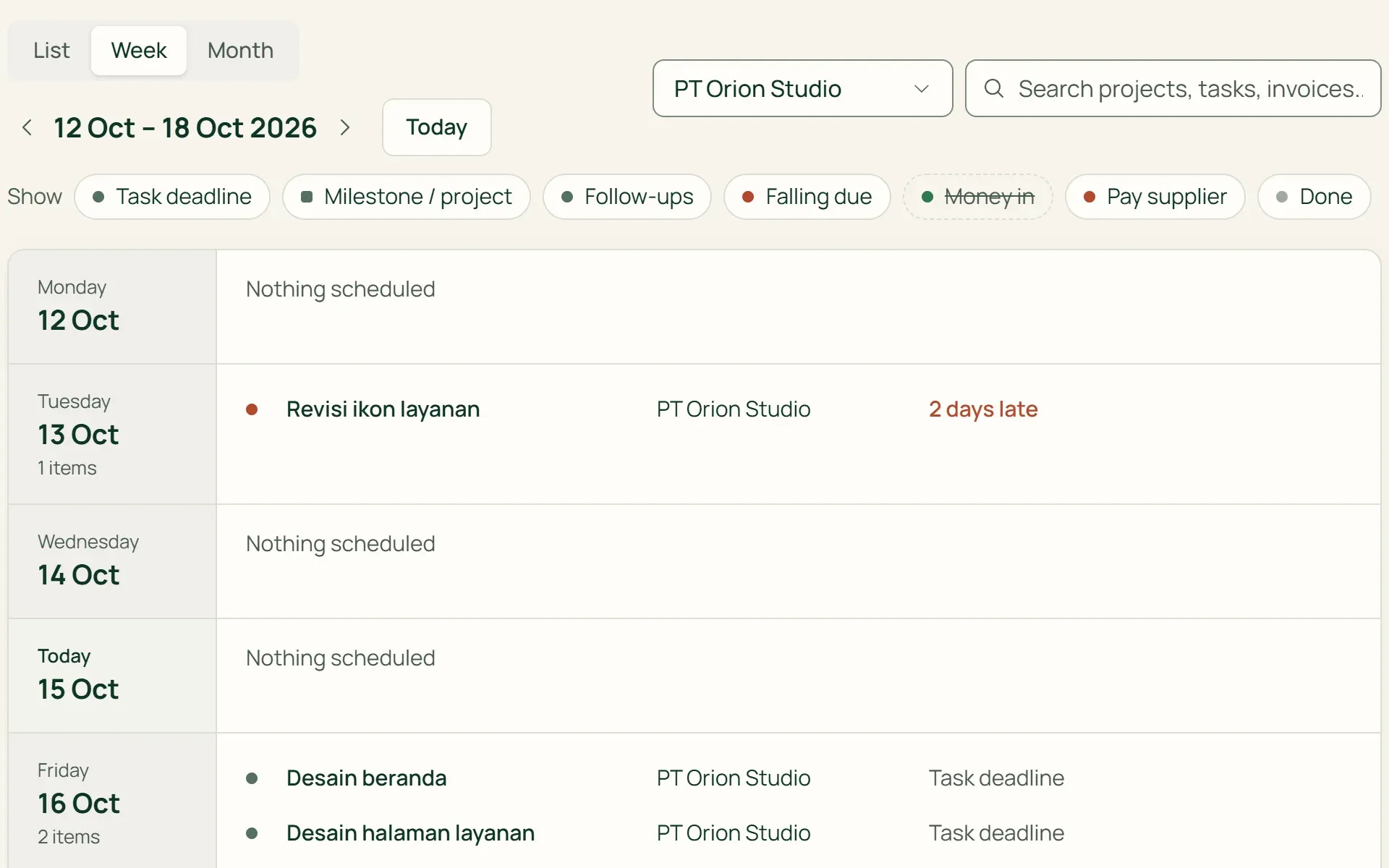
The colour key doubles as a filter: click "Money in" or "Done" to hide them. Pick one client, or search projects, tasks, and invoices. The Week view shows every item on each day, nothing cut off.
- By type
- By client
- Search
04 · Roles
Everyone sees their own part.
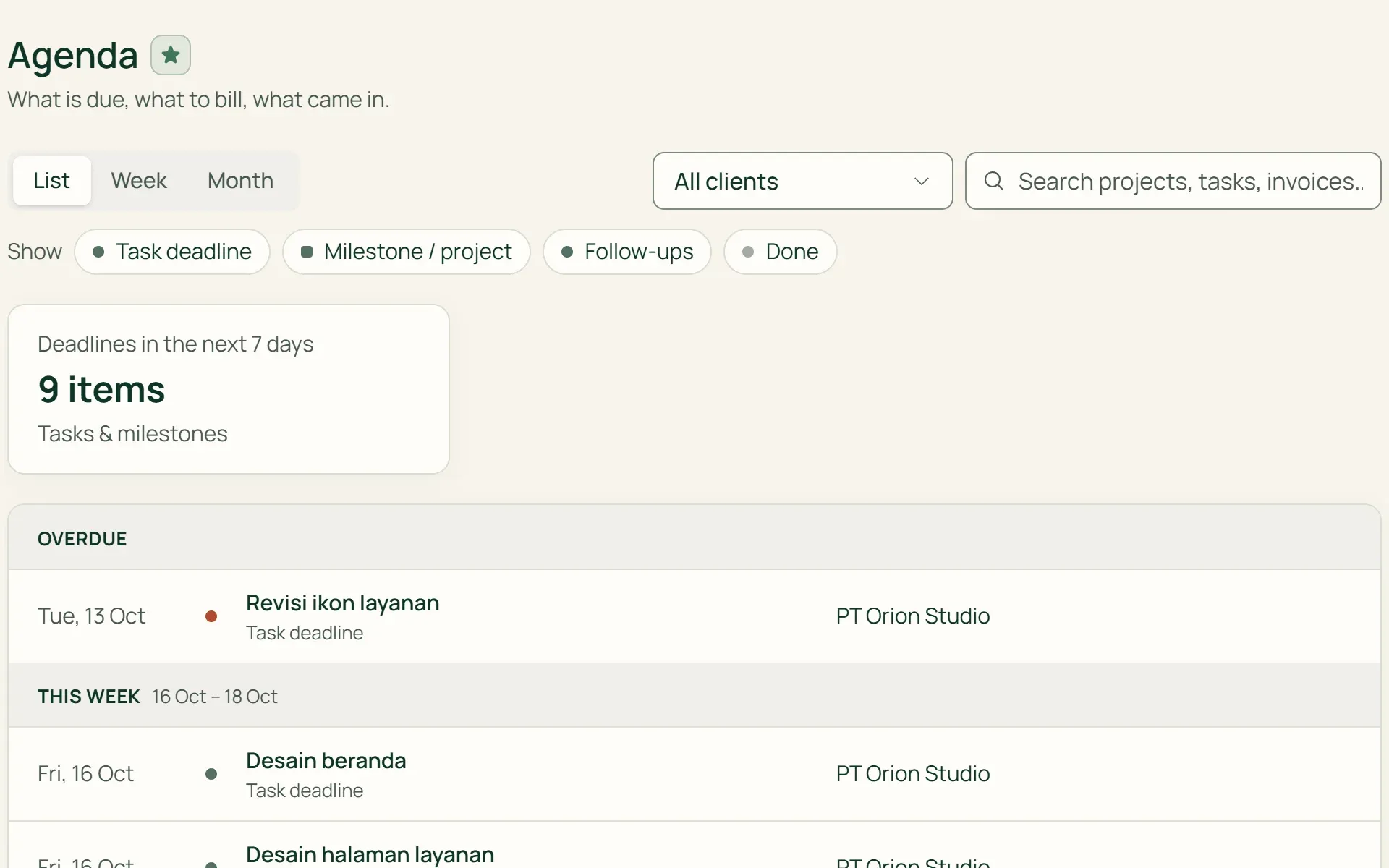
Staff see deadlines on projects shared with them and their own follow-ups. Due dates, money in, and supplier bills only appear for roles with finance access. Cashiers see sales from their own shift.
- Staff
- Finance
- Cashier
What you can do
One place for every deadline.
Only what needs action
Agenda reads due dates, not creation dates. Importing 150 tasks won't flood a single day. Anything past its date and not done is marked red.
Overdue receivables
The "Overdue" card counts every open invoice that is late, split by currency. Invoices show their outstanding balance and disappear once paid.
Contact follow-ups
Follow-ups you schedule from a contact's page appear on their date, including those from the "Remind me" button.
Money in
Payments received appear on their date. Sales on credit settled later still show on the day they're paid off.
Click straight to the source
Each item opens the task, project, invoice, contact, or purchase page it belongs to. The current month also appears in a small calendar on the dashboard.
Money figures by role
Owners, admins, and finance see due dates and money in. Staff only see work on projects shared with them.
For shops
The shop's day in numbers: counter, suppliers, expiry.
On the Retail Starter, Retail, and Bisnis plans, Agenda also shows counter sales by shift, supplier bills falling due, and batches about to expire. Sales don't appear one by one, so 40 transactions a day still make one line.
- Counter sales by shiftOne line per shift: the cashier's name, opening and closing times, number of sales, and the total.
- Pay supplierUnpaid goods receipts appear on their due date, with the balance still to pay.
- ExpiringBatches still in stock appear on their expiry date, with the quantity and batch code.
Agenda reads what you've already recorded.
Projects & tasks
Task, milestone, and project deadlines enter Agenda as soon as their date is set.
Learn more →Invoices & billing
Open invoices appear on their due date, with the outstanding balance.
Learn more →Client portal
Clients have their own Agenda in the portal, with their project deadlines and invoices.
Learn more →
Plans
Agenda on every plan.
Money figures are only visible to roles with finance access.
| Feature | FreeRp 0/moRp 0/yr | FreelancerRp 129,000/moRp 1,290,000/yr | AgencyRp 349,000/moRp 3,490,000/yr | StarterRp 179,000/moRp 1,790,000/yr | RetailRp 349,000/moRp 3,490,000/yr | BisnisRp 499,000/moRp 4,990,000/yr |
|---|---|---|---|---|---|---|
| List, Week, Month | Included | Included | Included | Included | Included | Included |
| Task & milestone deadlines | Included | Included | Included | Not included | Not included | Included |
| Contact follow-ups | Included | Included | Included | Included | Included | Included |
| Due dates & money in | Included | Included | Included | Included | Included | Included |
| Counter sales by shift | Not included | Not included | Not included | Included | Included | Included |
| Supplier payments & expiry | Not included | Not included | Not included | Included | Included | Included |
| Agenda in the client portal | Not included | Not included | Included | Not included | Not included | Included |
Retail Free: as on Starter.
FAQ
Common questions
Does Agenda send reminders?
Not yet. Agenda doesn’t send emails or notifications. Anything coming up or overdue is visible when you open Agenda or the dashboard.
Can Agenda connect to Google Calendar?
Not yet. Agenda can’t be synced, subscribed to as iCal, or exported. Its contents can only be viewed inside Tumra.
Can I add my own meetings or events?
Not yet. Agenda has no events of its own; everything is read from other data. To schedule something, create a task with a deadline, or schedule a follow-up on a contact’s page.
Can clients see the Agenda?
On the Agency and Bisnis plans, contacts with portal access see their own version of Agenda: deadlines for the projects, milestones, tasks, and invoices they’re allowed to see. Follow-ups, payments, and shop data aren’t included.
Why can’t my staff see invoices in Agenda?
Due dates, money in, and supplier bills only appear for owners, admins, and finance, and for project managers given finance access. Staff see deadlines on projects shared with them.
Is Agenda on the Free plan?
Yes. Agenda is on every plan. What it shows follows your type of business: service businesses see projects and tasks, shops see the counter, suppliers, and expiry, and the Bisnis plan sees both.
Start your week from one agenda.
Try every Tumra feature free for 30 days, no credit card needed.