

Sales & purchasing
From quotation to invoice, from PO to paid.
Create a quotation, turn it into an order, deliver part or all of it, then bill from the deliveries. On the other side, order from suppliers, receive the goods, and pay in full or on terms. Stock, COGS, receivables, and payables are recorded at every step.
Purchasing is on Retail Starter, Retail, and Bisnis. Wholesale sales start on the Retail plan.
Before and after
Orders in a notebook, debts in your head, stock noticed when it runs out.
Wholesale orders are written in a notebook, supplier invoices pile up in a drawer, and what you still owe is worked out again every time someone asks to be paid. Goods delivered but not yet billed are easily forgotten.
Before
4 separate places
- Order bookAdmin · goods delivered but not billed are forgotten
- Supplier invoicesFinance · invoices pile up in a drawer
- Stock spreadsheetWarehouse · stock is noticed when it runs out
- Notes on debtsOwner · what's owed is worked out again each time
- Quotation uses the wholesale price@ IDR 15,000
- Order billed from deliveriesIDR 1,710,000
- Goods receipt adds to stock+72 bottles
- Owed to supplier recordedIDR 1,182,000
How it works
Goods out and goods in, recorded at every step.
01 · Quotation
Quotations that know when to be chased.
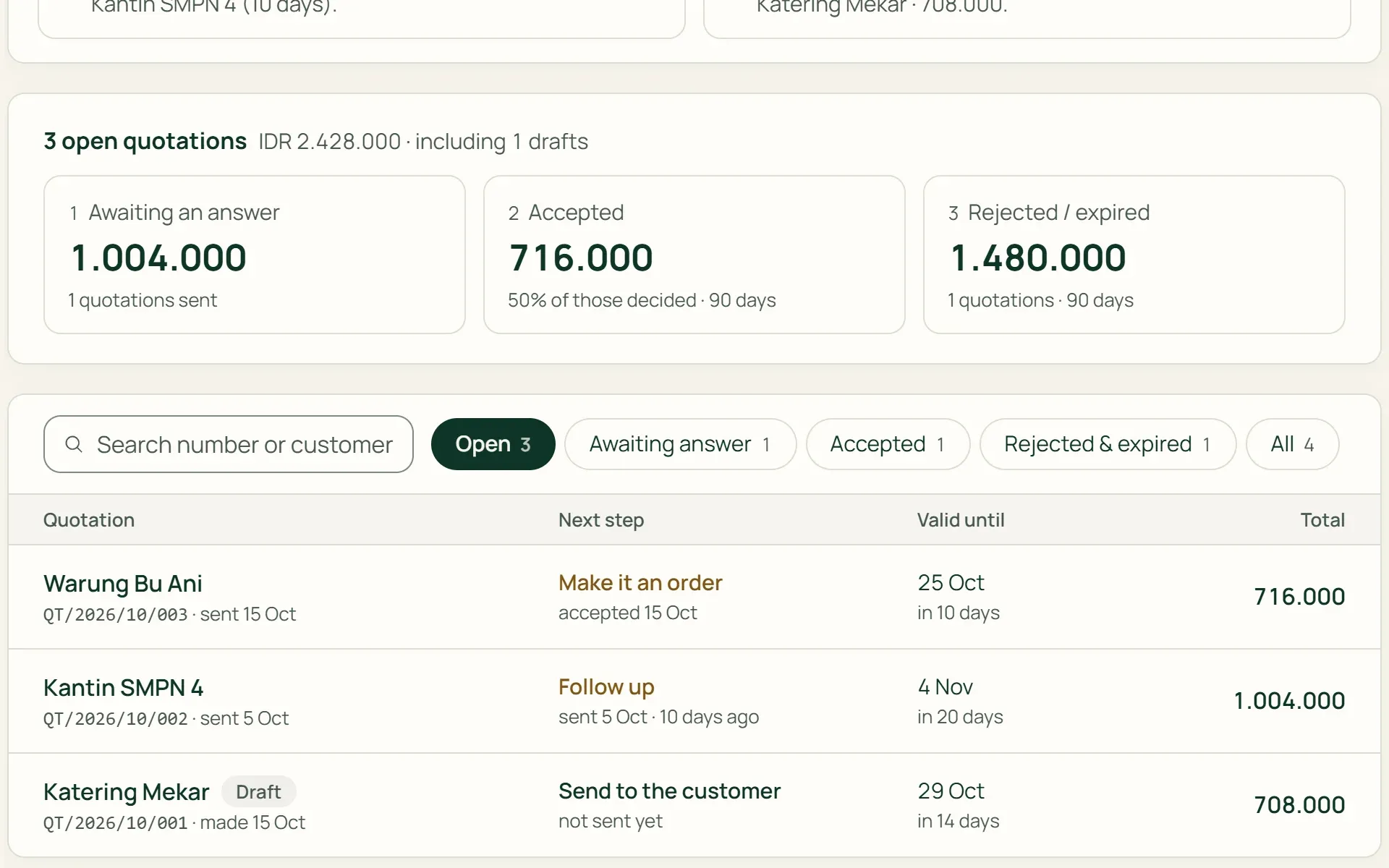
Prices and discounts fill in from the customer group. Print the quotation, mark it sent, and Tumra flags quotations unanswered for more than 7 days or close to expiring. An accepted quotation becomes an order without retyping.
- Group prices
- Validity period
- Print quotation
02 · Deliver
Deliver part, and keep track of the rest.
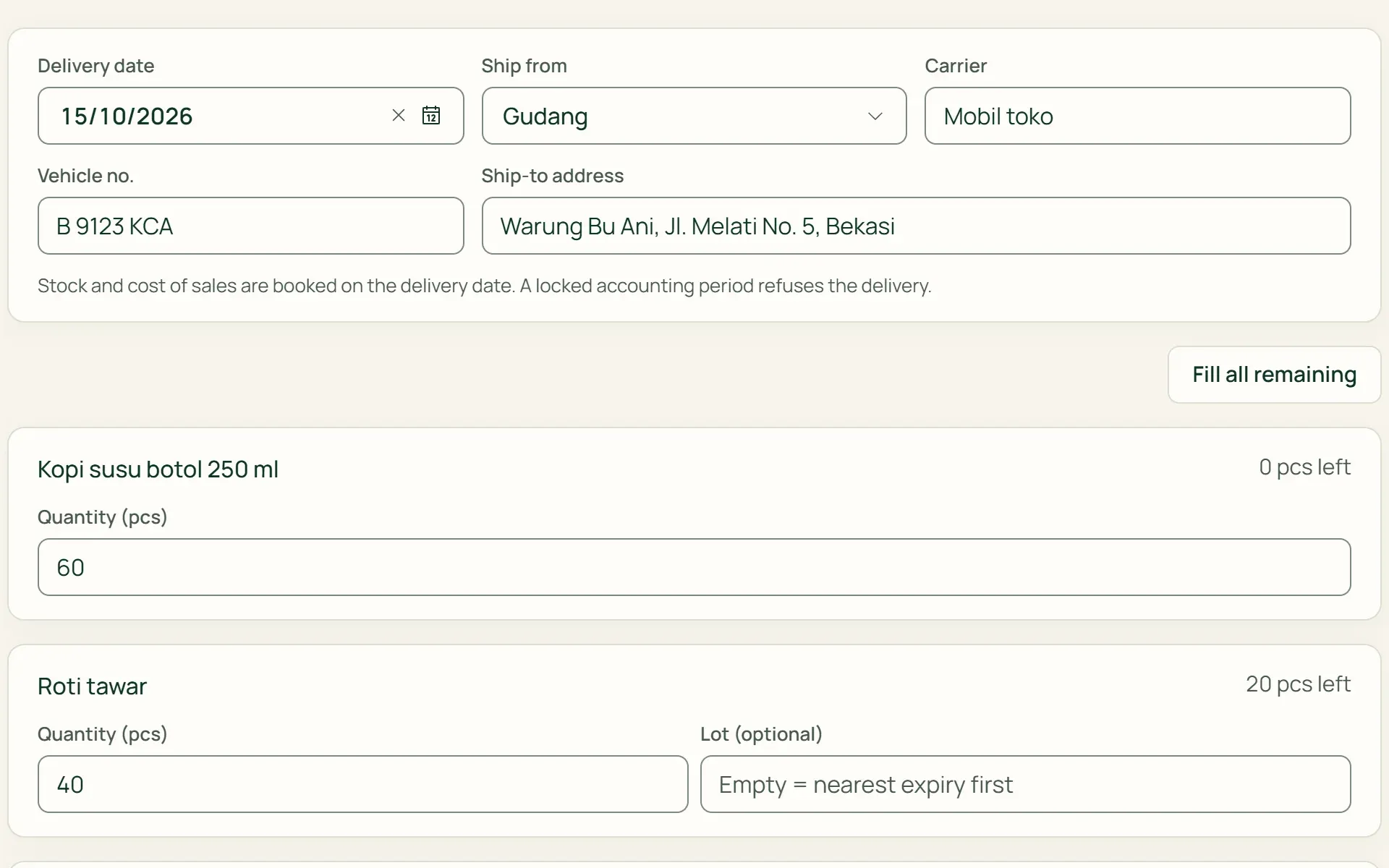
Choose the source location, then enter the quantity delivered, the carrier, the vehicle number, and the delivery address. Stock out and COGS are recorded on the delivery date. If the batch is left empty, the one closest to expiry goes first. The delivery note can be printed.
- Partial delivery
- Delivery note
- Nearest expiry first
03 · Bill
One invoice for everything delivered.
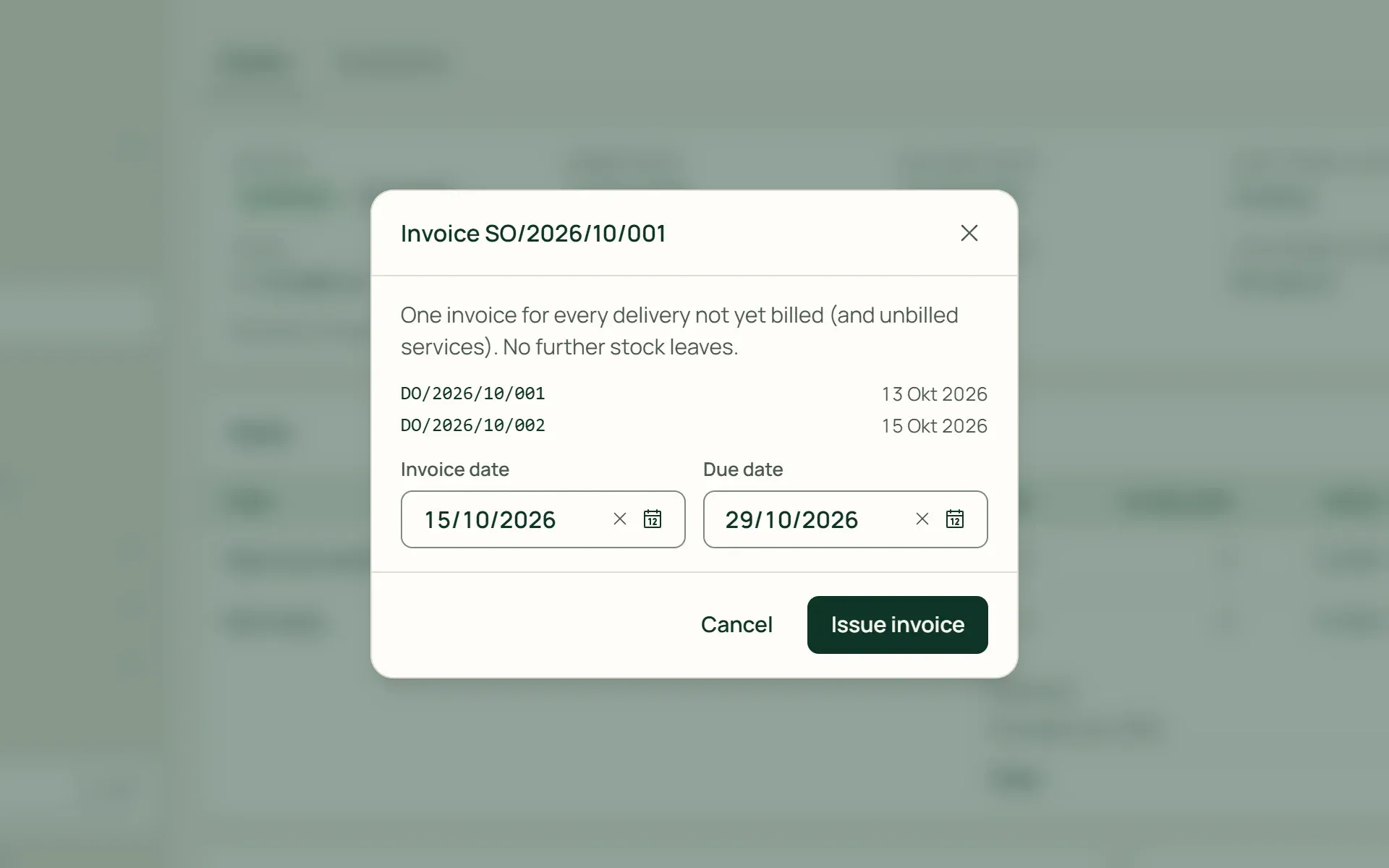
Tumra bills exactly what has been delivered and not yet billed, including service lines. Two deliveries to Warung Bu Ani become one IDR 1,710,000 invoice, and stock isn't reduced twice. Orders not yet billed appear in the To bill view.
- From deliveries
- Service lines
- To bill
04 · Order
Purchase orders from items running low.
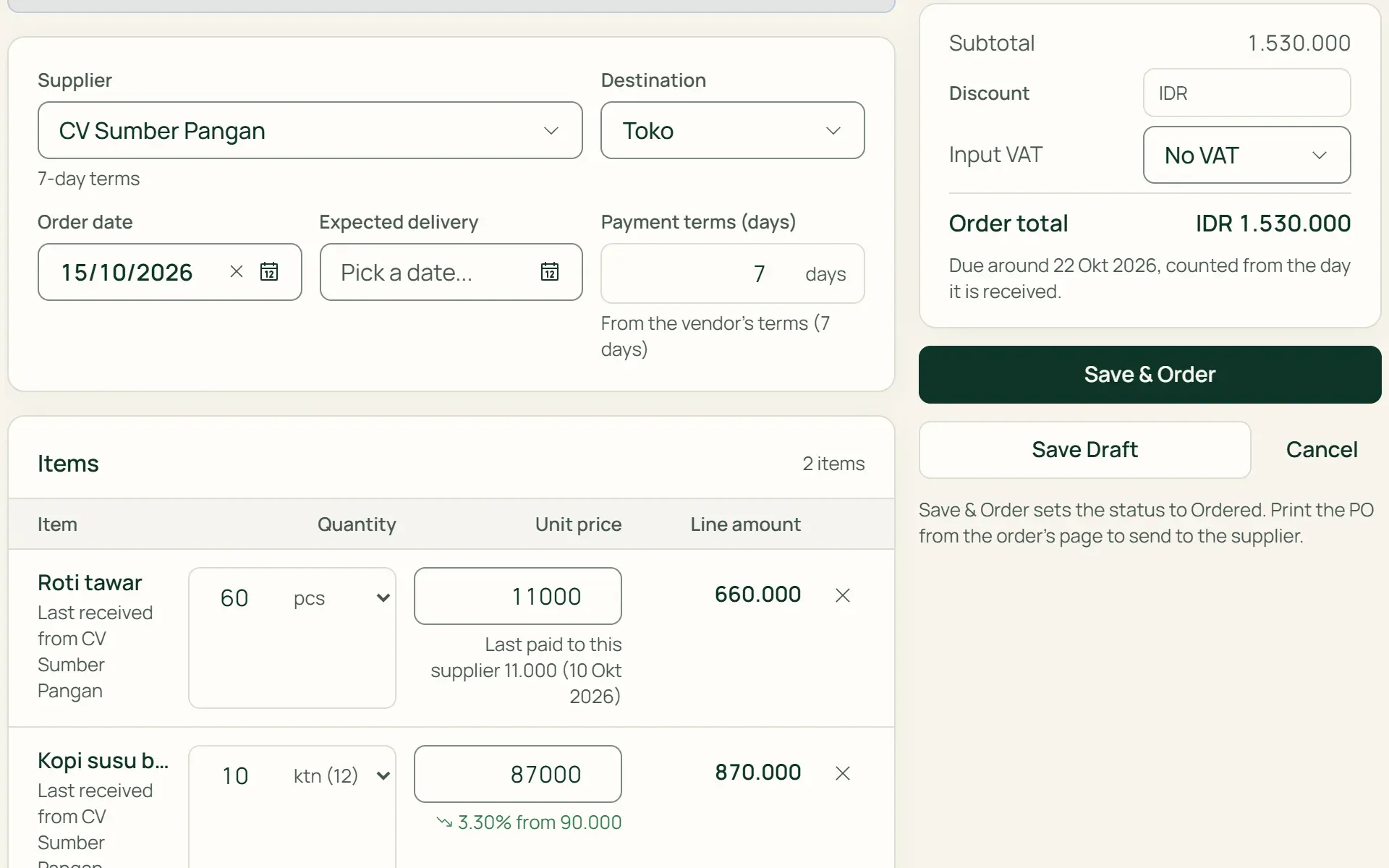
The From Low Stock button fills a PO with items below their reorder point. Check the supplier, quantities, and prices before saving; nothing is ordered automatically. Each line shows the last price paid to that supplier. Print the PO, then send it to the supplier.
- From Low Stock
- Discount & Input VAT
- Print PO
05 · Receive
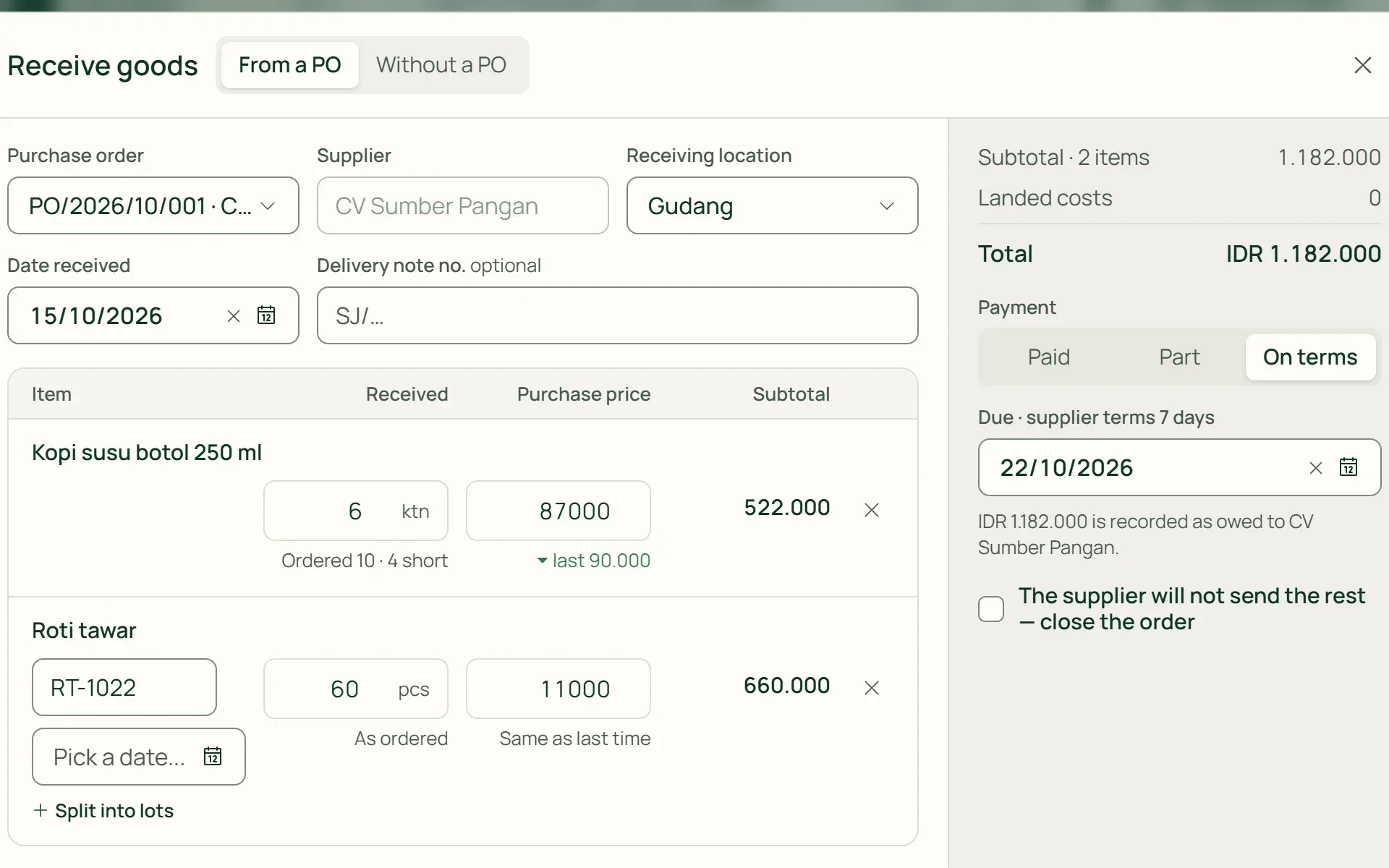
Goods received, stock and payables go up.
Receive part or all of what's left on a PO, with batch numbers and expiry dates if needed. Pay in full, on the supplier's terms, or in part. For example: 6 of 10 cartons of iced coffee and 60 loaves of white bread arrive, iced coffee stock goes up by 72 bottles, and IDR 1,182,000 is owed to CV Sumber Pangan.
- Paid
- On terms
- Part
- Attachment
What you can do
Wholesale buying and selling with no gaps in between.
Supplier returns from the receipt
Items, batches, and prices come from the original receipt, never more than is still on the shelf. Settle the return by deducting it from what is owed, with a refund now, or with a refund later.
Supplier debts in plain view
The Owed to suppliers card adds up unpaid receipts, less returns. Due dates appear in Agenda as "Pay supplier" and in the payables ageing report.
Purchase price history
What you actually paid each supplier, per base unit, so buying by the carton and by the bottle can be compared. Items whose price went up in the last 30 days are flagged.
Shipping, discounts, and Input VAT
Shipping and import duty go into the cost of goods or are recorded as an expense, depending on Stock rules. Discounts are spread across items by value, and Input VAT is calculated after the discount.
Corrections you can trace
A wrong receipt is fixed by cancelling and replacing it, with a reason. Anything already paid, already sold, or in a locked period isn't quietly changed.
Delays show straight away
Sales orders past their promised delivery date and POs past their expected arrival are marked Overdue. The rest of a PO that won't arrive can be closed.
For businesses selling goods and services
Goods and services on one order.
On Retail and Bisnis, a sales order can hold goods and services together, such as a delivery fee or installation. Services don't touch stock and are billed along with the delivery. Customers in a foreign currency are quoted and billed in their own currency.
- Service linesMarked "Service" and don't reduce stock. Services not yet billed go on the next invoice.
- The customer's currencyThe order uses the customer's currency. The rate to your base currency is entered when the invoice is created.
- Wholesale ReportQuotation conversion, order fulfilment, goods delivered but not billed, and invoices not yet paid.
Buying and selling, connected to the whole shop.
Products & stock
Deliveries, receipts, and returns are recorded on the stock card at average cost.
Learn more →Customers & credit
Customer groups set the shelf or wholesale price and the discount on quotations.
Learn more →Invoices & billing
Invoices from orders use the same numbering, tax, and payments as any other invoice.
Learn more →
Plans
Buying and selling, plan by plan.
Retail Starter includes purchasing without wholesale sales, and both are available to the owner, admins, and finance.
| Feature | FreeRp 0/moRp 0/yr | FreelancerRp 129,000/moRp 1,290,000/yr | AgencyRp 349,000/moRp 3,490,000/yr | StarterRp 179,000/moRp 1,790,000/yr | RetailRp 349,000/moRp 3,490,000/yr | BisnisRp 499,000/moRp 4,990,000/yr |
|---|---|---|---|---|---|---|
| Quotations & sales orders | Not included | Not included | Not included | Not included | Included | Included |
| Deliveries & delivery notes | Not included | Not included | Not included | Not included | Included | Included |
| Purchase orders (PO) | Not included | Not included | Not included | Included | Included | Included |
| Goods receipts & supplier returns | Not included | Not included | Not included | Included | Included | Included |
| Supplier payables & payments | Not included | Not included | Not included | Included | Included | Included |
| Purchasing & Wholesale reports | Not included | Not included | Not included | Purchasing | Included | Included |
| Vendor bills & expenses | Included | Included | Included | Included | Included | Included |
Retail Free: purchasing as on Starter. The Purchasing report covers up to last month, without export.
FAQ
Common questions
Does a sales order reserve stock?
No. Stock only leaves when the delivery is recorded, so the goods can still be sold at the till until they’re delivered. The order form shows the stock at the source location and the quantity already promised to other orders, so you know before you promise a customer.
Can I create a PO from items running low?
Yes. The From Low Stock button fills a PO with items whose stock is below their reorder point. Nothing is ordered automatically: you still check the supplier, quantities, prices, and location before saving.
What if a wholesale customer returns goods?
Issue a credit note on their invoice. The goods go back to the location they were delivered from, in proportion to the amount credited. Returning only specific items isn’t available yet, because a credit note is recorded as an amount, not per item.
Are there customer or supplier down payments?
Not yet. Customer down payments, down payments to suppliers, and overpayment balances aren’t available yet. Customer payments are recorded on the invoice, and supplier payments on the goods receipt.
Can quotations and POs be emailed from Tumra?
Not yet. Quotations, POs, and delivery notes are printed from the browser or saved as PDF, then sent through your own email or WhatsApp. A quotation’s status is changed with the Mark sent button.
Who on the team can use it?
The owner, admins, and finance, because deliveries and receipts move stock, receivables, and payables. Project managers can use it if they’re given finance access. The Cashier and Staff roles can’t open it.
Put your shop's wholesale buying and selling in order.
Try every Tumra feature free for 30 days, no credit card needed.