

Invoices & billing
Bill clients on time, and the books keep up.
Pull hours and project fees into an invoice, issue it, then send it by email or mark it as sent. Every issued invoice records the receivable and the revenue right away, and the invoice list shows what is unpaid or overdue.
On every plan. Email sending from the Freelancer plan.
Before and after
Billing shouldn't take four apps.
Hours tallied in a spreadsheet, the invoice typed in Word, sent by email, then the transfer matched by hand. Every copy and paste is another chance to get a number wrong.
Before
4 places
- Hours in ExcelAdmin · team hours added up again from notes
- Word templateAdmin · client, rate, and total retyped
- Manual emailAdmin · the send date only lives in the outbox
- Checking bank statementsFinance · transfers matched one by one
Invoice
INV/2026/10/021
Paid- Hours pulled into the invoice44 hours
- Invoice issuedIDR 12,210,000
- Payment recordedPaid 20 Oct
- Journal recordedWhen issued
How it works
From logged hours to a paid invoice.
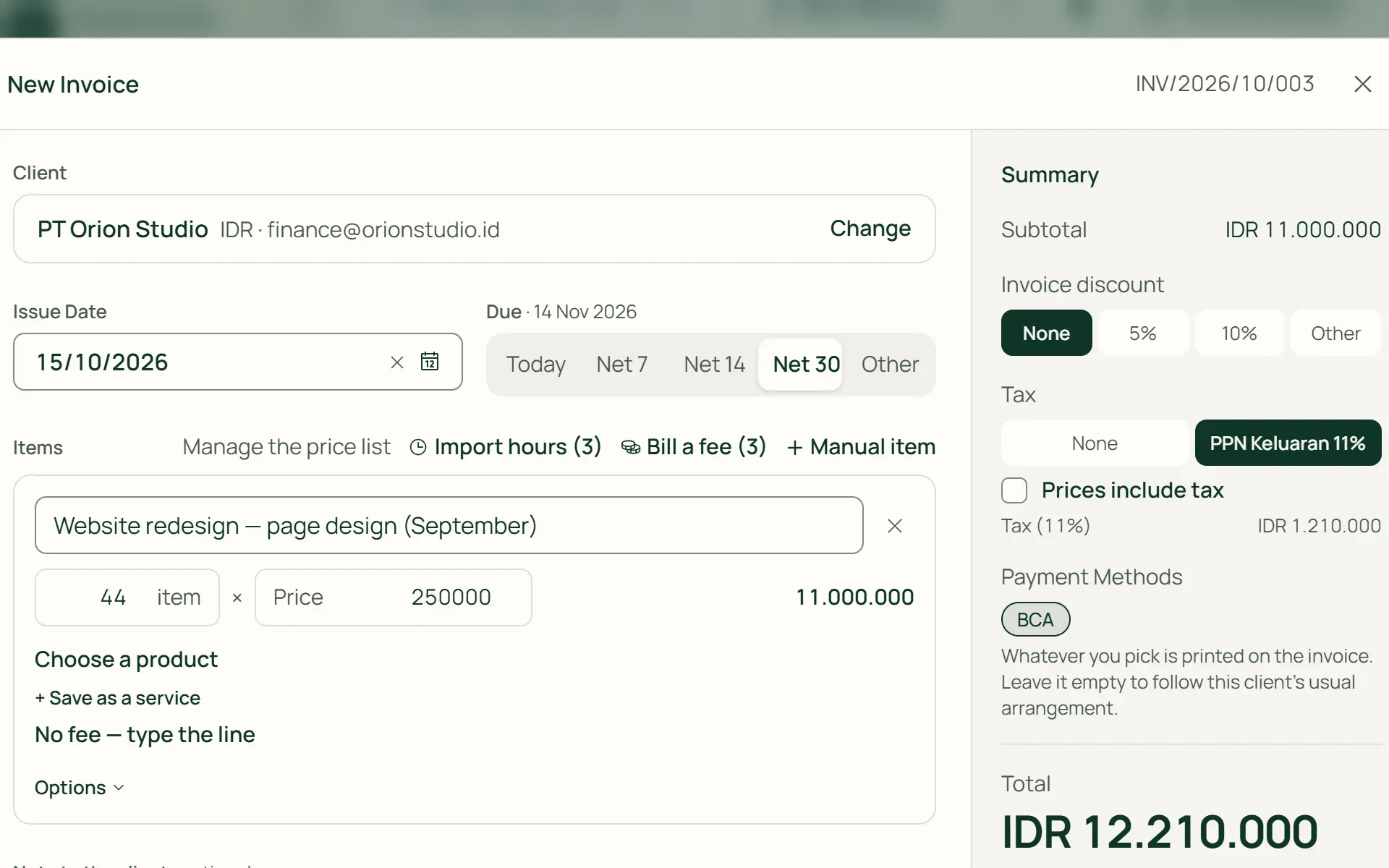
01 · Client
Pick the client, the rest fills itself in.
The client's currency, terms, invoice language, and default payment method are applied straight away. Numbers follow your series, for example INV/2026/10/021. Choose a due date: Today, Net 7, Net 14, Net 30, or another date.
- Client terms
- Number series
- Payment method
02 · Hours & fees
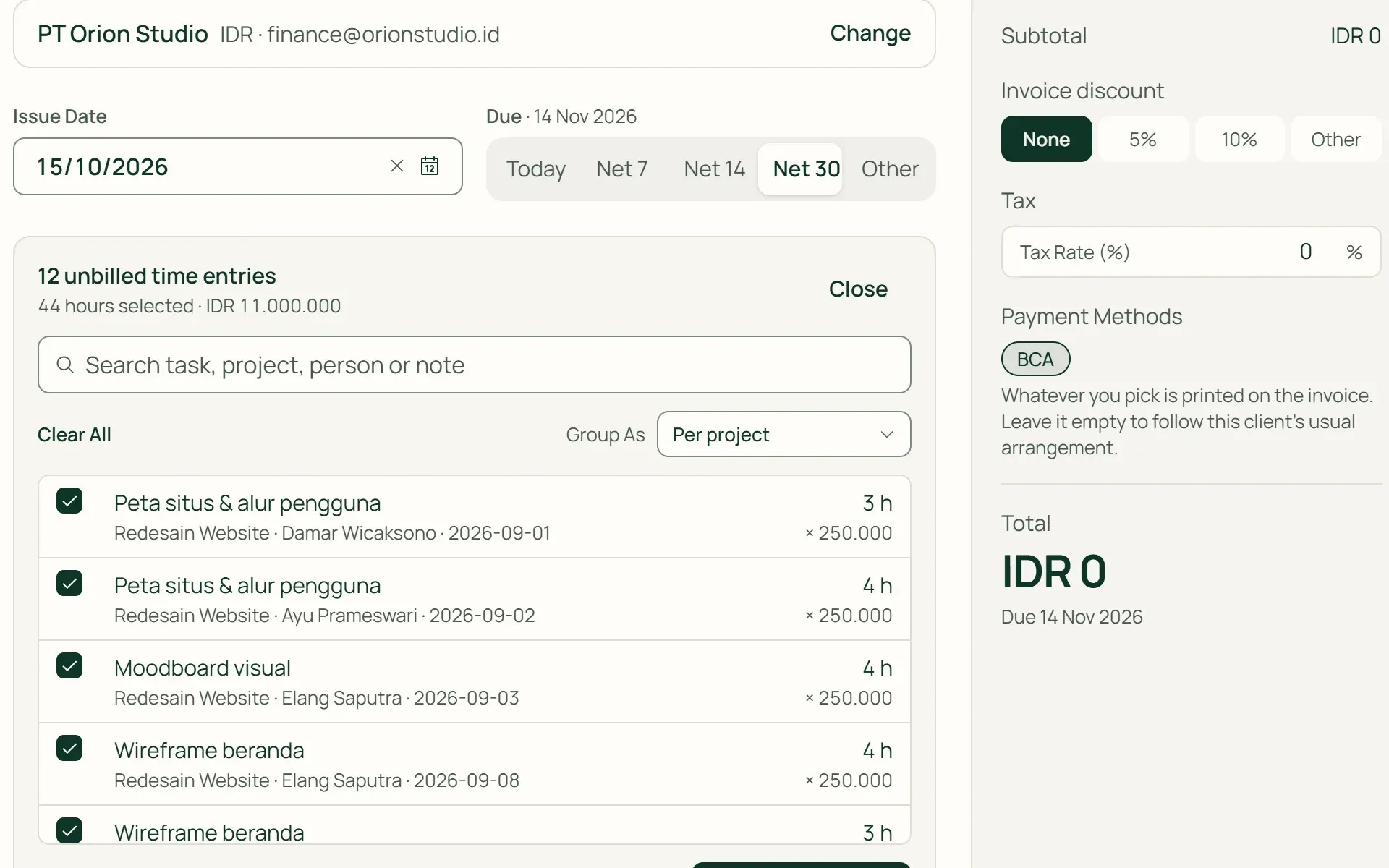
Bill hours and fees without retyping.
Press Import hours to pull in billable hours that haven't been invoiced, then group them as one line, per project, or per task. 44 hours × IDR 250,000 becomes IDR 11,000,000. Project, milestone, or task fees can be billed in stages.
- One total line
- Per project
- Per task
- Staged fees
03 · Issue
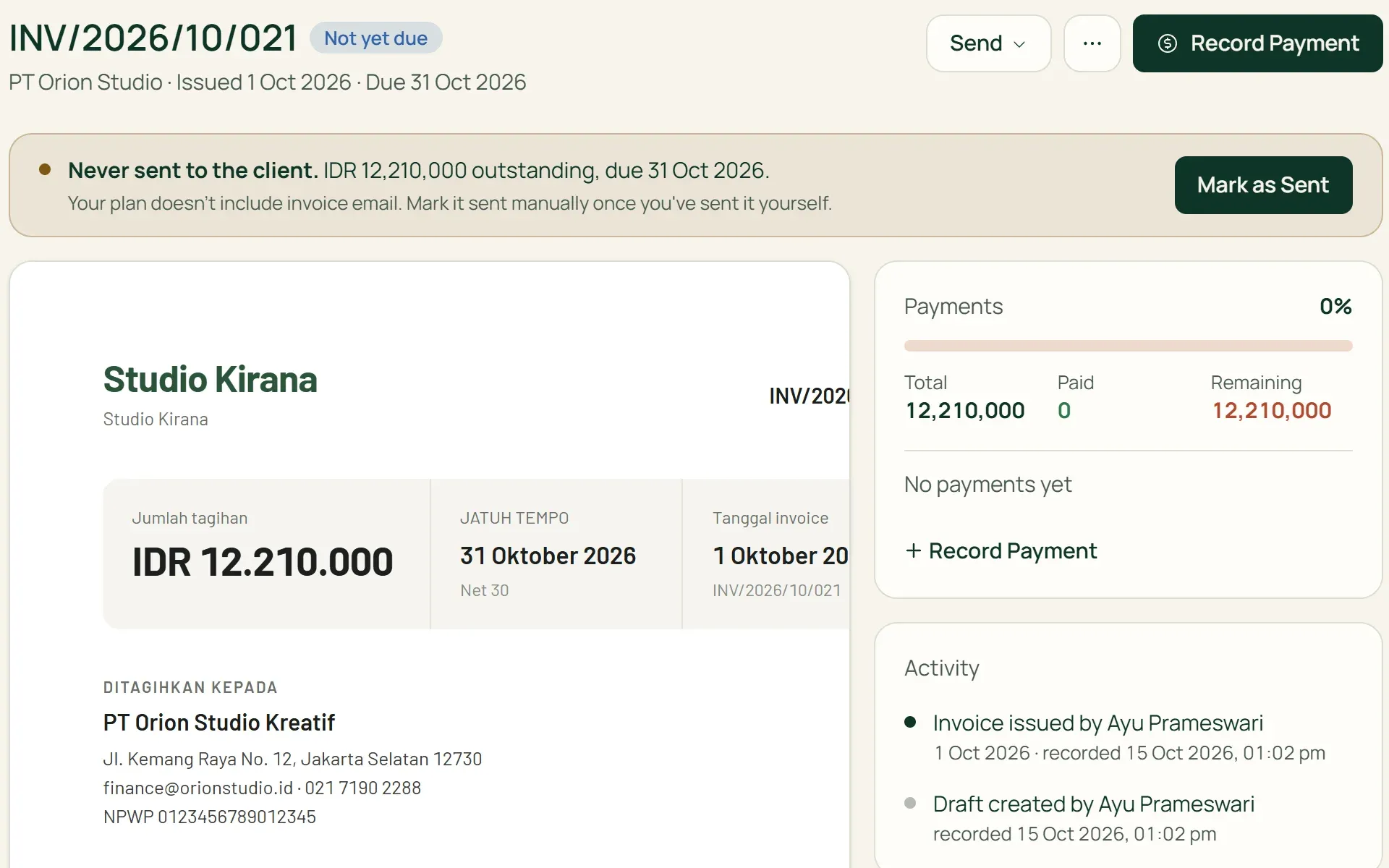
Issue it, then send it or mark it as sent.
A draft can be changed any time and stays out of the books. When it is issued, the receivable and revenue journal is recorded. Send it by email from Tumra, or send it yourself and press Mark as Sent so the status stays clear.
- Save Draft
- Issue & send
- Mark as Sent
04 · Follow up
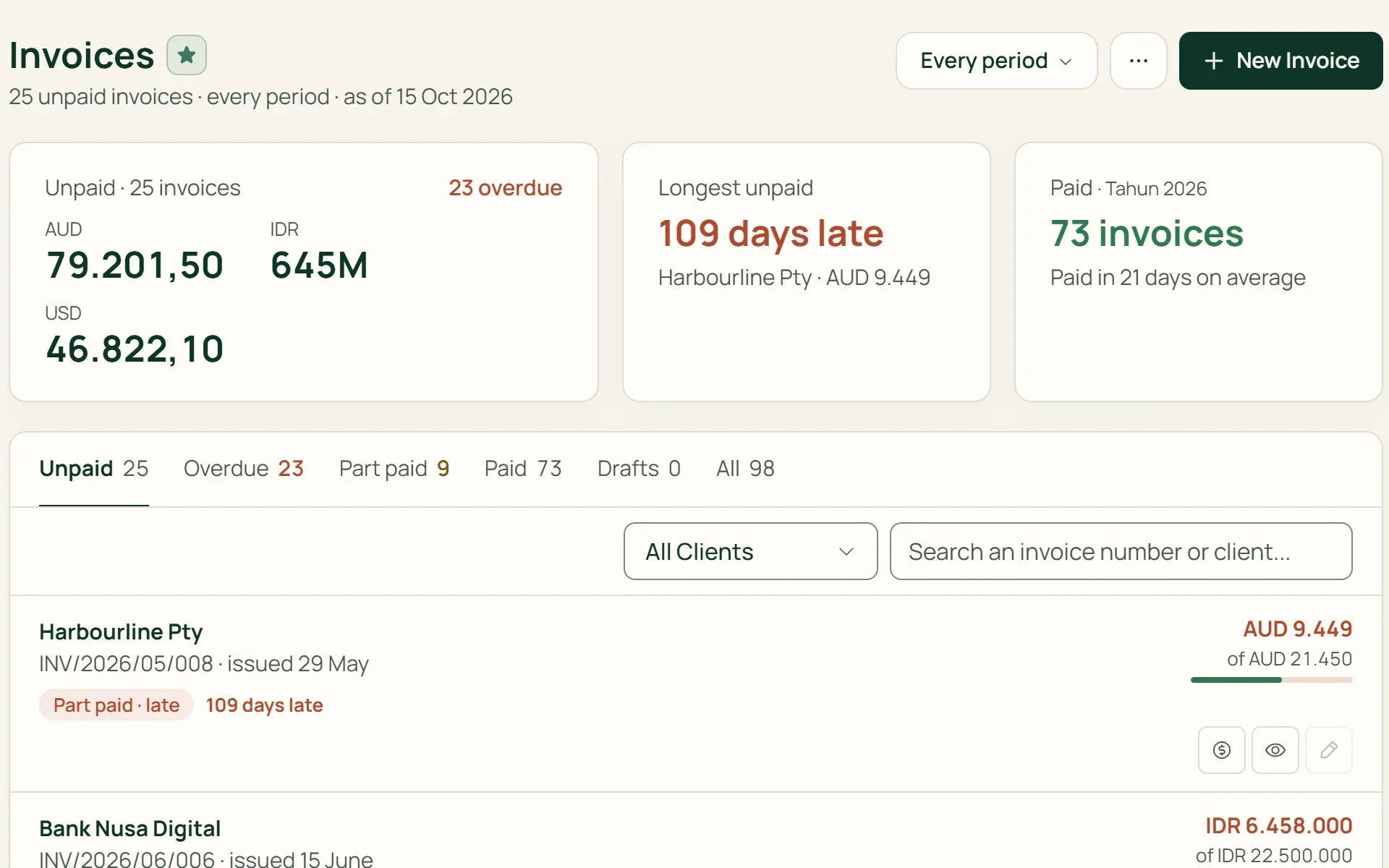
See what's unpaid, not just a list.
Tabs for Unpaid, Overdue, Part paid, Paid, and Drafts. The cards above show the total unpaid, the oldest unpaid invoice, and the average days to payment. Record a payment straight from its row.
- Overdue
- Part paid
- Record payment
What you can do
Everything you need to bill cleanly.
Draft first, journal on issue
Drafts can be edited freely and stay out of the books. The journal is created when the invoice is issued. Up to 100 drafts can be issued at once.
Credit Notes and cancellation
An issued invoice is never quietly edited. Reduce what's owed with a Credit Note, or cancel it if no payment has been recorded. The journal is reversed.
Discounts and tax
Percentage or fixed discounts, per line and per invoice. Prices can include or exclude tax, and VAT is recorded through its tax code.
Five currencies
IDR, USD, AUD, SGD, and EUR. The rate is set when you create the invoice, can be taken from that day's reference rate, and the amount is recorded in your base currency.
Invoices that look like you
Logo, accent colour, payment terms, and Indonesian or English per client. Print or save as PDF from the browser. Compact and Column templates on Pro plans.
Recurring invoices
Monthly, quarterly, half-yearly, or yearly retainers. Each period arrives as a draft to check first, never issued automatically.
For shops and wholesalers
Wholesale invoices, stock goes down with them.
On the Retail Starter, Retail, and Bisnis plans, invoice lines can be filled from products. Wholesale prices and customer group discounts fill in on their own, and the goods leave stock when the invoice is issued, complete with COGS. More on the Products & stock page.
- Prices by groupWholesale customers get wholesale prices straight away, and Gold Members get their group discount.
- Stock and COGS recordedGoods leave stock when the invoice is issued. If there isn't enough stock, the invoice can't be issued.
- Returns from the invoicePress Record Return on the invoice and the goods go back into stock.
Invoices bridge work and money.
Time tracking
Billable hours wait in one list until you pull them into an invoice.
Learn more →Payments & expenses
Record client payments, including partial payments, withheld PPh 23, and exchange differences.
Learn more →Accounting
An issued invoice becomes a receivable and revenue journal straight away, with no re-entry.
Learn more →
Plans
Invoicing on every plan.
Invoices are unlimited. The Free plan allows up to 3 active clients.
| Feature | FreeRp 0/moRp 0/yr | FreelancerRp 129,000/moRp 1,290,000/yr | AgencyRp 349,000/moRp 3,490,000/yr | StarterRp 179,000/moRp 1,790,000/yr | RetailRp 349,000/moRp 3,490,000/yr | BisnisRp 499,000/moRp 4,990,000/yr |
|---|---|---|---|---|---|---|
| Invoices, Credit Notes & payments | Included | Included | Included | Included | Included | Included |
| Recurring invoices | Included | Included | Included | Included | Included | Included |
| Send by email | Not included | 3 a day | 3 a day | 3 a day | 3 a day | 3 a day |
| No Tumra logo on invoices | Not included | Included | Included | Included | Included | Included |
| Invoice template choices | 1 | 1 | 1 (Pro: 3) | 1 | 1 (Pro: 3) | 1 (Pro: 3) |
| Pull hours into invoices | Included | Included | Included | Not included | Not included | Included |
| Goods & stock on invoices | Not included | Not included | Not included | Included | Included | Included |
| Receivables Ageing report | Not included | Included | Included | Included | Included | Included |
Retail Free: as on Free (no emailing, the Tumra logo stays on invoices), plus goods and stock on invoices.
FAQ
Common questions
Can the Free plan create invoices?
Yes. Invoices, payments, Credit Notes, and recurring invoices are included, with a limit of 3 active clients. On the Free plan you send invoices yourself and then mark them as sent, and the Tumra logo always appears in the invoice footer. Email sending and the Receivables Ageing report start on the Freelancer plan.
Are invoices sent as a PDF attachment?
Not yet. Emails from Tumra are plain text: your template, the amount, the due date, and your payment details. If the client has portal access (Agency and Bisnis plans), the email includes the link. Need a PDF? Open Print, save it as PDF, send it yourself, then press Mark as Sent.
How many invoices can I send by email?
Up to 3 invoice emails a day per workspace, and each invoice can be emailed once. Beyond that, send it yourself and mark it as sent. Mark as Sent is available on every plan with no limit.
Can clients pay online straight from the invoice?
Not yet. Tumra doesn’t process payments from your clients. The invoice lists the payment methods you set up, such as a bank account, QRIS, or your own payment link. Once the money arrives, you record the payment in Tumra.
Are there automatic payment reminders to clients?
Not yet. Tumra doesn’t send reminders to clients. Overdue invoices appear in the Overdue tab, in Agenda, and in the Receivables Ageing report (paid plans), so you know who to contact.
What if an issued invoice turns out to be wrong?
Drafts can be changed freely. An issued invoice is reduced with a Credit Note, or cancelled if no payment has been recorded. Both reverse the journal, so the original invoice and its correction both stay on record.
Issue your first invoice today.
Try every Tumra feature free for 30 days, no credit card needed.