

Clients & CRM
Keep every client organized, never miss a follow-up.
Store billing info for every client, log calls, emails, and meetings, and let Tumra remind you when to follow up. Projects, invoices, and receivables stay in one view.
Available on all plans. Free plan up to 3 active clients.
Before and after
Scattered client data leads to missed follow-ups.
Phone numbers on mobile, billing addresses in spreadsheets, chat logs in messaging apps, and call promises in your head. When something slips, clients slip with it.
Before
4 separate places
- Client spreadsheetAdmin · address and tax ID retyped on every invoice
- ChatTeam · conversations buried in group chats
- Notes on a phoneOwner · contact numbers live on one phone
- Calendar remindersEveryone · promised calls the team can't see
Client
PT Orion Studio
Client- Client saved30-day terms
- Contact linkedDimas Pratama
- History recordedINV/2026/10/021
- Follow-up scheduledTomorrow
How it works
From first conversation to first invoice.
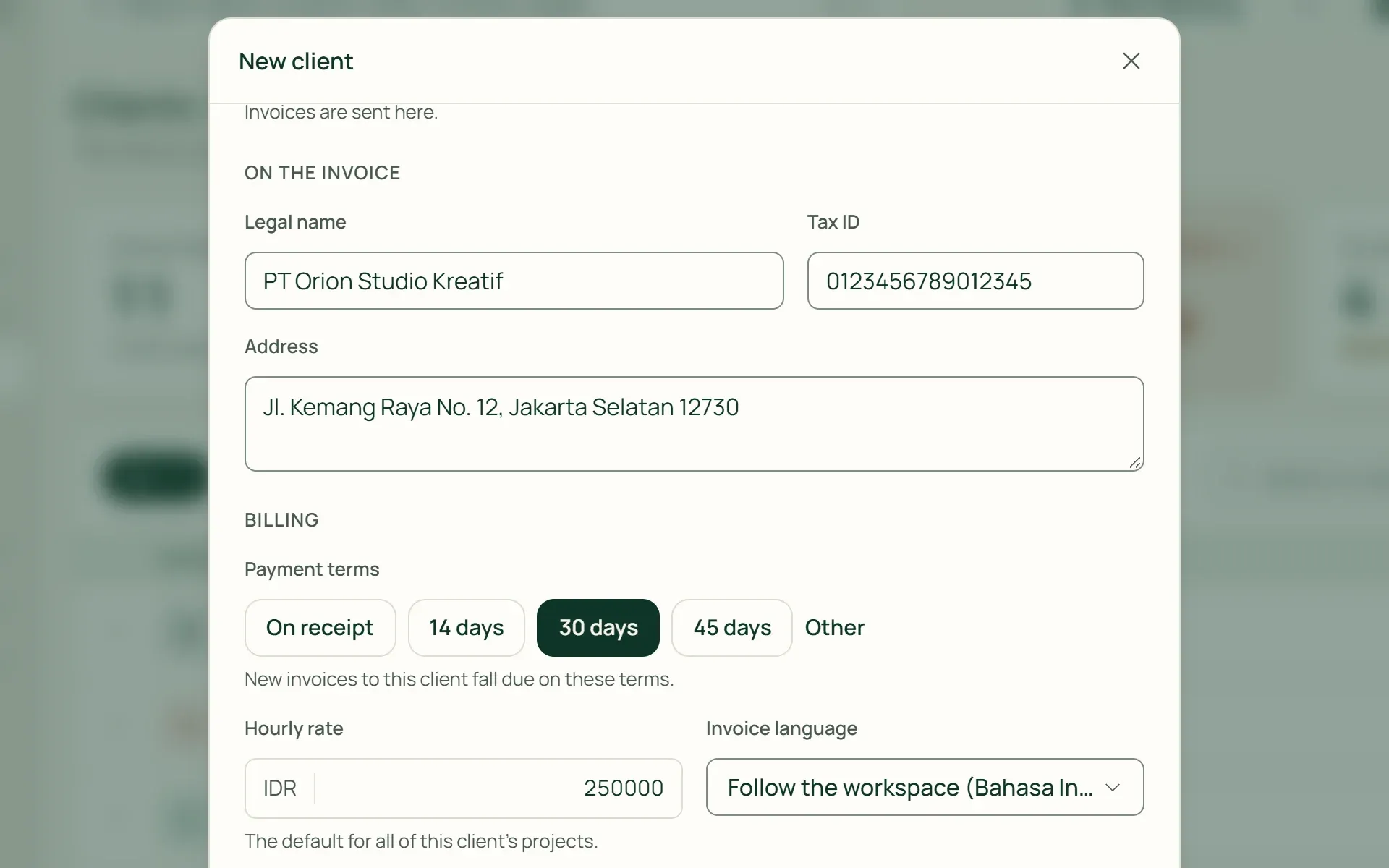
01 · Clients
Save once, use everywhere.
Companies or individuals, billing emails, currencies, tax IDs, addresses, default payment terms, hourly rates, and invoice languages. New projects and invoices inherit them immediately.
- Default terms
- Hourly rates
- Invoice languages
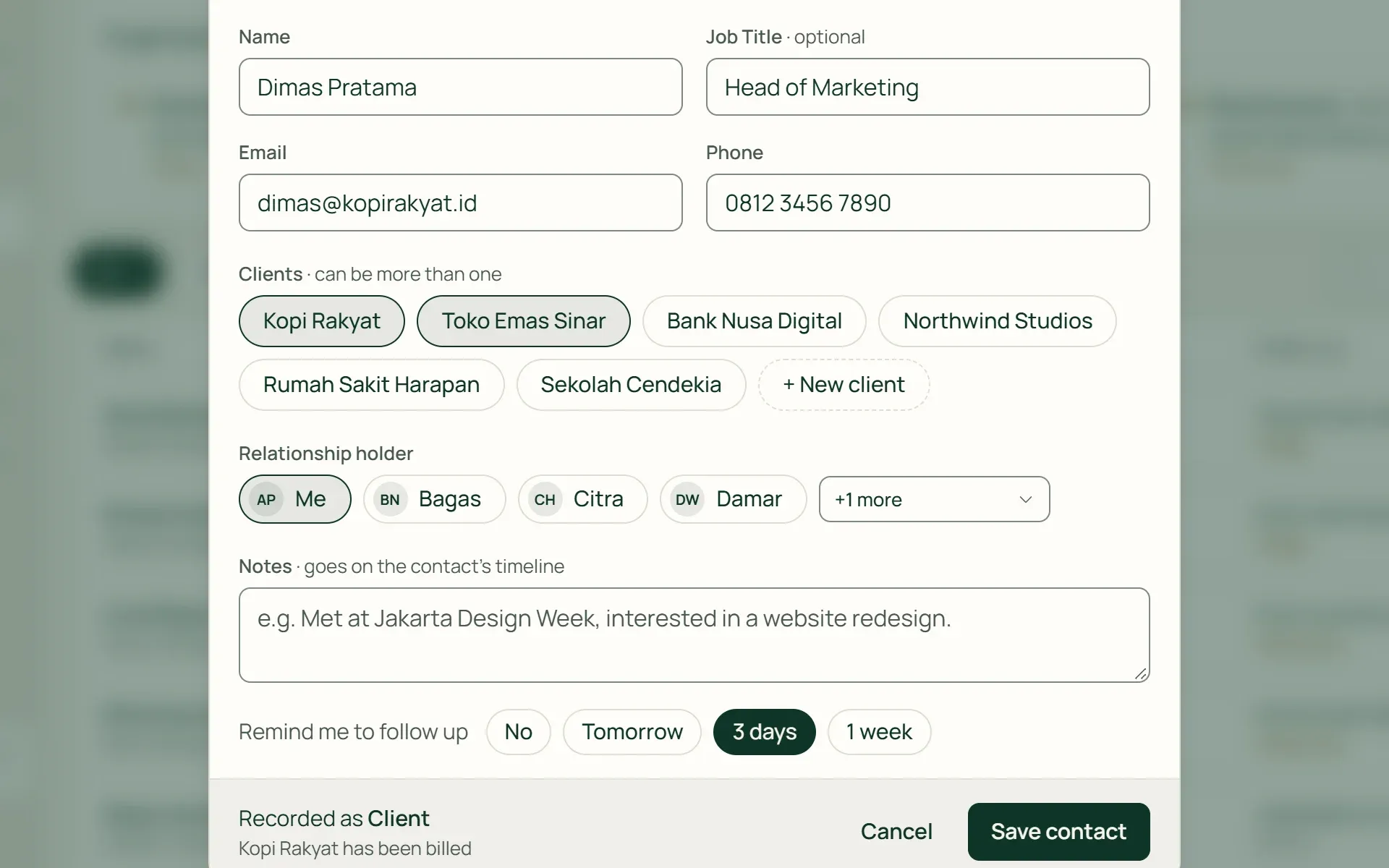
02 · Contacts
Connect the people you talk to.
Store names, job titles, emails, and phone numbers, and assign relationship owners on your team. One contact can link to multiple client profiles.
- Multiple clients per contact
- Relationship owners
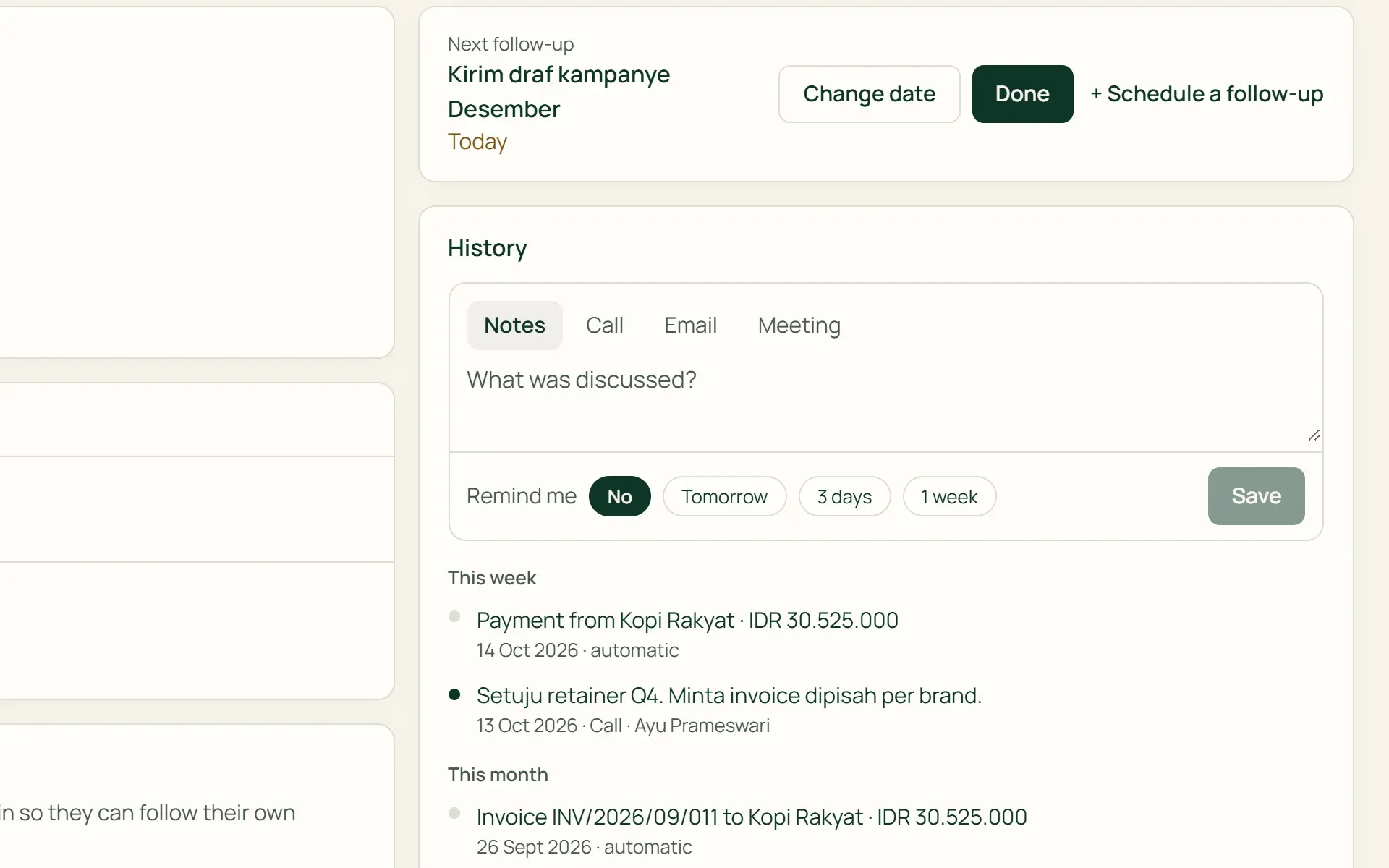
03 · History
Log every interaction.
Select note, phone call, email, or meeting, then record what was discussed. Click Remind Me for tomorrow, 3 days, or next week to schedule follow-ups automatically.
- Notes
- Phone calls
- Emails
- Meetings
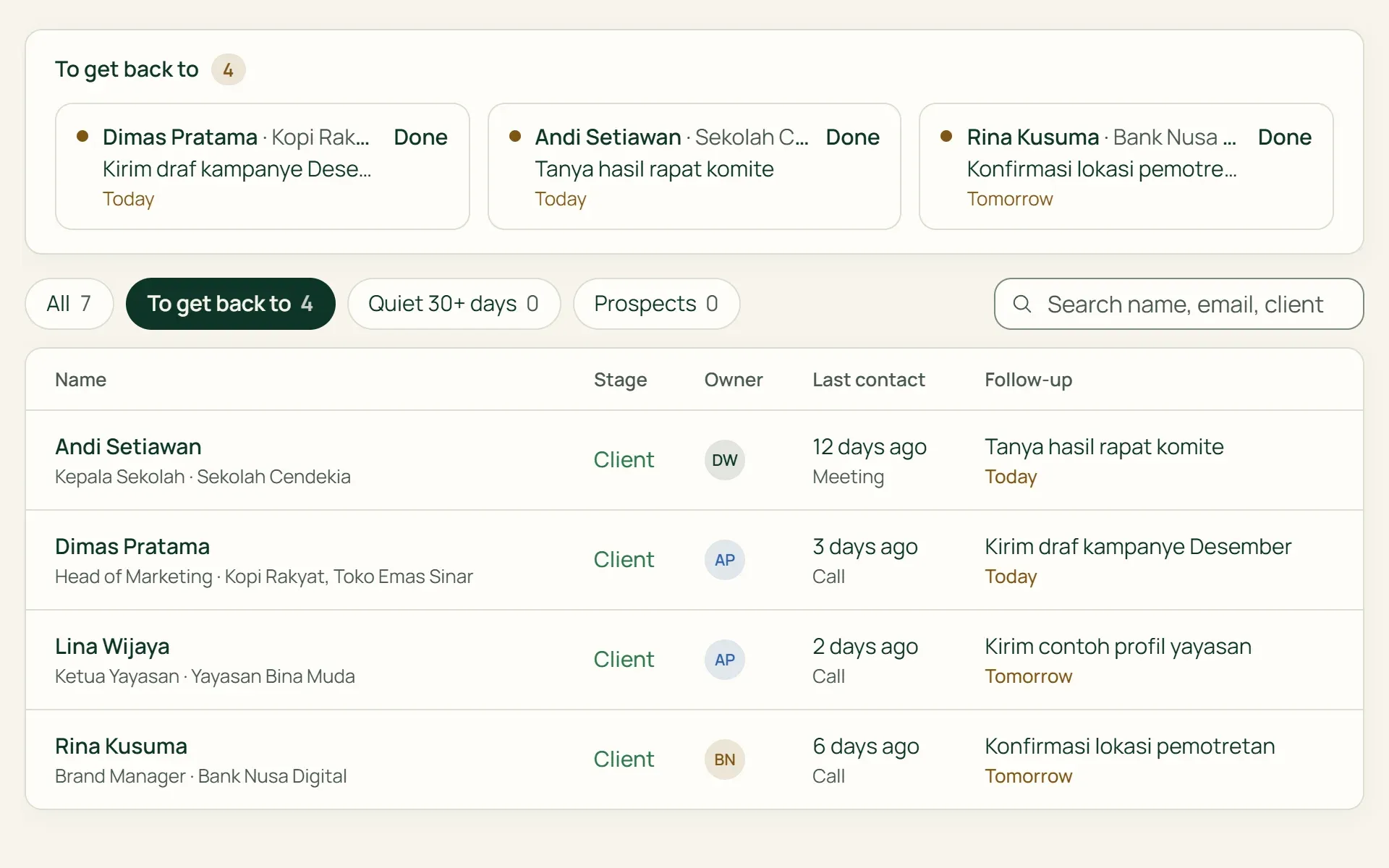
04 · Follow-ups
Surfaced on screens you check daily.
Due follow-ups appear in the Need to Contact list on Contacts, on your dashboard, and in Agenda. Mark done, and notes save to history.
- Dashboard
- Agenda
- Contacts
Capabilities
Everything about your clients, in one view.
Client finances at a glance
Year-to-date revenue, total and overdue receivables, unbilled hours, and last payments directly on the client page.
Client projects in the same place
Active projects with progress percentages, open or overdue tasks, and logged hours against estimates.
Automatic contact lifecycle stages
Lead, Prospect, Client, Inactive, or Lost. Once a client is billed, contacts automatically move to Client stage.
No communication for 30+ days
Contacts with no recent activity and no upcoming follow-up are highlighted so relationships do not go cold quietly.
Team access per client
Control which team members have access to each client. Staff only see assigned clients, along with their projects and contacts.
Portal access from contact profiles
Invite contacts to the client portal via email and customize what information they can view. Available on Agency and Business.
For retail and wholesale
Wholesale customers with custom pricing and credit limits.
On Retail Starter, Retail, and Business plans, organize customers into groups. Each group defines pricing bases (retail or wholesale), discounts, and store credit permissions that apply instantly at the POS.
- Customer groupsReady-to-use tiers: Silver Members, Gold Members, and Wholesale.
- Store credit limitsSet limits per group or per customer. The POS rejects transactions that exceed credit limits.
- Wholesale ordersOn Retail and Business plans, the last five quotes and orders display directly on customer profiles.
Clients are where everything begins.
Plans
Clients and CRM in every plan.
Archived clients do not count against Free plan limits.
| Feature | FreeRp 0/moRp 0/yr | FreelancerRp 129,000/moRp 1,290,000/yr | AgencyRp 349,000/moRp 3,490,000/yr | StarterRp 179,000/moRp 1,790,000/yr | RetailRp 349,000/moRp 3,490,000/yr | Business |
|---|---|---|---|---|---|---|
| Clients & contacts | Included | Included | Included | Included | Included | Included |
| Active client limit | 3 | Unlimited | Unlimited | Unlimited | Unlimited | Unlimited |
| History & follow-ups | Included | Included | Included | Included | Included | Included |
| Staff access per client | Included | Included | Included | Included | Included | Included |
| Client portal access | Not included | Not included | Included | Not included | Not included | Included |
| Customer groups & credit | Not included | Not included | Not included | Included | Included | Included |
FAQ
Frequently asked questions
What is the difference between clients and contacts?
Clients are the companies or individuals you bill. Contacts are the people you talk to. One client can have multiple contacts, and one contact can link to multiple clients.
How are contact lifecycle stages determined?
Contacts whose clients receive invoices automatically become Clients. On Retail and Business plans, contacts with active quotes become Prospects. Others remain Leads. Inactive and Lost stages are chosen manually.
Can my whole team see all clients?
Owners, admins, project managers, and finance roles see all clients. Staff only see clients shared with them. Financial figures such as receivables and revenue are restricted to finance roles.
Does Tumra sync with my email inbox automatically?
Not yet. Tumra does not read inboxes or calendar accounts. Interactions are logged manually, and follow-up reminders appear inside the app, not via email.
Can I import my client list from spreadsheets?
Yes. Owners or admins can download Excel templates in Settings → Import & Migration, fill them in, and upload. Existing client names are skipped. All client data can also be exported to Excel anytime.
Is CRM available on the Free plan?
Yes. Clients, contacts, interaction history, and follow-ups are included, up to 3 active clients. Paid plans have unlimited clients.
Start with your first client.
Try all Tumra features free for 30 days.