

Multi-currency
Bill in dollars, keep your books in rupiah.
Invoices for overseas clients are made in the client's currency, at a rate you enter or take from the ECB reference rate. When the money arrives, Tumra compares the rupiah received with the invoice rate and records the exchange gain or loss.
On every plan. FX Revaluation starts on the Freelancer plan.
Before and after
Rates kept in your head, differences never booked.
Dollar invoices are made in a separate template, the rate is looked up online, and the rupiah received is matched by hand. The exchange difference is left alone, so receivables and revenue never match the bank.
Before
4 separate places
- Invoice templateAdmin · dollar invoices made in a separate file
- Exchange rate websiteAdmin · the rate looked up online
- Bank transaction notesFinance · rupiah received matched by hand
- Working out the differenceFinance · exchange difference left unbooked
Foreign currency invoice
INV/2026/10/022
Paid- Client billed in AUDAUD 150 / hour
- Rate kept on the invoice10,750
- Payment recordedIDR 26,160,000
- Exchange gain booked+IDR 360,000
How it works
From the first rate to a booked difference.
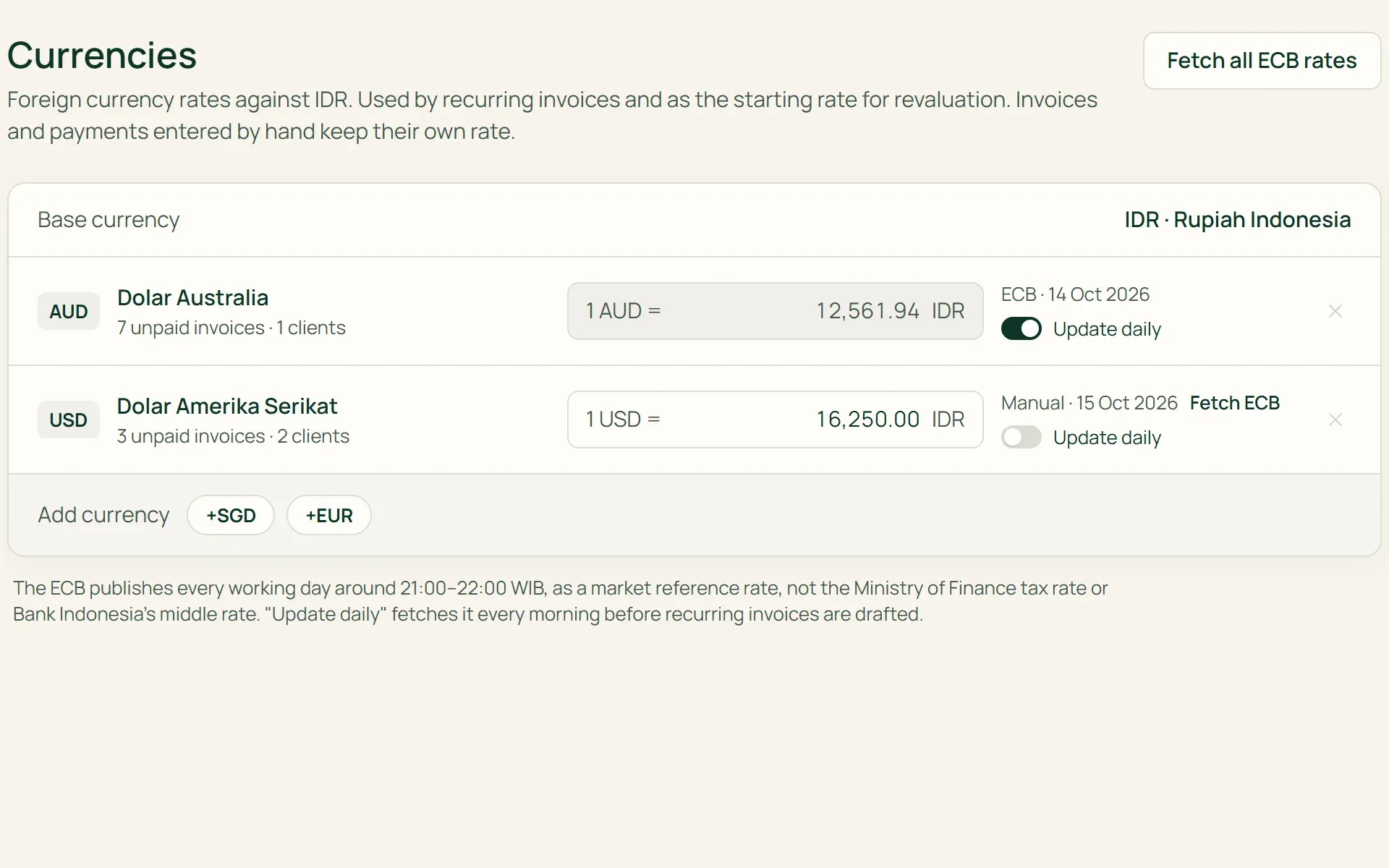
01 · Currencies
Choose your base currency and billing currencies.
The base currency is chosen when you start and becomes the currency of every report. Under Settings → Currencies, add USD, AUD, SGD, or EUR, then enter the rate yourself or fetch the ECB reference rate. Turn on Update daily to fetch the rate every morning.
- Fetch ECB rate
- Update daily
- Enter by hand
02 · Clients
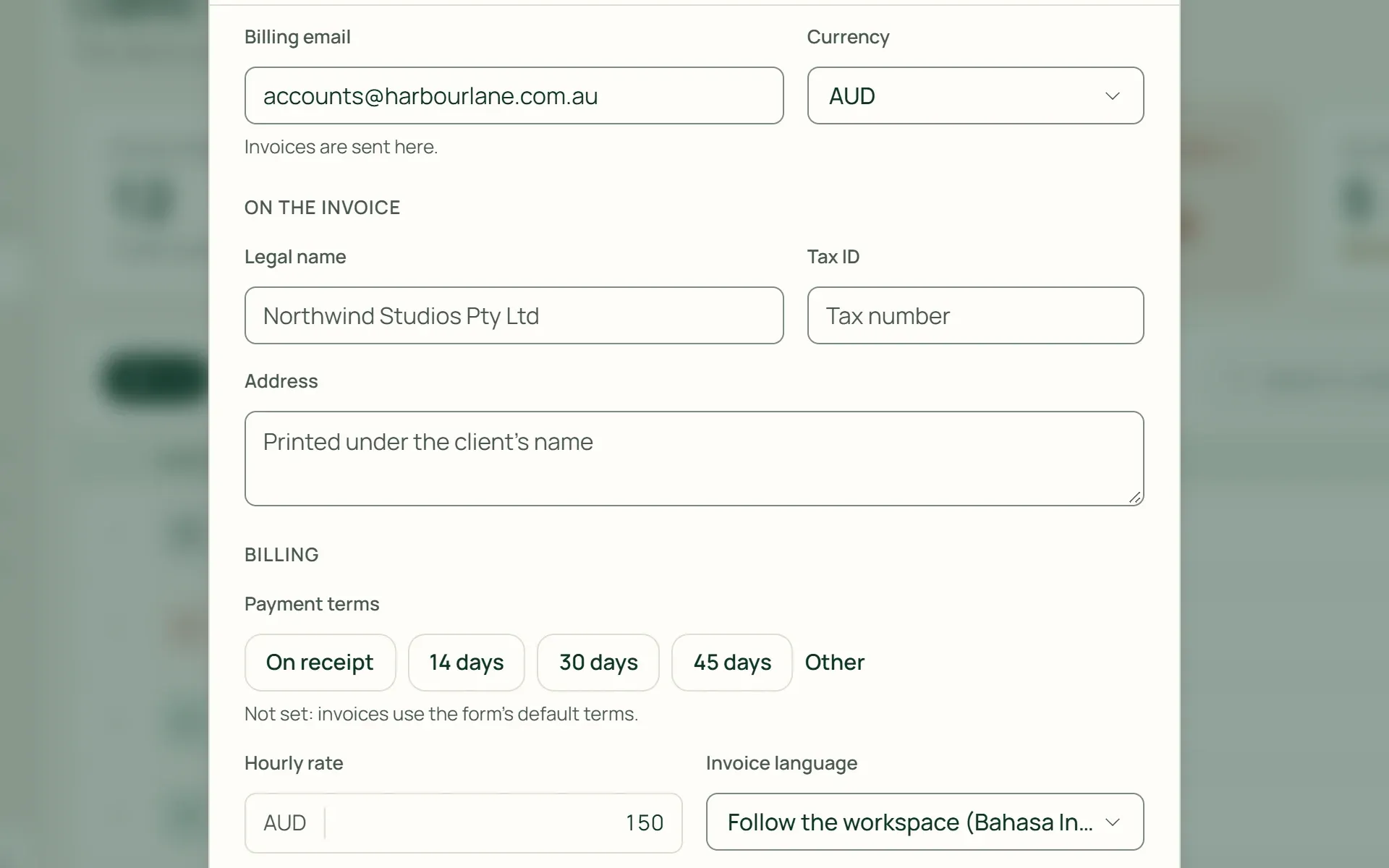
Each client is billed in one currency.
The currency is chosen on the client's record and used for all their invoices, as is their hourly rate. It locks after the first invoice, so one client's receivables never split across two currencies.
- Locked after the first invoice
- Hourly rate in foreign currency
03 · Invoice
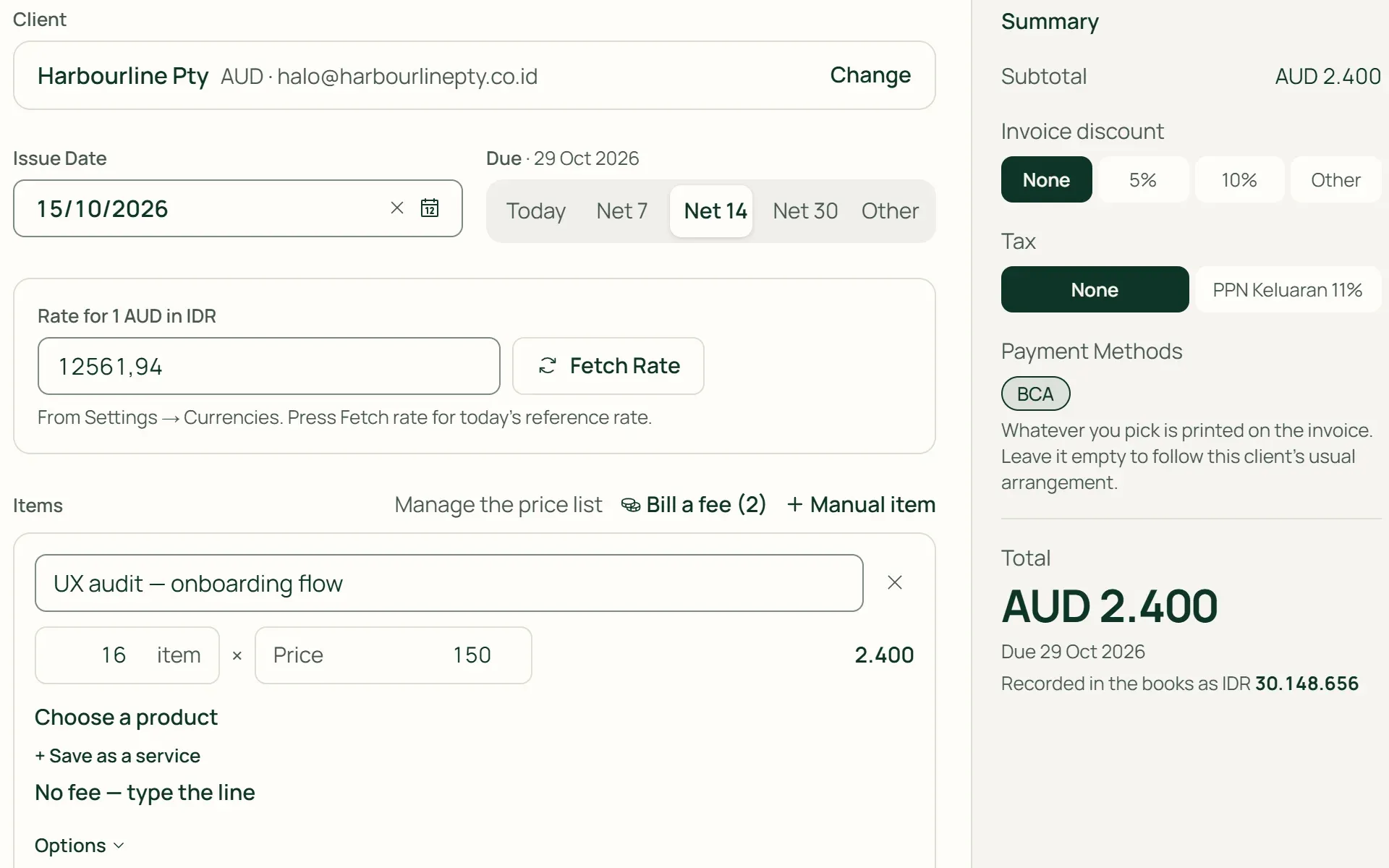
The rate is kept on the invoice.
A foreign currency invoice has a Rate section filled in from Settings, and the Fetch Rate button takes today's reference rate. The rupiah value is recorded in the books at that rate, and doesn't change when the market rate moves.
- Fetch Rate
- Recorded in rupiah
04 · Payment
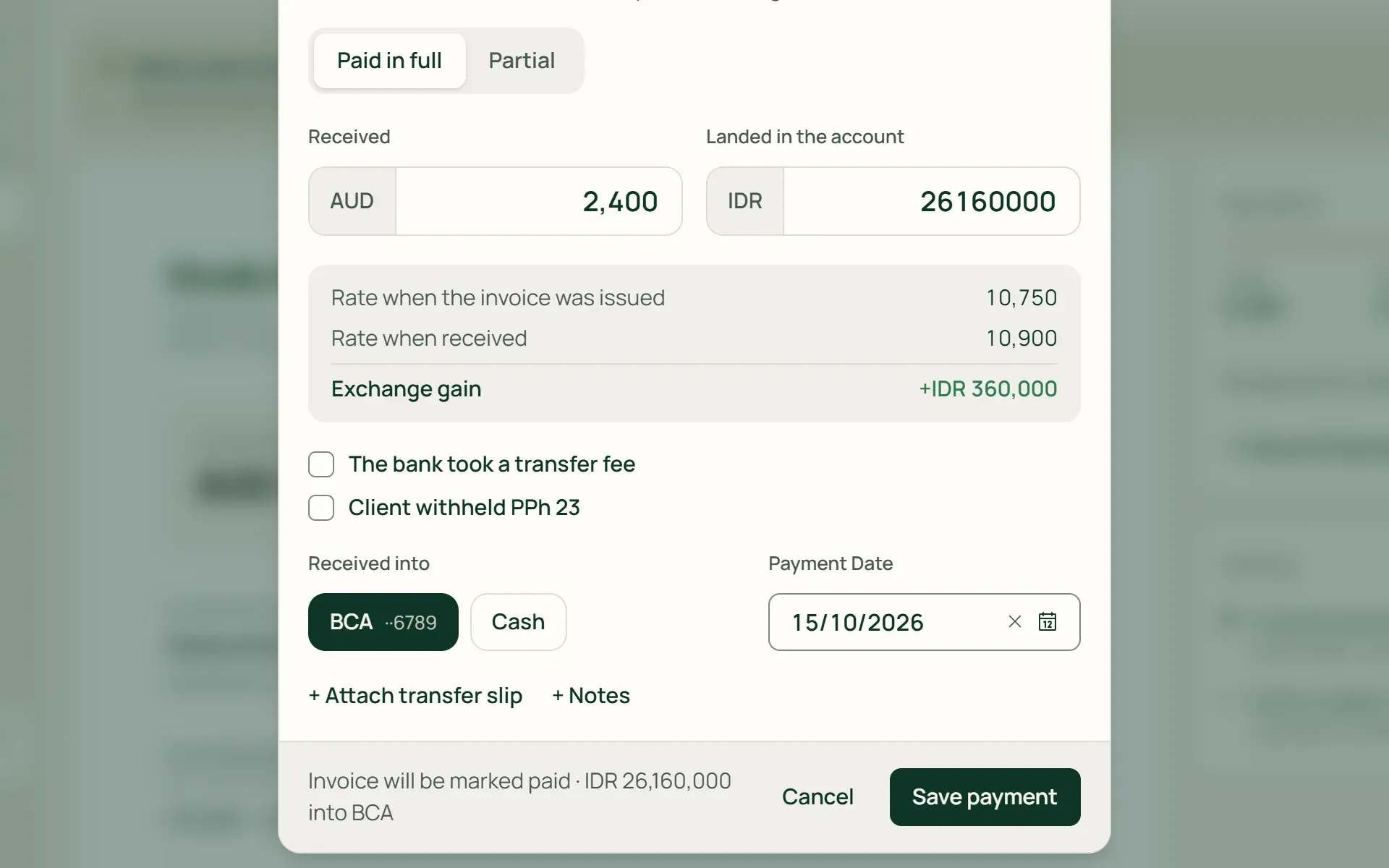
The exchange difference is worked out when the money arrives.
Record the AUD amount the client paid and the rupiah that landed in your account. Tumra compares the rate when the invoice was issued with the rate when it was received, then books the exchange gain or loss. Transfer fees are recorded separately to Bank & Transfer Fees.
- Exchange gain
- Exchange loss
- Transfer fee kept separate
05 · Revaluation
Revalue foreign currency receivables at month end.
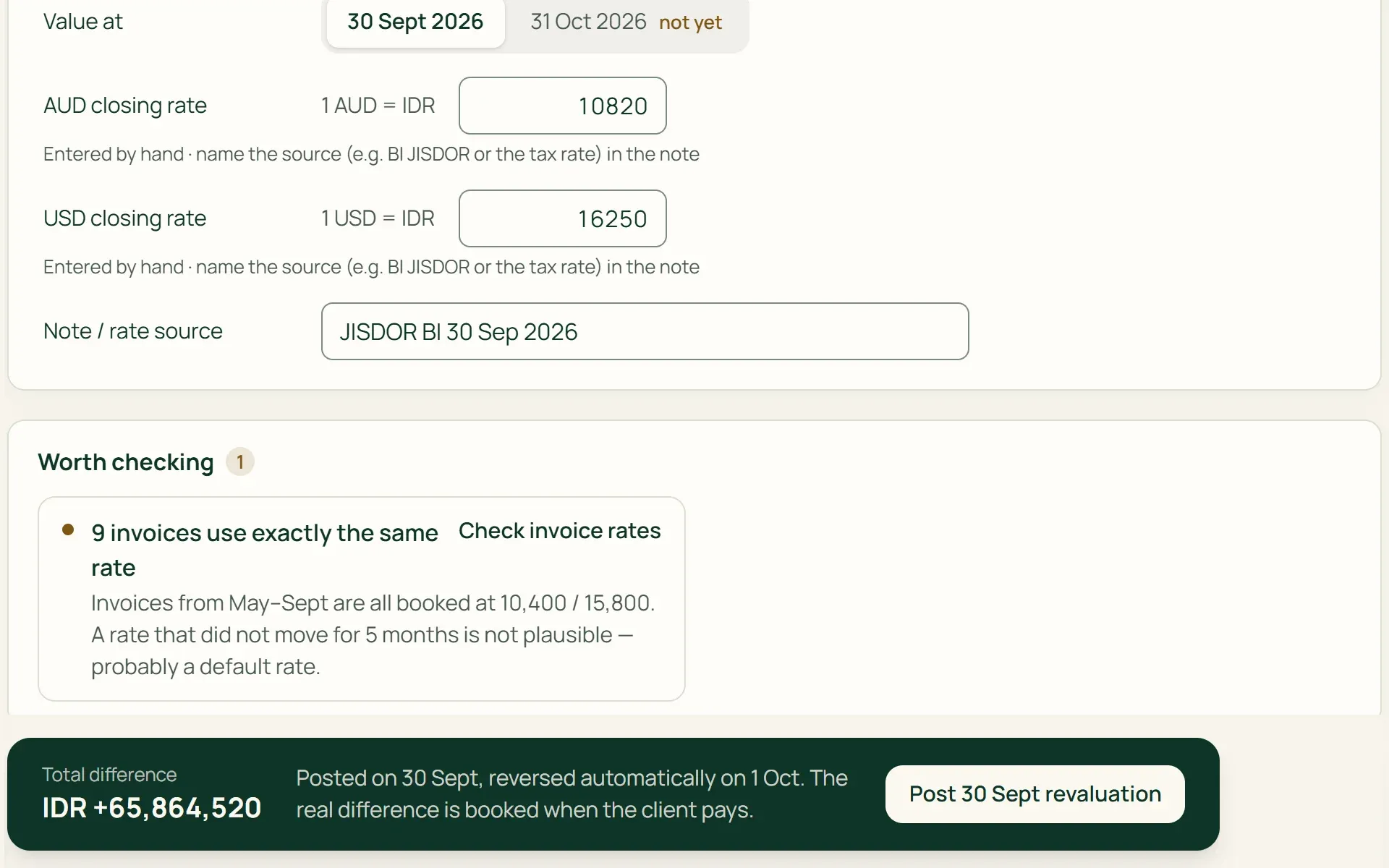
In FX Revaluation, enter the closing rate for each currency and note its source, such as BI JISDOR. Tumra works out the difference on every unpaid invoice, posts it on that date, and reverses it automatically the next day.
- Closing rate
- Reversed automatically
- Revaluation history
What you can do
Foreign currency, recorded correctly.
Receivables in two currencies
Receivables Ageing totals every invoice in the base currency, while each invoice is still shown in its billing currency.
Daily ECB rates
Turn on Update daily and the rate is fetched every morning. Recurring invoices refuse an ECB rate that hasn't been updated for more than 7 days.
Recurring invoices in foreign currency
Regular invoices in AUD or USD use the rate from Settings → Currencies. Tumra warns you if the rate hasn't been entered before the next scheduled run.
Base currency locked
Once an invoice, payment, or expense has been recorded, the base currency can't be changed, so reports already issued still match.
Rate checks
Tumra tells you when invoices across several months use exactly the same rate, or when a rate you type is far from the reference.
Reports in the base currency
Profit & Loss, Balance Sheet, Cash Flow, and Trial Balance use one currency. Exchange gains and exchange losses each have their own account.
Foreign currency that flows through all your books.
Invoices & billing
The currency, rate, and invoice language are filled in from the client's record.
Learn more →Clients & CRM
A client's currency is chosen once and locks after the first invoice.
Learn more →Accounting
Exchange differences and revaluations are recorded as journals you can check.
Learn more →
Plans
Multi-currency on every plan.
Supported currencies: IDR, USD, AUD, SGD, and EUR.
| Feature | FreeRp 0/moRp 0/yr | FreelancerRp 129,000/moRp 1,290,000/yr | AgencyRp 349,000/moRp 3,490,000/yr | StarterRp 179,000/moRp 1,790,000/yr | RetailRp 349,000/moRp 3,490,000/yr | BisnisRp 499,000/moRp 4,990,000/yr |
|---|---|---|---|---|---|---|
| Foreign currency clients & invoices | Included | Included | Included | Included | Included | Included |
| Manual & ECB rates | Included | Included | Included | Included | Included | Included |
| Exchange difference on payment | Included | Included | Included | Included | Included | Included |
| Recurring foreign currency invoices | Included | Included | Included | Included | Included | Included |
| FX Revaluation | Not included | Included | Included | Included | Included | Included |
| Receivables Ageing | Not included | Included | Included | Included | Included | Included |
| Active clients | 3 | Unlimited | Unlimited | Unlimited | Unlimited | Unlimited |
Retail Free: as on Free, with no limit on customers.
FAQ
Common questions
Which currencies are supported?
Indonesian rupiah (IDR), US dollar (USD), Australian dollar (AUD), Singapore dollar (SGD), and euro (EUR). One of them is the base currency of your books, and the others can be used to bill clients.
Where do the rates come from?
You can type them yourself, such as the BI middle rate or the tax rate, or fetch the ECB reference rate published every working day. The ECB rate is a market rate, not the Ministry of Finance tax rate or the BI middle rate. The rate an invoice uses is kept on that invoice.
Can I have a bank account in dollars?
Not yet. All cash and bank accounts are recorded in the base currency. When a client pays a foreign currency invoice, you record the rupiah that actually landed in your account, and the difference from the invoice rate becomes an exchange gain or loss.
Can expenses and purchases be in a foreign currency?
Not yet. Expenses, vendor bills, goods purchases, and POS sales are recorded in the base currency. Enter the amount actually debited from your account. Because of this, revaluation applies only to receivables, not to payables.
Can a client’s currency be changed?
Yes, as long as the client has no invoices yet. After the first invoice, the currency is locked. A client who needs billing in another currency is set up as a separate client record.
What if several foreign currency invoices are paid at once?
Settling several invoices at once uses each invoice’s own rate, so no exchange difference is booked. If the rupiah received is different, record each invoice’s payment one at a time with the regular payment form.
Bill overseas clients the tidy way.
Try every Tumra feature free for 30 days, no credit card needed.