

Payments & expenses
Money in and out, recorded as it happens.
Record client payments, expenses, and vendor bills in one place. Part payments, withheld PPh 23, transfer fees, and exchange differences are worked out for you, and every transaction creates its own journal straight away.
On every plan, including Free.
Before and after
Unrecorded money means cash that doesn't match.
Transfer proof in chats, receipts in your wallet, what you owe vendors kept in your head, and a cash book only filled in at month end. By the time you check it against the bank, the difference can no longer be explained.
Before
4 separate places
- Proof in chatsFinance · transfer proof buried in chats
- Receipts in your walletEveryone · receipts lost before they're recorded
- List of debtsOwner · what you owe vendors, kept in your head
- Cash bookAdmin · only filled in at month end
Expense
EXP/2026/10/015
IDR 2,400,000 left- Payment recordedPart paid
- Expense recordedIDR 5,000,000
- Vendor PPh 23 withheldIDR 100,000
- The rest becomes a payableIDR 2,400,000
How it works
From the bank statement to a paid vendor bill.
01 · Money in
Find the invoice from the amount on the statement.
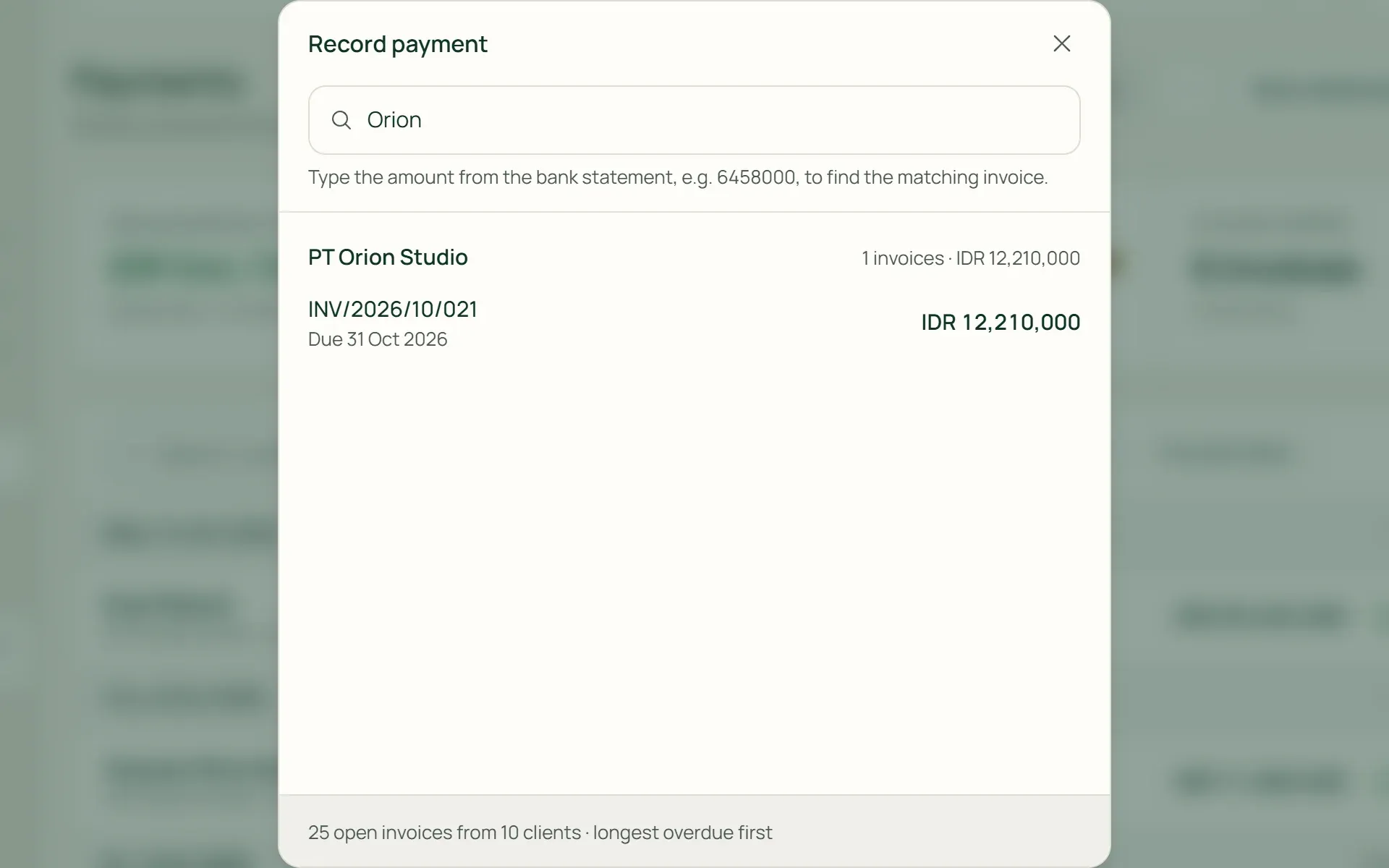
Press Record Payment, then type the amount from the bank statement, the invoice number, or the client's name. Open invoices appear, longest overdue first. Choose Paid in full or Partial, and split the payment across several accounts if the money came in more than one way.
- Search by amount
- Paid in full or partial
- Several accounts
02 · Deductions
PPh 23, transfer fees, and exchange rates are counted in.
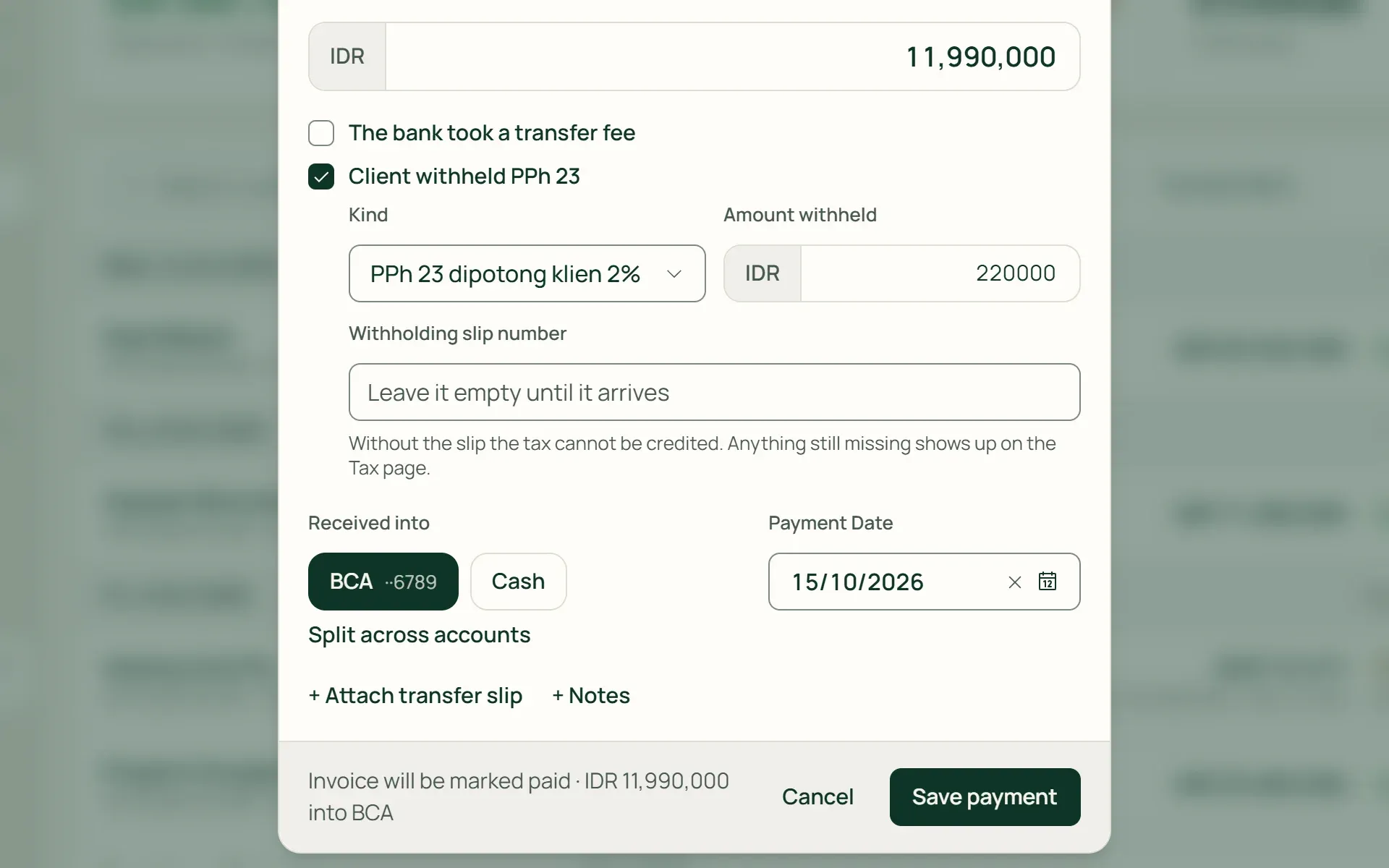
Did the client withhold PPh 23? Tick Client withheld PPh 23: of IDR 12,210,000, IDR 11,990,000 reaches the bank and IDR 220,000 is withheld, and the invoice is still recorded as paid. Transfer fees and exchange differences on foreign-currency invoices go to their own accounts.
- Client withheld PPh 23
- Transfer fee
- Exchange difference
03 · Expenses
Record a cost, paid now or later.
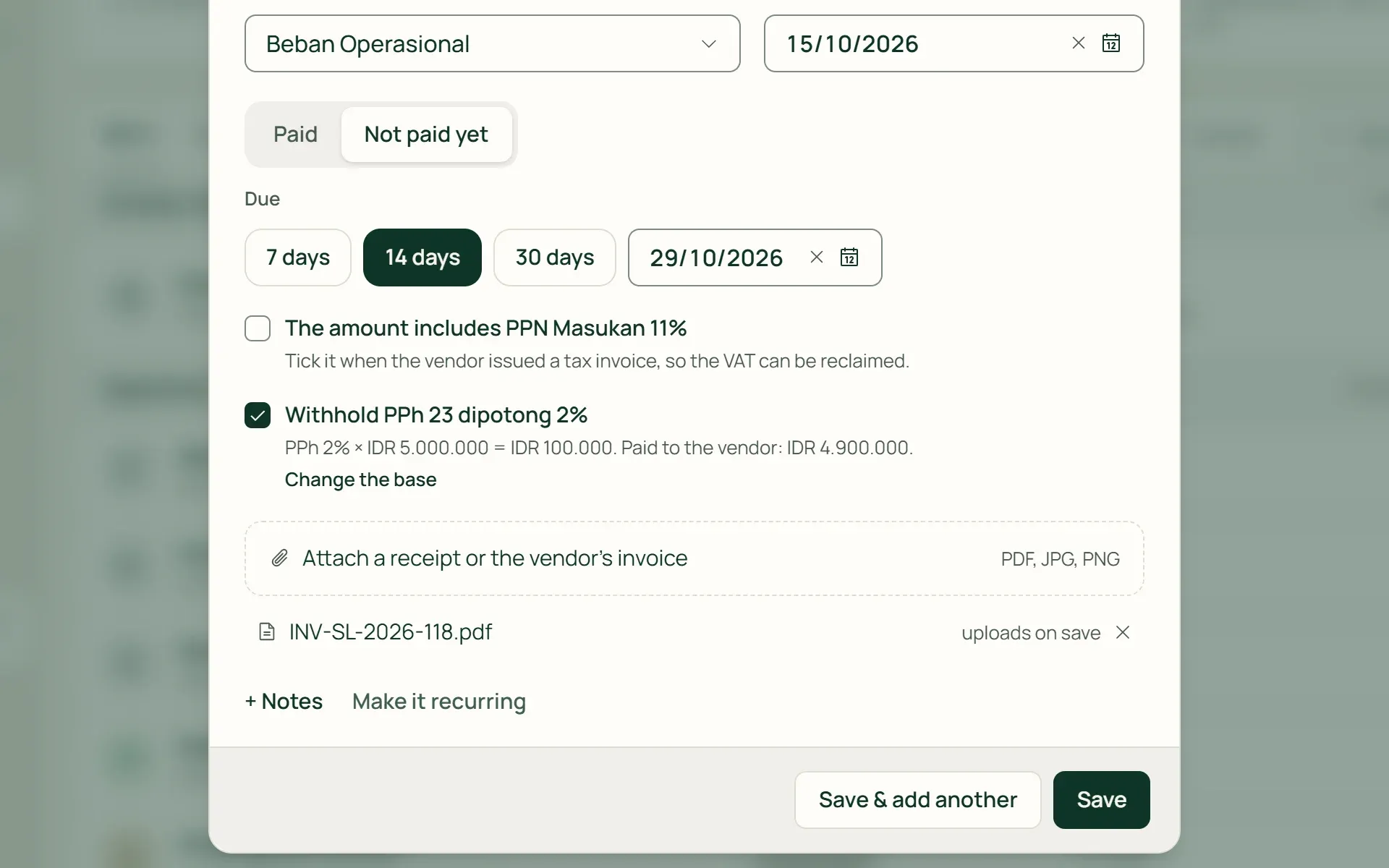
Enter the amount, the vendor, and what it was for. Choose Paid with the account it came from, or Not paid yet with a due date, so it is recorded as a payable. Attach the receipt or the vendor's invoice, and mark input VAT that can be credited.
- Paid
- Not paid yet
- Receipt attachment
04 · Payables
Pay vendor bills in full or in stages.
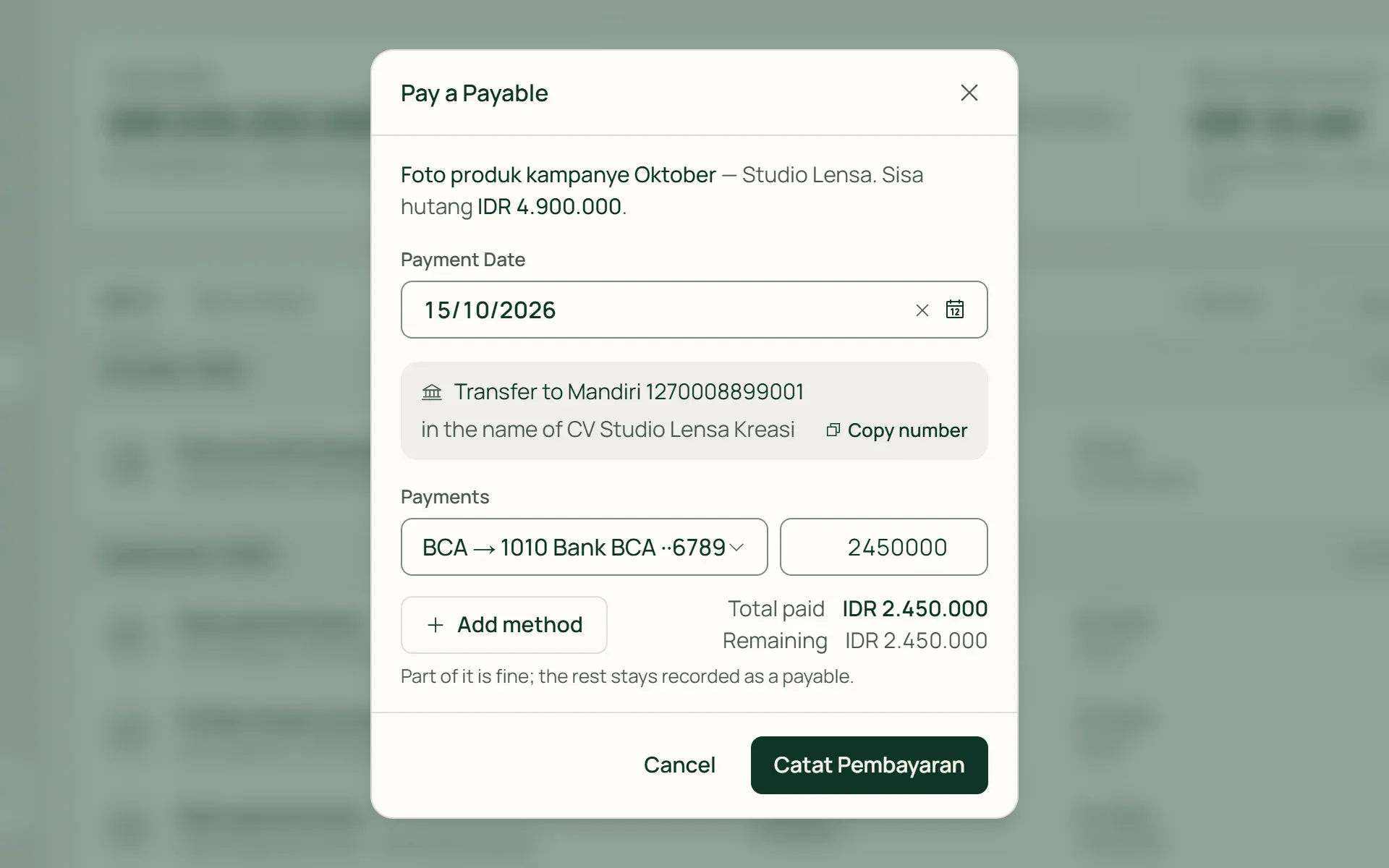
Press Pay on an unpaid expense. Part of it is fine; the rest stays recorded as a payable. The vendor's bank account is shown while you pay, and every payment is kept in Payment history, with a Cancel button.
- Pay a Payable
- Pay in part
- Payment history
05 · Recurring
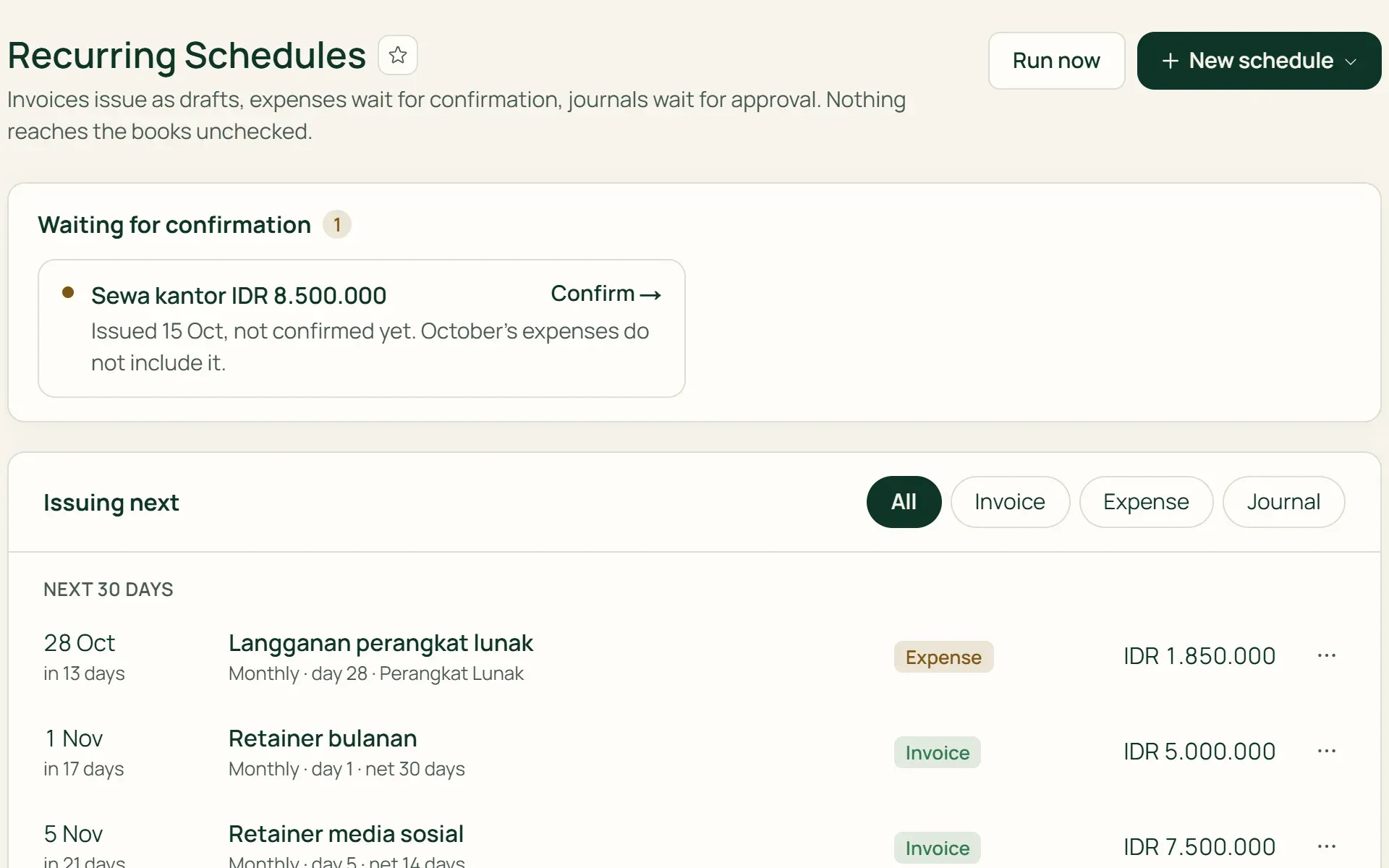
Recurring costs wait for your confirmation.
Press Make it recurring on an expense, for example office rent on the 1st of every month. Each period appears under Waiting for confirmation. Change the amount if this month's bill is different, then press Confirm & record. The journal is only created once it is confirmed.
- Make it recurring
- Waiting for confirmation
- Confirm & record
What you can do
Cash flow you can always read.
Bulk settlement
Settle up to 100 invoices at once, each for its remaining amount, with a payment date you can set for each invoice.
Exchange differences without manual sums
For USD, AUD, SGD, or EUR invoices, enter the rupiah that actually reached your account. The difference is recorded as an exchange gain or loss.
Receipts and transfer proof
Attach PDF, JPG, PNG, or WEBP files of up to 10 MB each, up to 10 files per expense or payment.
Vendors that fill in the details
The default category and payment terms fill in when you choose the vendor. Expenses from VAT-registered vendors (PKP) are ticked as including VAT automatically, and service vendors can have PPh 23 withheld.
Corrections without deleting
A wrong payment is corrected or voided with a reason. The old journal is reversed, so both the mistake and the fix stay on record.
Where the money goes
Totals per period, by category, and recurring monthly on the Expenses page. The Vendors list shows this year's spending with each vendor.
For shops
Shop costs kept apart from stock purchases.
In a shop business, the Expenses menu is called Operating Costs: rent, electricity, wages, shipping. Goods are recorded separately under Purchasing so stock and COGS stay correct, and customer credit (kasbon) can be paid off right at the counter.
- Credit settled into the drawerCredit paid off in cash can be recorded into the cashier drawer that is open, so the drawer count still matches.
- Stock purchases kept separateGoods from suppliers are recorded under Purchasing and goods received, not as costs.
- Supplier bank details savedThe supplier's bank and account number are shown when you record a payment to them, with a copy button.
Every rupiah has a source and a destination.
Invoices & billing
Payments are recorded straight from the invoice, and its status changes to Part paid or Paid.
Learn more →Accounting
Every payment and expense creates its own journal, with no re-entry.
Learn more →Tax
Input VAT and the PPh 23 you withhold from vendors are gathered for paying and reporting.
Learn more →
Plans
Payments and expenses on every plan.
Payments, expenses, and vendors are unlimited on every plan.
| Feature | FreeRp 0/moRp 0/yr | FreelancerRp 129,000/moRp 1,290,000/yr | AgencyRp 349,000/moRp 3,490,000/yr | StarterRp 179,000/moRp 1,790,000/yr | RetailRp 349,000/moRp 3,490,000/yr | BisnisRp 499,000/moRp 4,990,000/yr |
|---|---|---|---|---|---|---|
| Payments received & bulk settlement | Included | Included | Included | Included | Included | Included |
| Expenses, vendors & payables | Included | Included | Included | Included | Included | Included |
| Receipt & transfer proof attachments | Included | Included | Included | Included | Included | Included |
| Recurring expenses | Included | Included | Included | Included | Included | Included |
| PPh 23 withheld by clients & from vendors | Included | Included | Included | Included | Included | Included |
| Receivables & Payables Ageing reports | Not included | Included | Included | Included | Included | Included |
| Credit settled into the cash drawer | Not included | Not included | Not included | Included | Included | Included |
Retail Free: as on Free, plus settling store credit into the till drawer.
FAQ
Common questions
Can one transfer pay several invoices?
Partly. Bulk settlement settles up to 100 invoices at once, each for its remaining amount, and records one payment for each invoice. A single combined payment, deposits, and overpayment balances are not available yet. A payment also can’t be more than what is left on the invoice.
What if the client withholds PPh 23?
Tick Client withheld PPh 23 when you record the payment, then enter the amount withheld. The invoice is recorded as paid in full, the money in the bank matches the statement, and the withheld part is recorded as prepaid income tax. The withholding slip number can follow later, and payments still missing one can be filtered on the Payments Received page.
Are recurring expenses recorded automatically?
Not straight away, and that’s on purpose. Each period appears under Waiting for confirmation. You check the amount, change it if this month’s bill is different, then press Confirm & record. Only then is the journal created, so a wrong number never slips into the books unnoticed.
Can expenses be recorded in a foreign currency?
Not yet. Expenses and vendor bills are recorded in your base currency. Foreign currencies (USD, AUD, SGD, EUR) are only available for invoices and client payments for now.
What if an expense was recorded wrongly?
Use Correct: the old journal is reversed and a new one is recorded, so the history stays. Payments to vendors can be cancelled from Payment history. Voiding or deleting an expense that has been recorded can’t be done from the screen yet.
Can I use it on the Free plan?
Yes. Payments, expenses, vendors, attachments, recurring expenses, and PPh 23 are on every plan. The Receivables Ageing and Payables Ageing reports start on the Freelancer plan.
Record your first transaction today.
Try every Tumra feature free for 30 days, no credit card needed.