

Tax
Tax recorded from transactions, not from a pile of receipts.
Choose VAT or PPh 23 (withholding tax) on invoices and vendor bills, and Tumra posts it to the right account. The Tax page summarises Output VAT, Input VAT, and income tax withheld for each tax period, with the source documents.
Tax on invoices is on every plan. The Tax page starts on the Freelancer plan.
Before and after
Tax summaries from paper receipts always miss something.
Input tax invoices get lost in a folder, PPh withheld by clients is mistaken for an underpayment, and the VAT summary is rebuilt every month from invoices one by one.
Before
4 separate places
- Tax invoice folderAdmin · input tax invoices lost in a folder
- Manual VAT summaryFinance · rebuilt from invoices every month
- Withholding notesFinance · client withholding mistaken for underpayment
- Bank transactionsTax consultant · hunting for payments on the statement
Tax period
September 2026
18 days left- Input VAT recordedIDR 880,000
- VAT difference worked outIDR 2,420,000
- PPh withheld by clients recordedIDR 600,000
- Filing and payment deadline shown31 Oct 2026
How it works
From the first invoice to the period's payment.
01 · Profile
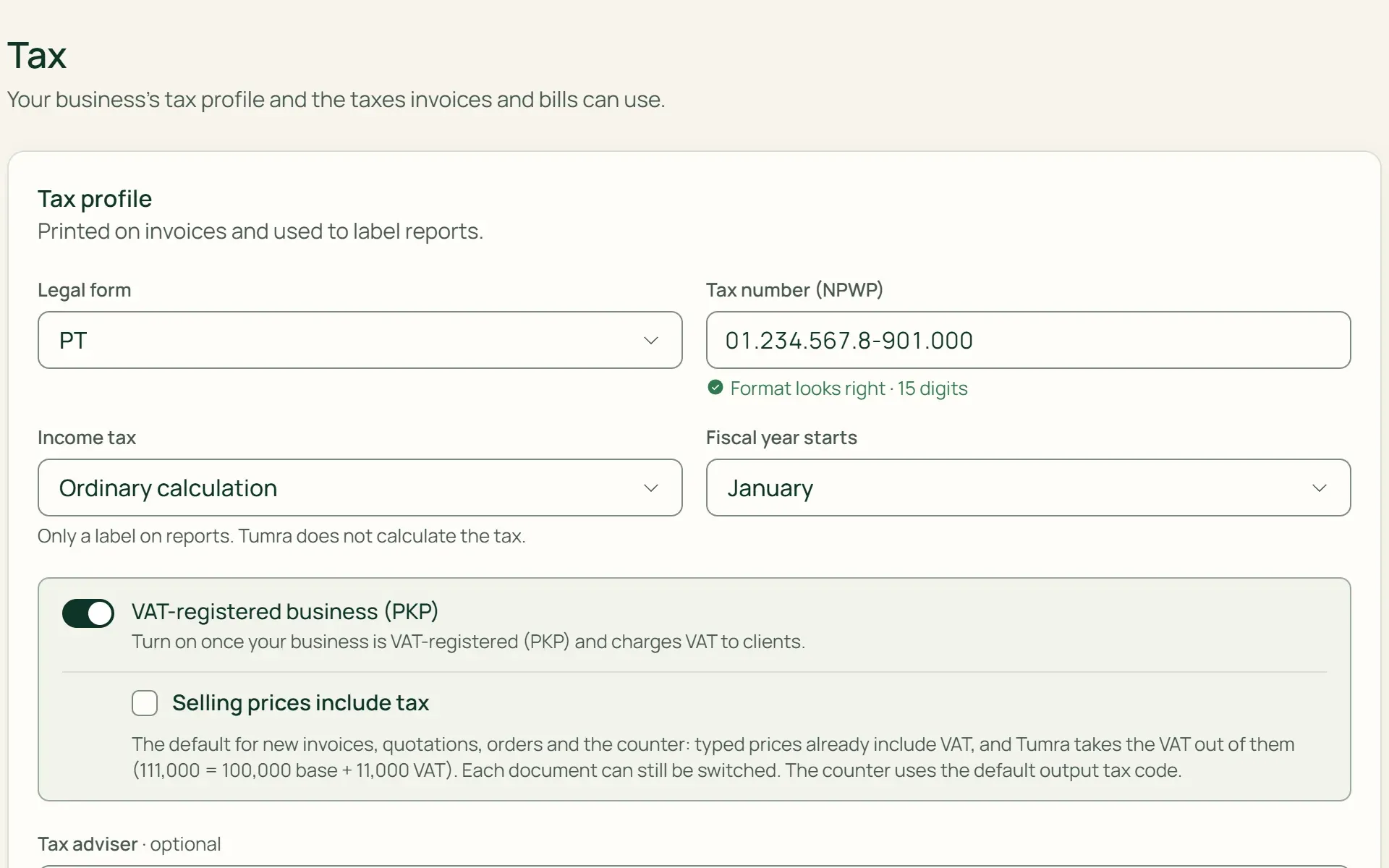
Set it up once under Settings → Tax.
Enter your legal form, NPWP (tax ID), PKP status (VAT-registered), and when your fiscal year starts. Then add tax types with Quick add: 11% output VAT, 11% input VAT, 2% PPh 23 withheld by clients, or 2% PPh 23 you withhold from vendors. The rates can be changed.
- 15- or 16-digit NPWP
- PKP status
- Quick add
02 · Invoice
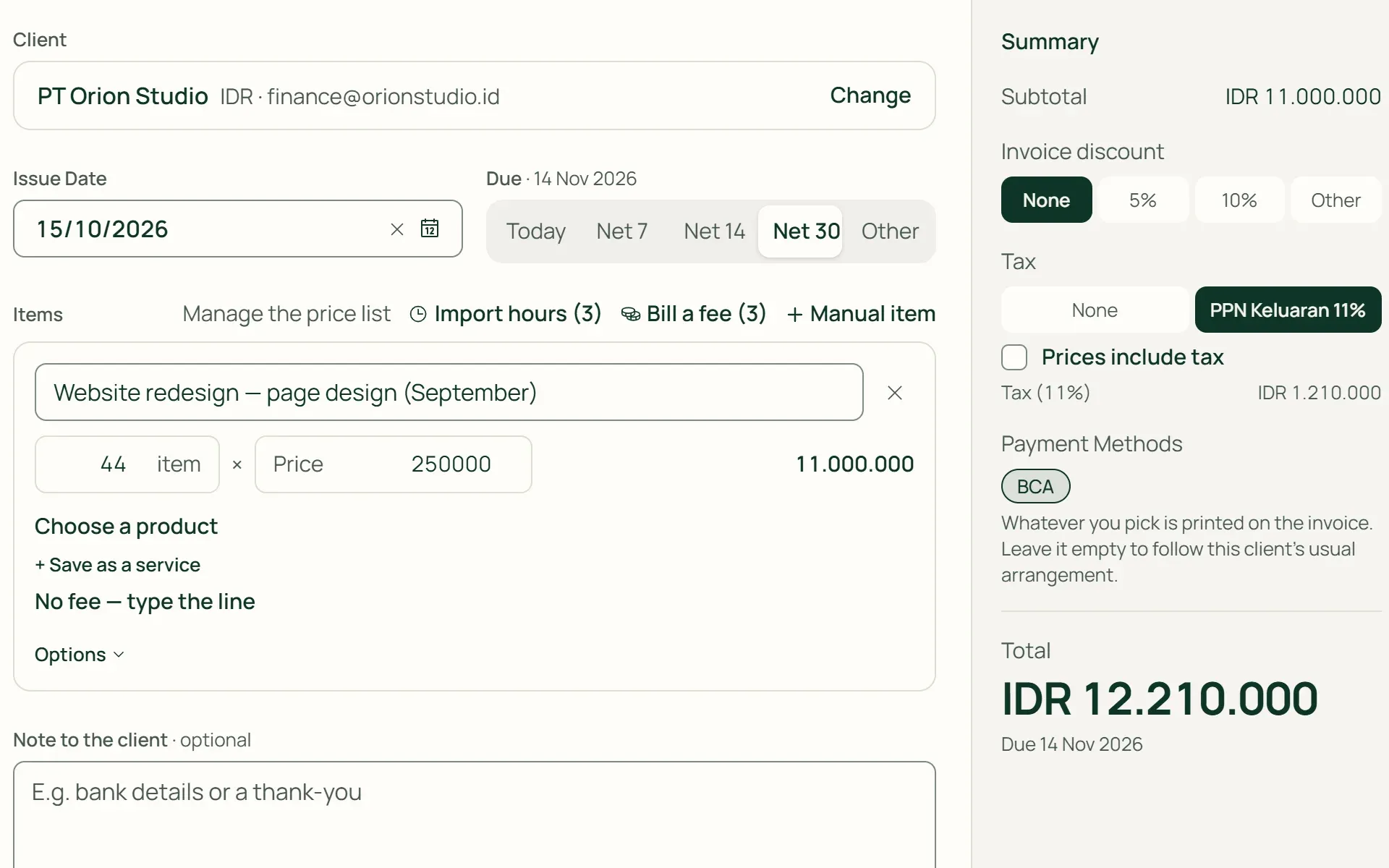
Tax base and VAT split out on their own.
Choose the tax type on the invoice and whether prices include tax. For INV/2026/10/021: 44 hours × IDR 250,000 = tax base IDR 11,000,000, 11% VAT IDR 1,210,000, total IDR 12,210,000. Your NPWP and the client's NPWP are printed on the invoice.
- Prices include tax
- NPWP on the invoice
03 · Withholding
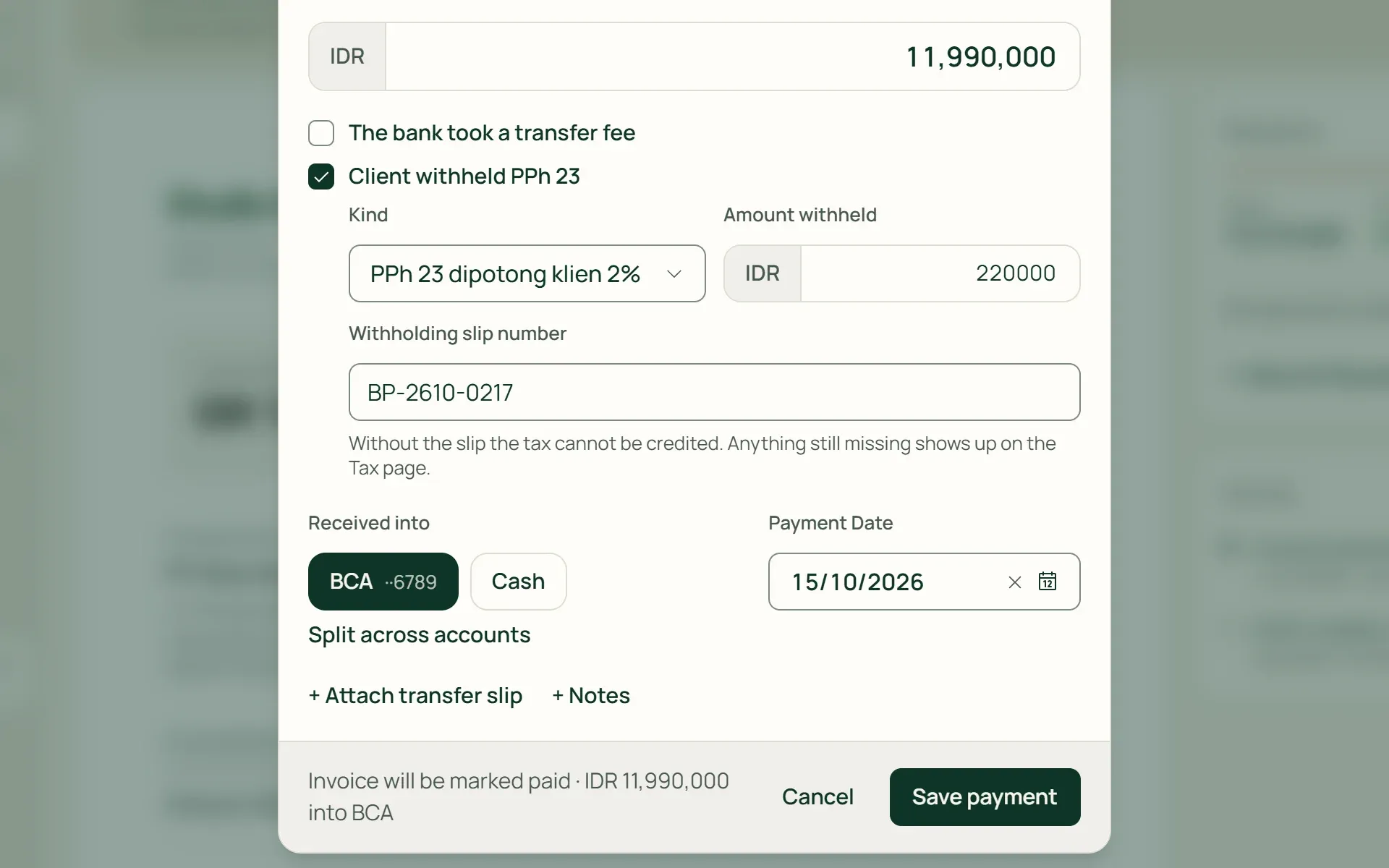
Record the PPh 23 your client withholds.
When PT Orion Studio pays, tick Client withheld PPh 23 and enter the amount. The invoice is recorded as paid in full at IDR 12,210,000: IDR 11,990,000 reaches the bank and IDR 220,000 is recorded as prepaid tax, not an underpayment. The withholding slip number can follow later.
- Prepaid tax
- Withholding slip number
04 · By period
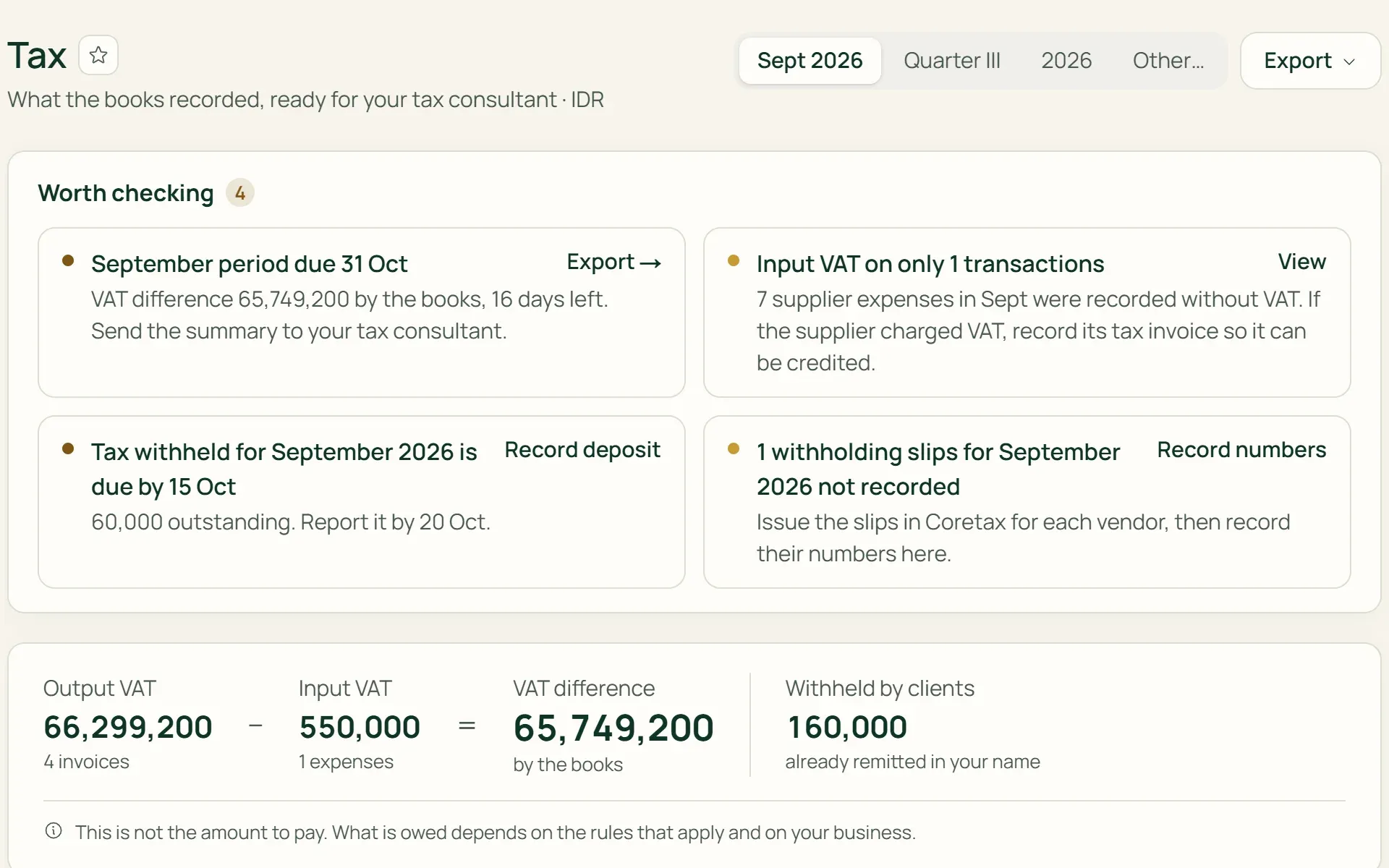
Every tax period, with its filing deadline.
The Tax page opens on the period being reported: Output VAT less Input VAT, PPh withheld by clients, and the deadline to file and pay. Open a period to see every invoice and expense with its tax base.
- Month
- Quarter
- Year
- Tax base per document
05 · Remittance
Record the payment, and the journal follows.
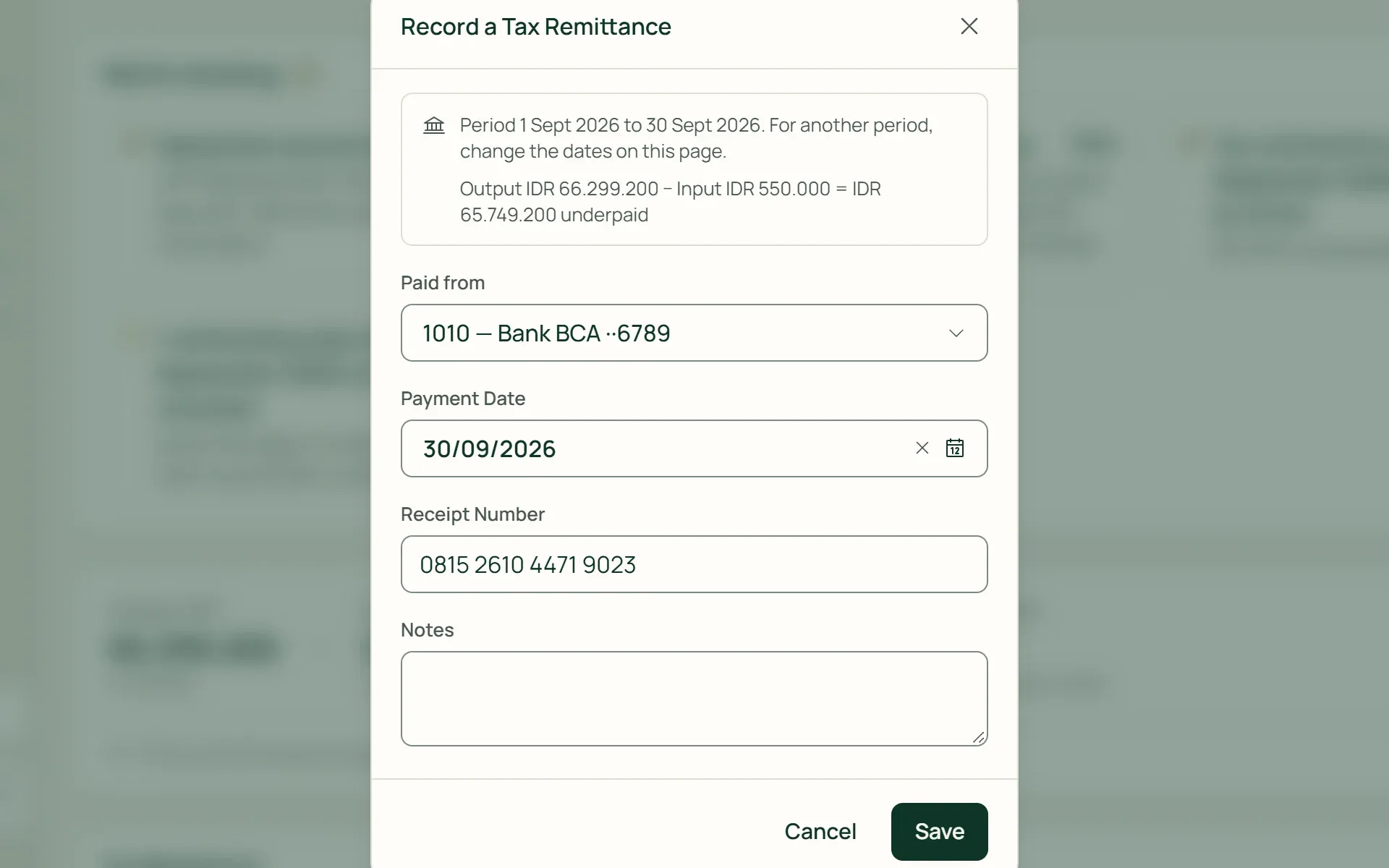
For PKP businesses, Record Remittance books one period's VAT difference with its NTPN (state receipt number). An overpayment is carried into the next period. The PPh 23 you withhold from vendors has its monthly payments recorded on the same page, with the withholding slip numbers.
- NTPN
- Overpayment carried forward
- Vendor PPh 23
What you can do
Tax obligations always in view.
The right accounts
Output VAT goes to a liability account; Input VAT and PPh withheld by clients go to asset accounts. Tumra rejects an account whose type doesn't match the direction of the tax.
PPh 23 on vendors
Mark service vendors with "We withhold PPh 23". The withholding is calculated when the bill is recorded, the vendor is paid the net amount, and vendors without an NPWP are withheld at double the rate.
Missing withholding slips
Payments with PPh withheld but no slip number are flagged on the Tax page and can be filtered in the Payments list.
"Worth checking" notes
Periods close to their deadline, supplier expenses without Input VAT, and client payments without PPh withheld appear as reminders at the top of the Tax page.
Corrections reverse too
An invoice cancelled or corrected with a Credit Note reverses its VAT through the journal, so each period's position still matches the general ledger.
Export for your consultant
One Excel file with Summary, By Period, Output VAT, Input VAT, PPh Withheld, and Details per document with its tax base.
For shops and wholesalers
VAT at the till, Input VAT from suppliers.
On the Retail Starter, Retail, and Bisnis plans, turn on "Selling prices include tax" and the POS separates VAT from the shelf price using the default output tax type. Purchase orders and goods receipts record Input VAT from suppliers.
- Receipts with VATThe receipt shows "Includes VAT" and the shop's NPWP. Customers pay exactly the total in the cart.
- Input VAT on purchasesPurchase orders and goods receipts record the tax base and Input VAT, which go straight into that period's VAT position.
- Quotations and wholesaleOn Retail and Bisnis, quotations, sales orders, and wholesale invoices use the same tax types.
Tax follows every transaction.
Invoices & billing
The tax type, and whether prices include tax, are chosen on each invoice.
Learn more →Payments & expenses
PPh 23 withholding is recorded on payments, Input VAT on expenses.
Learn more →Financial reports
Tax account balances appear on the Balance Sheet, and tax payments in the Cash Flow.
Learn more →
Plans
Tax on every plan.
Tax recording is on every plan; the summary, remittances, and export start on the Freelancer plan.
| Feature | FreeRp 0/moRp 0/yr | FreelancerRp 129,000/moRp 1,290,000/yr | AgencyRp 349,000/moRp 3,490,000/yr | StarterRp 179,000/moRp 1,790,000/yr | RetailRp 349,000/moRp 3,490,000/yr | BisnisRp 499,000/moRp 4,990,000/yr |
|---|---|---|---|---|---|---|
| Tax profile & NPWP | Included | Included | Included | Included | Included | Included |
| VAT on invoices & expenses | Included | Included | Included | Included | Included | Included |
| Client & vendor PPh 23 | Included | Included | Included | Included | Included | Included |
| Tax page by period | Not included | Included | Included | Included | Included | Included |
| Record remittances | Not included | Included | Included | Included | Included | Included |
| Tax Excel export | Not included | Included | Included | Included | Included | Included |
| VAT at the POS & on purchases | Not included | Not included | Not included | Included | Included | Included |
Retail Free: as on Free. VAT and withholding are recorded on every transaction, including till sales and purchases; the Tax page and its export start on paid plans.
FAQ
Common questions
Does Tumra calculate the tax I have to pay?
No. Tumra records tax according to the tax type you choose on each transaction, then totals it by tax period. The VAT difference on the Tax page is a figure by the books, not the amount owed. The conclusion stays with you and your tax consultant.
Does Tumra create e-Faktur or file tax returns (SPT)?
Not yet. Tumra doesn’t issue tax invoices or withholding slips, has no export for Coretax, and doesn’t file SPT returns. Withholding slip numbers and the NTPN of each payment can be recorded in Tumra, and the period summary can be exported to Excel for your consultant.
My business isn’t VAT-registered (PKP) yet. Can I still use it?
Yes. As long as no tax type is set up, VAT doesn’t appear on invoices, and the Tax page says there’s nothing to report. You can still add just PPh 23, for example if clients withhold it from what they pay you.
My prices already include VAT. How do I record that?
Turn on “Selling prices include tax” in the tax profile. Tumra separates the VAT from that price: 111,000 = tax base 100,000 + VAT 11,000. This becomes the default for new invoices, quotations, orders, and POS sales, and can still be changed per document.
Can one invoice use two tax rates?
Not yet. Each invoice, expense, and purchase order uses one tax type for all its lines. If you sell taxable and non-taxable goods together, split them into two invoices.
Can the Free plan record tax?
Yes. The tax profile, tax types, VAT on invoices and expenses, and PPh 23 withholding are on every plan. The Tax page, with the summary by period, remittance records, and Excel export, starts on the Freelancer plan.
Your next period's summary, without copying receipts.
Try every Tumra feature free for 30 days, no credit card needed.